
DeepSeek V4.1-Flash is an open-weight model that accepts text and images, generates text, and supports reasoning and tool use. On DeepSeek’s API, its model ID is deepseek-flash. It combines a one-million-token context window with relatively low token prices, making it worth considering for document work, coding assistants, and applications that process a lot of input.
Start with Flash if you need image understanding or want to control the cost of a new integration. Keep Pro in the comparison when a text task depends on answer quality: DeepSeek’s own results show that Flash improves on several agent benchmarks, but does not win every reasoning test. This guide explains what those differences mean, what you pay, and how to get started.
Table of Contents
DeepSeek V4.1-Flash at a glance
DeepSeek released V4.1-Flash on September 10, 2026. It replaced the previous V4-Flash and experimental Flash Vision models in the hosted API. The official model catalog lists it alongside DeepSeek-V4-Pro-0813, which remains available separately.
| Specification | V4.1-Flash |
|---|---|
| Official API model ID | deepseek-flash |
| Input and output | Text and image input; text output |
| Context window | 1M tokens |
| Maximum generated output | 384K tokens; input and generated tokens must also fit the context window |
| Reasoning | Thinking and non-thinking modes; thinking defaults to high effort |
| API interfaces | Chat Completions, Responses API, and Anthropic-compatible Messages |
| Additional features | Tool calls, JSON output, beta chat prefix completion, and beta FIM completion in non-thinking mode |
| Documented account concurrency | 2,500 simultaneous requests |
| Architecture | Mixture of Experts with a causal encoder–decoder; 552B backbone parameters, with 8B active during input processing and 16B during generation |
| Weights and license | Published by DeepSeek on Hugging Face under the MIT License |
The context window is the space available for the conversation, supplied material, and generation. It is useful for a large document set or repository, but it does not promise that every detail will be used correctly. The API reference also makes the output limit a ceiling, not the default response length. Set an output budget appropriate to the task rather than requesting the maximum for every answer.
What can you use V4.1-Flash for?
Coding and agent workflows are a natural starting point. The model can work with repository context and request tool calls, so an application can connect it to file search, tests, or other tools. A model response does not execute those actions by itself: the surrounding application controls which tools exist, what they may do, and how their results return to the conversation.
Document and research assistance benefits from the large input window. For example, you can provide several policy documents and ask for a comparison tied to section headings. Give the model the relevant material and ask it to identify supporting passages. A large window helps fit the evidence; it does not make an unsupported answer reliable or make the model’s stored knowledge current.
Images and screenshots expand the same workflow. You can ask about a chart, extract visible text, or combine an error screenshot with a written bug report. It generates a text response, not a new image. For a chart, ask it to distinguish labels it can read from values it is estimating, especially when the source image is small.
Routine text processing—classification, rewriting, extraction, and short summaries—can use non-thinking mode to avoid generating reasoning tokens. More difficult analysis may benefit from thinking mode. Choose the setting for the job rather than treating “max” as a requirement for every request.
How to start using DeepSeek V4.1-Flash
For an ordinary conversation, the official DeepSeek chat is the simplest entry point. The app’s controls and model availability are separate from the API catalog. If you specifically need to select deepseek-flash, configure an API client or a supported agent application.
DeepSeek’s quick-start guide supports OpenAI-compatible clients. Use these settings with a DeepSeek API key:
- Base URL:
https://api.deepseek.com - Model:
deepseek-flash - Credentials: a key from the DeepSeek API platform, with available account balance for usage.
For Python, install the client with python -m pip install -U openai. Set an environment variable called DEEPSEEK_API_KEY to your key in the terminal where you will run the script: Bash or zsh uses export DEEPSEEK_API_KEY="your-key"; PowerShell uses $env:DEEPSEEK_API_KEY="your-key". Keep the real key out of source files and browser code.
Save this illustrative example as flash_example.py and run python flash_example.py. It makes one billed request when you run it. Thinking is explicitly disabled because this first task only needs a short explanation.
import os
from openai import OpenAI

client = OpenAI(
    api_key=os.environ["DEEPSEEK_API_KEY"],
    base_url="https://api.deepseek.com",
)

response = client.chat.completions.create(
    model="deepseek-flash",
    messages=[{
        "role": "user",
        "content": "Explain a cache hit to a new developer in two sentences.",
    }],
    max_tokens=300,
    extra_body={"thinking": {"type": "disabled"}},
)

print(response.choices[0].message.content)
print("Finish reason:", response.choices[0].finish_reason)
if response.usage:
    print("Usage:", response.usage.model_dump())
You should receive an explanation followed by the finish reason and usage information; the wording will vary. If the finish reason is length, the output budget or context limit stopped generation. Check that before treating a partial answer as complete. An authentication error calls for checking the DeepSeek key and endpoint, while insufficient balance requires attention in the API account. The DeepSeek API guide covers the broader setup.
If you prefer a coding agent, DeepSeek documents integrations with applications including Claude Code, OpenCode, and WorkBuddy/CodeBuddy. Use the guide for that application, because its endpoint format and configuration fields can differ. Our DeepSeek with Claude Code guide explains that particular route.
DeepSeek V4.1-Flash API pricing
The following prices are USD per one million tokens, checked against DeepSeek’s official price list on October 8, 2026. These are direct API charges, separate from the chat app and any third-party provider’s bill.
| Usage type | Flash off-peak | Flash peak | Pro off-peak | Pro peak |
|---|---|---|---|---|
| Input: cache hit | $0.003 | $0.006 | $0.022 | $0.044 |
| Input: cache miss | $0.15 | $0.30 | $0.66 | $1.32 |
| Output | $0.60 | $1.20 | $1.98 | $3.96 |
Peak hours are 01:00–04:00 and 06:00–10:00 UTC, Monday through Friday, excluding Chinese public holidays. All other hours are off-peak, including weekends and those holidays. The off-peak token rates are half the peak rates. If a job can wait, scheduling it outside the peak windows reduces its cost for the same billed token mix.
A cache hit means part of the input can use DeepSeek’s cached computation. Do not budget every input token at the cache-hit price: use the hit and miss counts returned for your actual requests. Reasoning tokens are billed as output too, so the visible answer length alone does not tell you the full output charge.
A practical cost example
Suppose a batch uses 1 million cache-miss input tokens and 100,000 output tokens, including any reasoning. With no cache hits, its Flash cost is $0.21 off-peak: $0.15 for input plus $0.06 for output. At peak rates, the same usage costs $0.42. This is an illustration, not a fixed price for a batch of a particular size.
For comparison, the same token counts on Pro cost $0.858 off-peak or $1.716 at peak. That comparison holds token usage constant; two models can generate different amounts of text or take different numbers of tool steps. Compare the cost of completing your task, including retries, rather than assuming a rate difference transfers directly to the final bill.
The token rates also explain why “Flash is several times cheaper” needs a qualification. Pro’s cache-miss input rate is 4.4 times Flash’s, its output rate is 3.3 times Flash’s, and its cache-hit input rate is about 7.3 times Flash’s. Your mix determines which difference matters. See the DeepSeek pricing guide for more billing examples.
Choosing thinking mode and reasoning effort
Thinking is enabled by default at high effort. In the Python example above, changing the request to extra_body={"thinking": {"type": "enabled"}} enables it explicitly; adding reasoning_effort="low", "high", or "max" chooses the effort level. Increase the example’s small output budget when asking for a substantial reasoning task.
A useful starting point is non-thinking for straightforward transformation or extraction, low effort for lighter reasoning, and high for more involved coding or analysis. Reserve max for tasks where additional reasoning is worth its token use and waiting time. These are starting choices, not guarantees of quality or speed.
The official thinking guide maps minimal to low, medium and xhigh to high, and ultra to max. In particular, medium is not a separate middle setting. The model card’s numeric 1–100 effort scale concerns the released model; use the documented named settings for this hosted Chat Completions interface.
In Chat Completions, the answer is in message.content and reasoning is returned separately as reasoning_content. For ordinary conversation requests without tools, earlier reasoning need not be sent back. For requests carrying tools, DeepSeek requires the earlier reasoning content to be preserved in subsequent requests. The thinking-mode guide explains that conversation handling.
Sampling controls also behave differently here. Thinking mode ignores temperature, presence_penalty, and frequency_penalty. It accepts top_p in the effective range 0.95–1.0, raising lower values to 0.95; non-thinking mode fixes it at 1.0. Changing an ignored setting will not fix an unsuitable response.
Working with images
V4.1-Flash accepts JPEG, PNG, GIF, and WebP images together with text. You do not need a separate vision model. Under the official vision interface, a Chat Completions user message can contain text and an image_url block, using either a publicly accessible image URL or a base64 data URL. An uploaded Files API image can instead be referenced through a file block and its file_id.
For a screenshot question, provide the screenshot and a specific instruction such as “Read the error message and identify which setting it refers to.” For a document image, say whether you need transcription, interpretation, or a comparison with supplied text. Those tasks require different answers even when the image is identical.
DeepSeek detects image format from the actual file content. Inline and URL images have a 32 MiB per-image limit, and the complete request body has a 48 MiB limit; an image referenced by Files API ID may be up to 64 MiB. In Chat Completions, place images in user messages, not system or assistant messages. The image-input guide covers the full request shapes and remaining limits.
Images are resized before inference and billed as input tokens, with a documented upper bound of 1,024 tokens per image. The official examples show 2000×2000 and 5000×5000 images consuming the same token count after resizing. That does not make their readability equivalent. A clear crop of the relevant chart or text can be more useful than a large screenshot containing many unrelated details.
For image_url, detail="low" downsamples to 512×512. The high, original, and currently auto options keep the original image for the subsequent documented processing. Avoid low detail when small text or fine chart labels are essential.
Why the architecture matters
V4.1-Flash separates processing the supplied context from generating the answer. Its causal encoder–decoder activates about 8B parameters per token during prefill—the stage that reads input—and 16B during decoding. For a task with a large repository or long documents and a relatively short answer, reducing input-side work is particularly relevant.
The official model card describes a 552B-parameter backbone and a separate 196B Engram conditional-memory component. Hugging Face also displays a 763B parameter inventory for the repository. These figures count different parts of the release. Neither the 8B active-input figure nor the 16B active-output figure means that the full download fits in the memory of a small dense model.
The other major change is the KV cache: the stored attention information used while serving a conversation. DeepSeek reports about one-quarter of V4-Flash’s global KV cache footprint, at 890 bytes per token, and about one-eighth of its persistent cache footprint. Sharing compressed cache information and reconstructing some recent state reduce what must stay in accelerator memory or persistent storage.
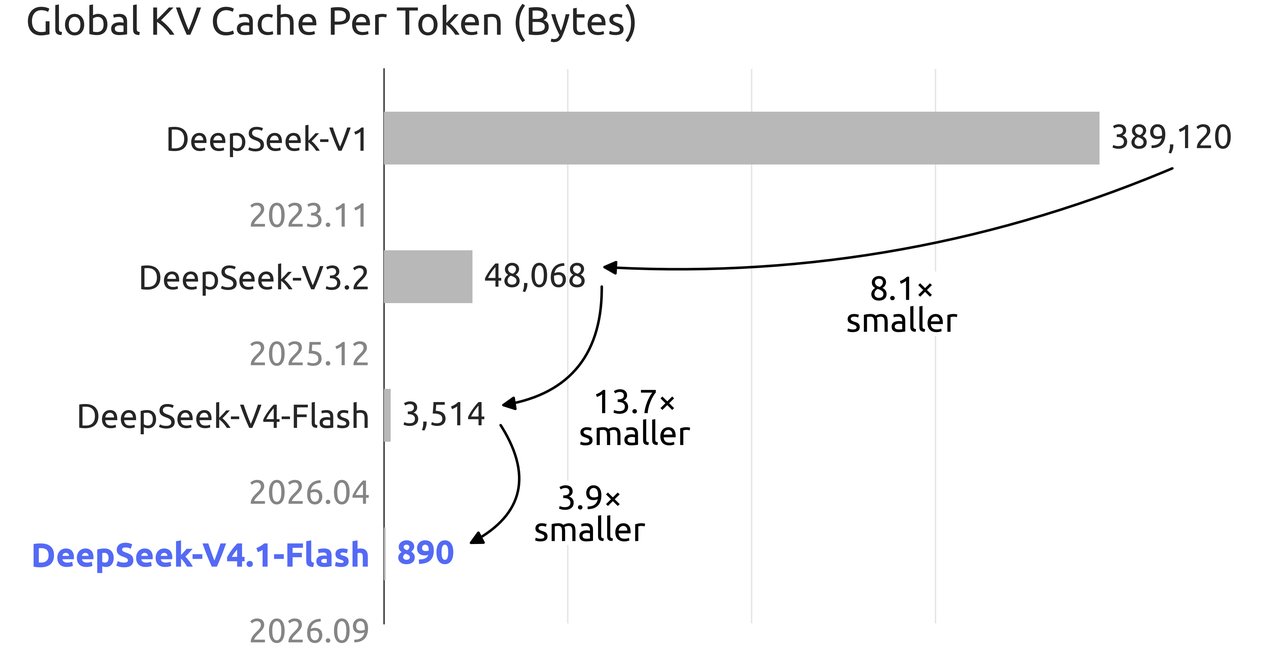
Those are serving-efficiency improvements. They help explain the design’s emphasis on long context, but they do not mean every request finishes four times faster or that all server memory requirements shrink by that amount. Model weights, runtime buffers, concurrency, and requested context still matter. API users pay the published token rates; operators running the weights need to size the whole deployment.
What the official benchmarks show
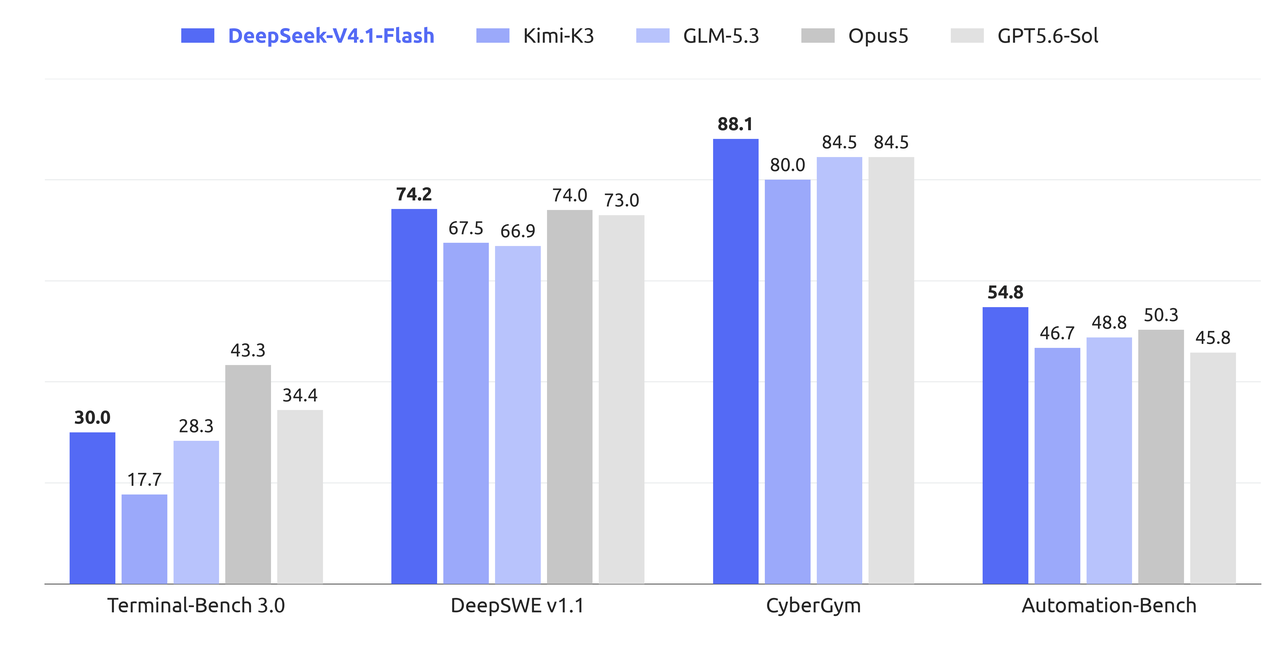
DeepSeek’s instruct-model results give a more useful picture than a blanket claim that Flash beats Pro. Here are selected results from the company’s comparison. They are provider-reported scores, not tests conducted by Chat-Deep.ai.
| Benchmark and metric | V4-Flash | V4-Pro | V4.1-Flash |
|---|---|---|---|
| Terminal-Bench 2.1, Pass@1 | 82.7 | 87.9 | 90.6 |
| DeepSWE v1.1, resolved | 54.4 | 62.7 | 74.2 |
| GPQA Diamond, Pass@1 | 89.9 | 92.4 | 90.9 |
| MathArena Apex, Pass@1 | 58.6 | 65.3 | 65.6 |
The results support taking Flash seriously for coding agents: it improves on the earlier Flash and on Pro in the two coding-agent examples above. The GPQA result goes the other way, while the reported MathArena scores are close. A decision about difficult scientific reasoning should not be based solely on an agent-coding score.
Conditions matter. DeepSeek reports V4.1-Flash’s instruct results at maximum reasoning effort, with specified sampling settings. Its agent evaluations use particular harnesses and context limits; DeepSWE uses mini-SWE, while Terminal-Bench 2.1 uses DeepSeek Harness Minimal in the main comparison. These results do not establish what you will get from non-thinking mode, a different tool setup, or an arbitrary chat prompt.
Should you choose V4.1-Flash or V4-Pro?
Choose Flash first for image-dependent work. The current official API table gives Flash image input and lists Pro as text-only. That is a functional difference, not a small score advantage.
Start with Flash for a cost-sensitive new integration. It has lower input and output rates and a documented account concurrency limit of 2,500, versus 500 for Pro. Concurrency counts simultaneous in-flight requests, not tokens per second or completed jobs per minute. DeepSeek’s rate-limit documentation explains that requests over the limit receive HTTP 429.
Keep Pro as a valid option for an established text workflow or demanding reasoning. If Pro already gives the answers you need, cheaper rates alone do not justify replacing it without checking the effect on the work. Flash’s coding-agent improvements are promising, but the official reasoning results do not establish universal superiority. Use the DeepSeek model selection guide when comparing beyond this pair.
The practical comparison is a completed task: a correct extraction, an acceptable explanation, or a code change that satisfies its requirements. Choose an output budget and reasoning setting appropriate to that task, then compare usefulness and billed usage. You do not need an elaborate benchmark system to identify which answer actually helps you.
Can you download and run V4.1-Flash?
Yes. DeepSeek publishes the weights at deepseek-ai/DeepSeek-V4.1-Flash under the MIT License. That makes downloading and operating the model a separate option from paying DeepSeek per API token. You still pay for the hardware, storage, electricity, and operation of your deployment.
Start with the release’s inference instructions. DeepSeek describes this implementation as a readable reference rather than a production serving engine. Its example converts the Hugging Face weights into checkpoint files for tensor-parallel ranks, then runs inference; the illustrated setting uses eight ranks. That example is not a universal minimum-GPU specification.
Before planning a deployment, confirm support for this exact architecture in your chosen runtime, the weight precision and files, the memory needed for your context and concurrency, and the prompt format. The model card provides an encoding implementation rather than a Jinja chat template. A generic command that starts another DeepSeek model does not prove this release will work unchanged.
Open weights do not automatically include the original training data or the complete training and hosted serving systems. The MIT license covers the published release; check any additional runtime or third-party conversion separately. For most readers who simply want to use Flash, the API avoids this infrastructure work.
What happens to older Flash and Pro model IDs?
The API still accepts deepseek-v4-flash and deepseek-v4-flash-vision-exp, but the models behind those old names have retired. Requests using either are now served by V4.1-Flash and billed at Flash rates. Use deepseek-flash for a new integration; an accepted old identifier does not preserve the old model’s behavior.
Pro is different. The original release announcement proposed routing Pro traffic to Flash. The amended official change log says Pro service continues after September 14, 2026 with unchanged billing, and the current catalog still lists deepseek-v4-pro as DeepSeek-V4-Pro-0813. Follow those current documents rather than the superseded transition plan.
If you are updating an existing client, check the endpoint, model field, thinking settings, image handling, and token budget together. The current Flash name is a service identifier, not a promise of an immutable model version. Our model-name reference explains the differences between hosted IDs and downloadable checkpoints.
DeepSeek V4.1-Flash FAQ
Is DeepSeek V4.1-Flash free?
Direct API use is billed by tokens. The published weights are available under MIT, but running them has infrastructure costs. Access through the consumer chat app is a different product and should not be treated as free API credit.
Is the API name deepseek-v4.1-flash?
No. Use deepseek-flash with DeepSeek’s endpoint. DeepSeek-V4.1-Flash is the version and repository name. Other providers may use their own IDs, so copy the identifier from the service you are actually calling.
Can V4.1-Flash generate images?
It understands image input and produces text. You can ask it to describe a picture, read a screenshot, or explain a chart; this does not make it an image-generation API.
Is it a small model because only 8B or 16B parameters are active?
No. Those numbers describe activated parameters during two processing stages. The backbone alone has 552B parameters, alongside other components. Active parameter counts are not download sizes or complete memory requirements.
Does every request produce up to 384K tokens?
384K is the maximum allowed output setting. The API defaults are lower: 8K in non-thinking mode, 64K in thinking mode, and 128K with max effort. Set max_tokens for your task, while allowing room within the shared context limit for the input and generation.
Do Pro users have to switch to Flash?
No. Pro remains available in the official API catalog. Consider Flash when its image support, cost, or task performance suits your needs; an older announcement about retiring Pro is not a reason by itself to migrate.
Start with the job you need it to do
V4.1-Flash is a practical starting point when you need image understanding, a large context window, or lower API costs. Begin with one representative task and a deliberate thinking setting. Check that the answer is complete and useful, then look at its token usage before expanding the workflow. If you are still choosing how to access the service, our DeepSeek overview connects the official chat, API, and downloadable-model routes.