

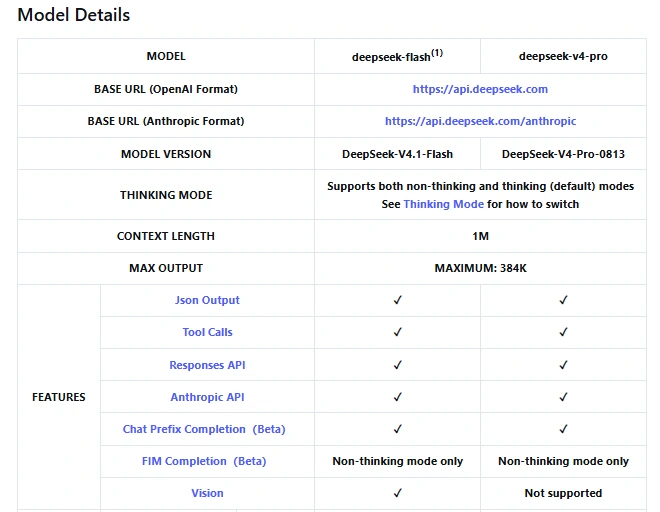
The DeepSeek vision API lets you send images with a text prompt and get a text answer. Use deepseek-flash for tasks such as reading a screenshot, describing a photo, or interpreting a chart. It currently runs DeepSeek-V4.1-Flash; deepseek-v4-pro does not accept images, according to the official model table.
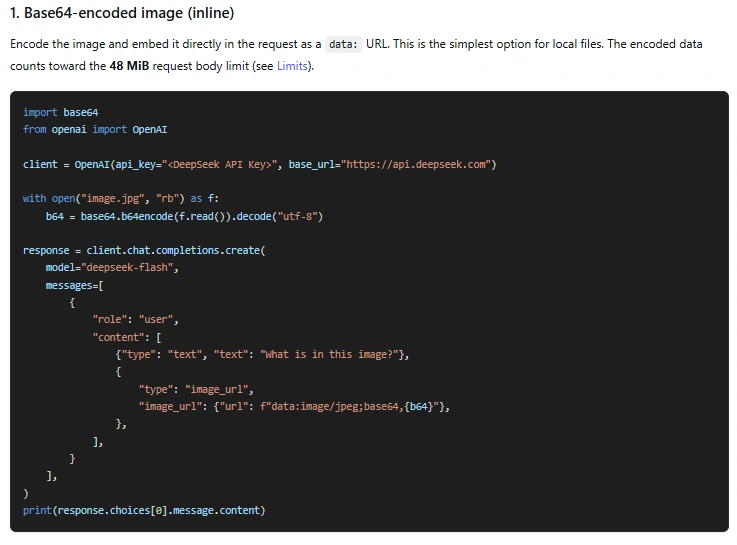
For your first request, start with one clear image and one specific question. A local file can go directly in the request as Base64. An image already hosted online can use its public URL. If you will ask several questions about the same image, upload it once and reuse its file ID. The examples below cover all three routes, then explain how to handle multiple images, detail settings, cost, and errors.
Table of Contents
Choose how to send your image
You do not need a separate vision endpoint for Chat Completions. Send the request to https://api.deepseek.com/chat/completions, select deepseek-flash, and make the user message’s content an array containing your text and image. A plain text string containing a filename does not attach that file.
| Method | When it fits | What goes in the request |
|---|---|---|
| Base64 data URL | A local screenshot or photo you want to send directly. | An image_url block whose URL contains the encoded image bytes. |
| Public image URL | An image already available through a direct HTTP(S) link. | An image_url block pointing to the image. |
| Files API | Repeated use, a large image, or a request that would be too large inline. | A file block with the uploaded image’s file_id. |
These are the three routes documented in DeepSeek’s Vision guide. They accept JPEG, PNG, GIF, and WebP. The service checks the file’s actual content, so changing a filename from .pdf to .png will not make it an image.
If you are updating older code, replace deepseek-v4-flash-vision-exp with deepseek-flash. The old name is still accepted, but it now routes to the current Flash model and its pricing. It does not select a separate experimental model. Use the current name in new integrations to make that choice clear.
Send a local image with Python
You need a DeepSeek API key, available API balance, and a supported image. Set the key in your environment as DEEPSEEK_API_KEY, then install the OpenAI Python package. The package acts as a client for DeepSeek’s compatible endpoint; the key and billing belong to DeepSeek.
python -m pip install --upgrade openaiSave this as vision.py and put a real PNG named image.png in the directory where you run it. The example asks for a description and visible text, disables thinking for a direct answer, and allows up to 2,048 output tokens.
import base64
import os
from pathlib import Path
from openai import OpenAI

api_key = os.environ.get("DEEPSEEK_API_KEY")
if not api_key:
    raise RuntimeError("Set DEEPSEEK_API_KEY before running this script.")

encoded_image = base64.b64encode(Path("image.png").read_bytes()).decode("ascii")
data_url = "data:image/png;base64," + encoded_image
client = OpenAI(api_key=api_key, base_url="https://api.deepseek.com")

response = client.chat.completions.create(
    model="deepseek-flash",
    messages=[{
        "role": "user",
        "content": [
            {"type": "text", "text": (
                "Describe this image, then transcribe its visible text. "
                "Mark anything you cannot read as [unclear]."
            )},
            {"type": "image_url", "image_url": {"url": data_url}},
        ],
    }],
    max_tokens=2048,
    extra_body={"thinking": {"type": "disabled"}},
)

choice = response.choices[0]
print(choice.message.content or "No answer text returned.")
print("Finish reason:", choice.finish_reason)
if response.usage:
    print("Usage:", response.usage.model_dump())
Run python vision.py. The answer is in choices[0].message.content; the script also prints the stop reason and usage. Compare the answer with the actual image. A successful HTTP request confirms that the request was accepted, but it does not prove that every word or number was read correctly.
If finish_reason is length, the answer reached a generation or context limit. For a long transcription, raise max_tokens within the documented limits or ask for a smaller part of the image. The Chat Completions reference defines these fields. Thinking is enabled by default; remove the explicit switch to use that default, or see the thinking-mode guide when the task needs more reasoning.
For a JPEG, change both the filename and the data-URL prefix to match: data:image/jpeg;base64,. Keep API calls on your server or in a trusted local script so the key is not exposed in browser code.
Use an image URL instead of Base64
Keep the same Python request and replace the image block with the following object. Substitute your actual direct image link for the placeholder:
{
    "type": "image_url",
    "image_url": {"url": "https://example.com/your-image.png"}
}
The link must return the image itself without a sign-in page or browser cookies. DeepSeek documents a limit of 8,192 URL characters, a 32 MiB image, and a download timeout of 60 seconds. If your storage link expires before the request runs, issue a fresh link or use Base64 or a file ID. Uploading through the Files API also avoids making an otherwise private image publicly accessible.
Upload once and reference the file ID
Use this route when you will reuse an image or when embedding its bytes would make the request too large. The Files API accepts an image up to 64 MiB and requires purpose="user_data". Uploading stores the image; a separate model request analyzes it.
This standalone Python example uploads image.png, prints the returned ID, and uses it in a Chat Completions request:
import os
from openai import OpenAI

client = OpenAI(
    api_key=os.environ["DEEPSEEK_API_KEY"],
    base_url="https://api.deepseek.com",
)

with open("image.png", "rb") as image:
    uploaded = client.files.create(file=image, purpose="user_data")

print("Uploaded file ID:", uploaded.id)
response = client.chat.completions.create(
    model="deepseek-flash",
    messages=[{
        "role": "user",
        "content": [
            {"type": "text", "text": "Read the chart title and explain its main trend."},
            {"type": "file", "file_id": uploaded.id},
        ],
    }],
    max_tokens=2048,
    extra_body={"thinking": {"type": "disabled"}},
)
print(response.choices[0].message.content)
The important detail is {"type": "file", "file_id": uploaded.id}. In Chat Completions, the ID is a top-level field of that content block. Do not put it inside an image_url object or wrap it in an extra file object.
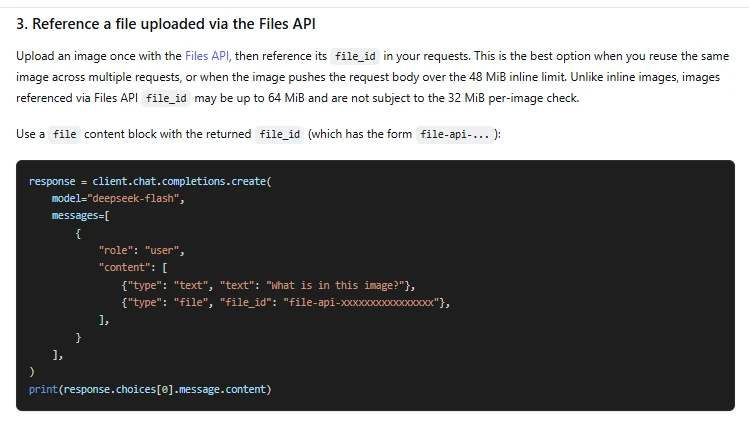
For another question, reuse the saved ID in the request instead of running the upload again. Files belong to the API key that created them. This example does not set an expiry, so the file remains stored until deleted. Once you no longer need it, client.files.delete(uploaded.id) deletes that uploaded file. The file-upload guide covers expiration, listing, and cleanup in more detail.
Reusing the ID saves repeated image transfer. It does not make model input free or guarantee a cache hit. The image still contributes input tokens whenever it is processed.
Send an image with cURL
If you prefer a direct HTTP request, this example uses a public image URL. In a Bash-compatible shell, set DEEPSEEK_API_KEY and replace the example image address before running it. The placeholder URL is not a sample image to test against.
curl --fail-with-body --silent --show-error \
  "https://api.deepseek.com/chat/completions" \
  -H "Authorization: Bearer ${DEEPSEEK_API_KEY}" \
  -H "Content-Type: application/json" \
  --data-raw '{
    "model": "deepseek-flash",
    "thinking": {"type": "disabled"},
    "max_tokens": 2048,
    "messages": [{
      "role": "user",
      "content": [
        {"type": "text", "text": "Describe this image and identify any unreadable text."},
        {"type": "image_url", "image_url": {"url": "https://example.com/your-image.png"}}
      ]
    }]
  }'
Read the returned JSON’s choices[0].message.content for the answer. Unlike the SDK’s Python examples, the direct request puts thinking in the top-level JSON body; extra_body is an SDK argument, not a field to send over HTTP.
Send an image with Node.js
Install the package with npm install openai. Save this as vision.mjs, set DEEPSEEK_API_KEY, and place image.png in your working directory. Run it with node vision.mjs.
import OpenAI from "openai";
import { readFile } from "node:fs/promises";

async function main() {
  const apiKey = process.env.DEEPSEEK_API_KEY;
  if (!apiKey) throw new Error("Set DEEPSEEK_API_KEY before running this script.");

  const image = await readFile("image.png");
  const client = new OpenAI({ apiKey, baseURL: "https://api.deepseek.com" });
  const response = await client.chat.completions.create({
    model: "deepseek-flash",
    thinking: { type: "disabled" },
    max_tokens: 2048,
    messages: [{
      role: "user",
      content: [
        { type: "text", text: "Describe the image and transcribe its visible text." },
        { type: "image_url", image_url: {
          url: "data:image/png;base64," + image.toString("base64")
        } }
      ]
    }]
  });
  console.log(response.choices[0].message.content);
  console.log("Finish reason:", response.choices[0].finish_reason);
}

main().catch((error) => {
  console.error(error.message);
  process.exitCode = 1;
});
This is server-side JavaScript. The thinking property is a DeepSeek extension passed through in the request; the example is an .mjs file, so it does not rely on the OpenAI TypeScript definitions knowing that extension.
Ask about more than one image
Add several image blocks to the same user message. Give them labels in nearby text so your question has a clear reference: “before” and “after,” for example, or “chart A” and “chart B.” Each image is processed and counted separately.
To compare two screenshots, replace the messages argument in the Python request with this list, using real image URLs:
messages=[{
    "role": "user",
    "content": [
        {"type": "text", "text": "Image A: the original screen."},
        {"type": "image_url", "image_url": {"url": "https://example.com/before.png"}},
        {"type": "text", "text": "Image B: the revised screen."},
        {"type": "image_url", "image_url": {"url": "https://example.com/after.png"}},
        {"type": "text", "text": (
            "List the visible changes from A to B. "
            "Separate text changes from layout changes. Do not infer hidden behavior."
        )},
    ],
}]
For unrelated images, separate requests can make answers easier to match to their sources. A single request makes more sense when the task requires comparison or relationships between images. The maximum image count is an acceptance limit, not a recommendation to send hundreds of images for a small question.
Choose detail settings and ask a useful question
The optional detail field goes inside the Chat Completions image_url object. DeepSeek documents low as downscaling to 512 × 512 before inference. high and original are equivalent; auto currently behaves like original. See the official detail settings.
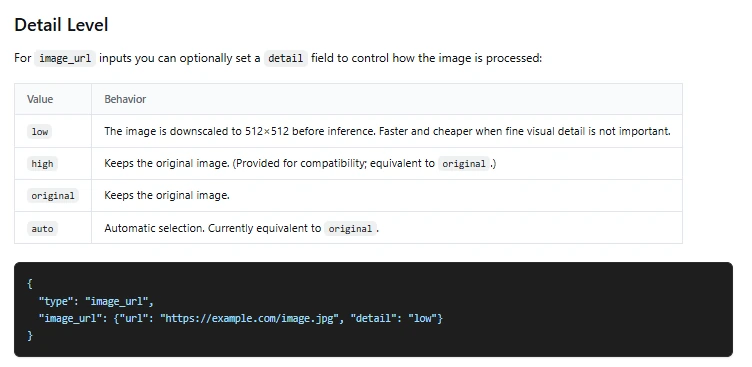
For a broad description, low may be enough. For small labels, a receipt, or a dense chart, start with original so you do not deliberately discard detail before the model reads it:
{
    "type": "image_url",
    "image_url": {
        "url": "https://example.com/chart.png",
        "detail": "original"
    }
}
“Original” is the detail-setting choice, not a promise that the image bypasses DeepSeek’s separate automatic resizing and token-processing rules. If small text remains unreadable, a clear crop of the relevant area may be more useful than a full-page screenshot with tiny lettering. Keep any context needed to interpret that crop, such as the chart title, axes, or units.
Give the model a concrete job and an output you can check. These are example prompts to adapt, not measured results:
- Screenshot: “Transcribe the error message exactly, then explain what it refers to. Mark unreadable text as [unclear].”
- Chart: “Identify the axes and units, describe the main trend, and distinguish labeled values from visual estimates.”
- Receipt: “Return the merchant, date, currency, and total as JSON. Use null when a field is not visible, and do not calculate a missing total.”
Check numbers and extracted text against the source before using them in a record or calculation. A precise prompt makes the task clearer; it does not guarantee a correct reading. If your application needs JSON, request the format explicitly and validate the result. Our JSON-output guide explains the format controls and validation; valid JSON alone does not establish that an extracted amount is correct.
Image formats, size limits, and context
The documented image limits apply together. A request can fit the image-count limit and still fail because one image is too large or the encoded request body exceeds its limit.
| Check | Limit |
|---|---|
| Accepted formats | JPEG, PNG, GIF, WebP |
| One Base64 or external-URL image | 32 MiB |
| One image referenced by file ID | 64 MiB |
| Request body | 48 MiB |
| Total image size | 64 MiB without file-ID images; up to 200 MiB including file-ID images |
| Images per request | 600 |
| Dimensions | 8,192 pixels per side; 4,096 per side when the request contains 15 or more images |
| External URL | 8,192 characters; download must complete within 60 seconds |
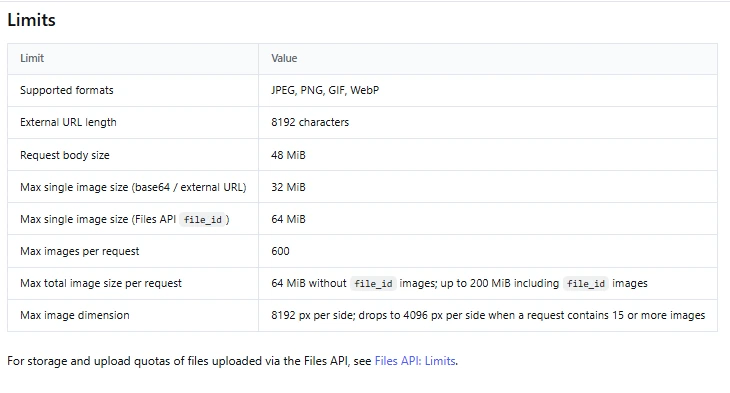
Base64 makes the transmitted data larger than the original binary file. A 30 MiB image becomes roughly 40 MiB of Base64 before the rest of the JSON, so count the encoded payload when checking the 48 MiB body limit. File IDs keep those bytes out of the chat request body, but the referenced images still count toward the image-size, count, and dimension limits.
Flash’s current model limits are a 1M-token context and up to 384K output tokens. Images, text, and conversation history all contribute to the input budget. Leave room for the answer; the model’s maximum output is not space added on top of the context window.
How much does image input cost?
DeepSeek bills image tokens together with text input, then charges for generated output. The Vision guide places an upper bound of 1,024 input tokens per image after processing. Multiple images are counted independently under the same rule.
DeepSeek preserves aspect ratio during automatic resizing. It describes scaling very small images toward a pixel count equivalent to roughly 544 × 544, and large images down toward roughly 1,300 × 1,300. A larger source file therefore does not necessarily use more tokens: the documented 2,000 × 2,000 and 5,000 × 5,000 examples reach the same token count after resizing.
These are the official Flash rates, in USD per one million tokens:
| Token category | Off-peak | Peak |
|---|---|---|
| Input, cache hit | $0.003 | $0.006 |
| Input, cache miss | $0.15 | $0.30 |
| Output | $0.60 | $1.20 |
Peak hours are 01:00–04:00 and 06:00–10:00 UTC, Monday through Friday, excluding Chinese public holidays. Other hours are off-peak. A repeated file ID alone does not determine which input rate applies.
An illustrative cost for 1,000 images
Assume 1,000 separate requests, each containing one image at the 1,024-token ceiling, 200 text-input tokens, and 300 output tokens. Thinking is disabled, and all input is billed at cache-miss rates. These are assumptions for the calculation, not measured response lengths or a fixed charge per image.
The input total is 1,000 × (1,024 + 200) = 1,224,000 tokens; output is 1,000 × 300 = 300,000 tokens. Off-peak, that costs (1.224 × $0.15) + (0.300 × $0.60) = $0.3636. At peak rates, the same usage costs $0.7272.
Longer answers, thinking tokens, conversation history, cache hits, or different image token counts change the total. Use the returned usage fields and the DeepSeek pricing guide to estimate your actual workload.
Images in Responses and Anthropic-compatible requests
You can use the same image-capable model through other supported API formats. The image limits stay relevant, but the content-block shape changes. Copying a Chat Completions block unchanged into another API is a common source of invalid requests.
Responses API
Using the client initialized in the Python example, the equivalent request uses input_text and input_image. Here, image_url is a string and detail is alongside it:
response = client.responses.create(
    model="deepseek-flash",
    reasoning={"effort": "none"},
    max_output_tokens=2048,
    input=[{
        "role": "user",
        "content": [
            {"type": "input_text", "text": "Describe the visible chart."},
            {"type": "input_image", "image_url": "https://example.com/chart.png",
             "detail": "original"},
        ],
    }],
)
print(response.output_text)
Replace the placeholder URL with your image. A stored image instead uses {"type": "input_image", "file_id": uploaded.id}. Supply either image_url or file_id, never both. The Responses reference says detail is ignored for a file ID. It allows images in user or developer message items and supported tool-output items, while system and assistant image messages are rejected. Chat Completions uses user messages for image input.
Anthropic-compatible API
For an Anthropic client, use DeepSeek’s base URL https://api.deepseek.com/anthropic and an image block with a source. For example, the image part of a user message can be:
{
    "type": "image",
    "source": {"type": "url", "url": "https://example.com/chart.png"}
}
The official Anthropic image examples also cover Base64 and file sources. A file source uses {"type": "file", "file_id": "file-api-..."} inside source and requires the header anthropic-beta: files-api-2025-04-14. These are message parts, not standalone requests; use them within the API’s message structure.
When an image request fails or reads the image badly
Invalid format or parameters
For a 400 or 422 response, read the error body before changing the SDK. Check the selected model, message role, content-block shape, and actual file format. Chat Completions expects a user message containing an array; its image_url value is an object, whereas Responses expects an input_image part with a string URL.
For inline images, include the complete data-URL prefix and valid Base64. For file IDs, use the same API key that uploaded the image and check that the file has not expired or been deleted. Sending the image to Pro will not work simply because you change its format or upload method. If you need Pro for a later text task, extract the relevant information with Flash first and check it before passing that text onward.
The URL works in your browser but fails in the API
Your browser may have authentication cookies that DeepSeek does not. Check whether the link returns an image without signing in, whether it has expired, and whether the server can deliver it within the documented download timeout. Use an uploaded file or Base64 when direct URL access is unsuitable.
The payload is too large
If you receive an oversized-request error, including HTTP 413 from an intermediary, check the encoded body first, then each image’s bytes, dimensions, and the combined limits. Reduce the image size, split independent tasks, or use file IDs. Do not rely on automatic resizing to admit an upload that already exceeds the accepted dimensions.
The request succeeds, but text or numbers are wrong
Start with a sharper image or a crop that keeps the relevant labels. Avoid the low-detail setting when the task depends on small text. Ask the model to identify unclear fields instead of guessing, and compare its answer with the image. For charts, distinguish exact labeled values from estimates taken from the plot. Increasing the output limit helps a truncated answer; it cannot recover details missing from the source image.
Authentication, exhausted balance, and traffic limits need different fixes. The official error reference separates those cases, and our API troubleshooting guide gives the next steps. If a supported image still fails after a minimal request, contact DeepSeek with the error and relevant request details, excluding your API key and private image contents.
Frequently asked questions
Can I send a PDF to the vision API?
The documented image and Files API formats are JPEG, PNG, GIF, and WebP. To inspect a PDF page visually, render that page as a supported image and send it within the image limits. For text-only work, extracting the PDF’s text can be more appropriate. Neither route means that a raw PDF is supported by the image upload endpoint.
Can this API generate an image?
No. The official Flash model card describes image-and-text input with text output. Creating an image file is a different task; our DeepSeek image-generation guide explains the separate Janus models.
Does it remember an image in a follow-up question?
Keep the earlier image-bearing message in the conversation history you send with the next request. A stored file ID lets you reference the same image again, but it does not create conversational memory by itself. The API remains stateless. DeepSeek’s official multi-round guide explains how to resend earlier messages; its image-input examples show how to include the image URL, Base64 data, or file ID in those messages.
Is using the app the same as calling the vision API?
No. The app is a ready-made interface; the API is for your own code and integrations. This article’s request fields, limits, and token charges describe the hosted API. Do not use them as quotas or subscription terms for the consumer app.
Can I run an image-capable DeepSeek model myself?
DeepSeek publishes multimodal V4.1-Flash weights under the MIT license. Self-hosting requires a suitable inference setup that supports the vision encoder and image preprocessing, as well as the model’s substantial hardware requirements. The hosted API limits and prices do not describe your local deployment.
Start with an image you can check
Choose one clear image, send it to deepseek-flash, and ask a question whose answer you can verify directly. Once that request works, choose the input route that fits your application: Base64 for direct local input, a URL for an accessible hosted image, or a file ID for reuse.
Then expand to your real workload while checking the extracted information, returned usage, and relevant size limits. That gives you a useful image workflow before you add more images or automate decisions based on the answer.