If you are evaluating DeepSeek for your work, the first thing you need is an accurate picture of how the model actually works today — not six months ago, not based on rumors, but based on what is running right now on the official API. This guide covers exactly that: the current model and its two operating modes, what each one costs, what DeepSeek can and cannot do, and practical tips for getting the best results. It is written for developers, researchers, and business teams who want to make an informed decision before committing time or budget.
You can try DeepSeek directly on this site — no setup required. If you are looking for detailed implementation workflows, like building a RAG pipeline or automating customer support with DeepSeek, see our use cases page. This article focuses on the fundamentals you need to understand first.
What Is Actually Running on the DeepSeek API Today
There is a surprising amount of outdated information online about DeepSeek’s model lineup. Many articles still describe DeepSeek V3 and DeepSeek R1 as separate models that you choose between. That is no longer how it works. As of April 2026, both API endpoints — deepseek-chat and deepseek-reasoner — run the same underlying model: DeepSeek V3.2. The difference between the two endpoints is the operating mode, not the model itself.
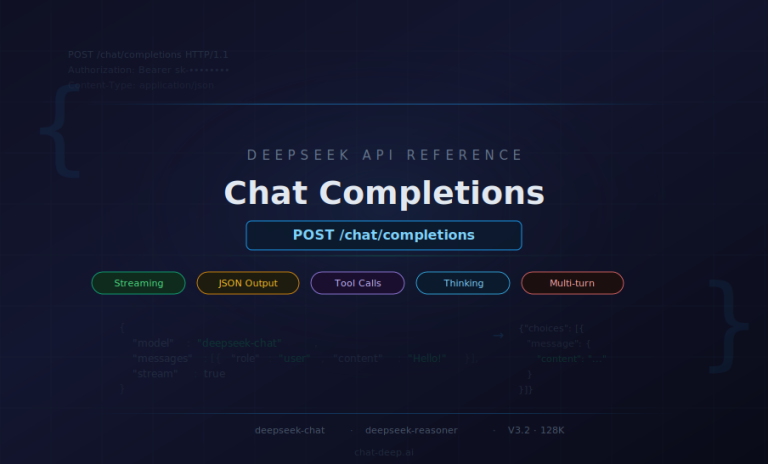
deepseek-chat runs V3.2 in non-thinking mode. It produces fast, direct responses with a maximum output of 8K tokens (default 4K). This is the mode for everyday tasks: conversation, content generation, straightforward Q&A, and most coding work.
deepseek-reasoner runs V3.2 in thinking mode. Before delivering its final answer, the model generates explicit step-by-step reasoning. The maximum output is 64K tokens (default 32K), and responses take longer but are generally more accurate for complex analytical tasks.
Both endpoints share the same specifications, verified from the official DeepSeek pricing page:
- Context length: 128K tokens (both endpoints)
- Pricing: $0.28 per 1M input tokens (cache miss), $0.028 per 1M input tokens (cache hit), $0.42 per 1M output tokens — identical for both endpoints
- Supported features: JSON output, tool calls, chat prefix completion (beta), FIM completion (beta, non-thinking mode only)
One of V3.2’s most significant capabilities is Thinking in Tool-Use. This means the model can reason through problems while simultaneously deciding when and how to call external tools — a crucial feature for building AI agents. According to the V3.2 release notes, DeepSeek introduced a new agent training data synthesis method covering over 1,800 environments and 85,000 complex instructions, making V3.2 the first DeepSeek model to integrate thinking directly into tool-use. Both thinking and non-thinking modes support tool calling.
For context, here is how the model evolved to reach this point: DeepSeek V3 (December 2024) → V3-0324 (March 2025) → R1-0528 (May 2025, dedicated reasoning model) → V3.1 (August 2025, first hybrid thinking/non-thinking model) → V3.1-Terminus (September 2025) → V3.2-Exp (September 2025) → V3.2 (December 2025, current production model). If you encounter references to DeepSeek-Coder as a separate model, note that it was merged into the general-purpose model with V2.5 in September 2024 — there is no separate coding model on the API today.
One important note: the official documentation states that the APP/WEB version may differ from the API version. The specifications above apply to the API endpoints specifically. For detailed model comparisons, see our models page.
How Does DeepSeek Thinking Mode Work?
The choice between thinking and non-thinking mode is the most important practical decision you will make when using DeepSeek. Getting it right affects the quality of your results, the speed of responses, and how much you pay.
Non-thinking mode (deepseek-chat) is designed for interactive use. The model responds directly without generating intermediate reasoning steps. It is fast, token-efficient, and appropriate for the majority of everyday tasks: writing emails, answering simple questions, generating content, having conversations, and handling routine code generation. If you need a quick answer and the question is not particularly complex, non-thinking mode is the right choice.
Thinking mode (deepseek-reasoner) is designed for problems that benefit from step-by-step analysis. When activated, V3.2 generates an internal chain of reasoning before producing its final answer. This makes the output more transparent — you can follow the model’s logic and spot where it might go wrong — and generally more accurate for multi-step problems. The trade-off is that thinking mode is slower and consumes more tokens, since the reasoning chain counts toward the output.
The reasoning capability traces back to DeepSeek R1, which demonstrated strong performance on analytical benchmarks. The R1-0528 update achieved an AIME 2025 score of 87.5, GPQA of 81.0, and Aider of 71.6, according to the official release notes. V3.2 inherits these reasoning capabilities while also being faster — the V3.1 release notes noted that thinking mode responses arrive in significantly less time than the original R1-0528.
The practical rule is straightforward: use thinking mode when accuracy and depth of reasoning matter more than speed — complex math, multi-step logic, difficult debugging, research analysis. Use non-thinking mode for everything else. Since both endpoints cost the same per token, the cost difference comes entirely from thinking mode using more output tokens for its reasoning chains. Budget accordingly, and consider capping max_tokens when you do not need the full 64K output. For technical details on controlling thinking behavior, see the official thinking mode guide.
Can DeepSeek Read Documents and Analyze Files?
Yes — with important caveats. DeepSeek V3.2 accepts up to 128K tokens of input, which is roughly equivalent to 200 pages of text. You can paste an entire report, research paper, or policy document into a single prompt and ask specific questions about it. The DeepSeek platform also supports file uploads, making it practical to work with documents without manual copy-pasting.
However, the current production API is text-only. The deepseek-chat and deepseek-reasoner endpoints do not process images, audio, or video. If your document contains charts, diagrams, or photographs that carry essential information, those visual elements will not be interpreted by the model. DeepSeek has published separate vision-language research models (DeepSeek-VL and DeepSeek-VL2), but these are distinct from the production API and require separate deployment.
It is also important to understand that DeepSeek has no access to your data unless you explicitly provide it. The model does not crawl your files, does not connect to your internal systems, and does not retain memory across separate sessions. Every conversation starts from scratch. If you want DeepSeek to know something, you must include it in the prompt. The DeepSeek platform may store conversation history per its privacy policy — worth reviewing if you handle sensitive data. For more detail on data handling, see our security page and privacy policy.
If you need to build a full document analysis workflow — such as a retrieval-augmented generation (RAG) pipeline that answers questions from a large internal knowledge base — our use cases page walks through the implementation in detail.
What Are the Limitations of DeepSeek?
Every AI model has limitations, and being honest about them is what separates productive use from frustration. Here is what you need to know about DeepSeek’s boundaries.
It can hallucinate. Like any large language model, DeepSeek can generate plausible-sounding statements that are factually incorrect. DeepSeek’s own model algorithm disclosure acknowledges this directly. This means you should never treat its output as authoritative without verification, especially in domains where accuracy has real consequences — legal analysis, medical information, financial decisions, regulatory compliance.
The API is text-only. As discussed above, the production endpoints do not process images, audio, or video. If your workflow requires understanding visual content, you need a different tool or a separate vision model in your pipeline.
It is not for mission-critical or real-time systems. DeepSeek’s output is not deterministic — the same prompt can produce different responses. Response times vary depending on load and prompt complexity. These characteristics make it unsuitable for systems that require guaranteed accuracy and predictable timing, such as financial transaction processing, medical device control, or industrial automation.
It needs human oversight. DeepSeek is a powerful assistant, but it is not an autonomous decision-maker. It lacks genuine understanding of real-world stakes and has no accountability mechanism. For anything consequential — hiring decisions, legal determinations, medical recommendations — a qualified human must review and approve the output.
Thinking mode costs more tokens. The reasoning chains that make thinking mode more accurate also consume significantly more output tokens. A question that generates a 500-token response in non-thinking mode might use 5,000 tokens in thinking mode. This is a real cost consideration at scale.
The 128K context window is a hard limit. Documents exceeding roughly 200 pages cannot be processed in a single prompt. You will need to use chunking strategies, incremental summarization, or a retrieval-augmented approach for larger corpora.
There is no long-term memory. Each API session starts with a blank slate. The model does not remember previous conversations unless you explicitly include prior context in the current prompt. This is by design for privacy, but it means you must manage conversation continuity yourself.
Being clear about these limitations is what separates productive use from frustration. DeepSeek is powerful within its lane — language understanding, generation, and reasoning — but treating it as infallible will lead to problems.
DeepSeek API Pricing: What You Actually Pay
Many third-party articles cite incorrect DeepSeek pricing. The numbers below come directly from the official DeepSeek API pricing page, verified in April 2026. Both deepseek-chat and deepseek-reasoner share identical pricing:
- Input tokens (cache miss): $0.28 per 1M tokens
- Input tokens (cache hit): $0.028 per 1M tokens — a 90% discount
- Output tokens: $0.42 per 1M tokens
The cache hit discount is the key to cost optimization. DeepSeek automatically caches input token prefixes using its context caching system. In practical terms, if every prompt you send starts with the same system instruction (say, 2,000 tokens of instructions and tool definitions), that prefix is cached after the first request and subsequent calls pay only $0.028 per million tokens for it. A well-structured production application can achieve effective input costs far below the headline $0.28 rate.
To manage costs effectively, consider these strategies: use non-thinking mode for tasks that do not require deep reasoning — it produces shorter responses and therefore fewer output tokens. Set max_tokens to limit response length when you know the expected output size. Structure your prompts so that shared context (system instructions, tool schemas, reference material) appears at the beginning, maximizing cache hits. And monitor thinking mode usage carefully — reasoning chains can multiply output token consumption by 5–10x for complex questions.
DeepSeek also offers a free tier for evaluation, and the web and app interfaces are available at no cost. For a detailed cost estimation tool, see our API cost calculator, and for a broader pricing overview, visit our pricing page.
Practical Tips for Better DeepSeek Output
The difference between a disappointing DeepSeek response and a genuinely useful one usually comes down to how the question was asked. Here are the practices that experienced users follow consistently.
Be specific with your prompts. A vague question produces a vague answer. Instead of “tell me about our sales,” try “summarize the European Q4 revenue growth from this report, focusing on year-over-year percentage changes.” The more precisely you define the scope, format, and focus of the response, the more useful the output will be.
Provide the actual context. DeepSeek does not know your internal data unless you include it. If you want analysis of a document, paste the document. If you want feedback on code, paste the code. Do not expect the model to guess or retrieve information on its own — supply it directly in the prompt.
Choose the right mode. Use thinking mode for complex analysis, math, debugging, and multi-step reasoning. Use non-thinking mode for conversation, content generation, and straightforward questions. Mismatching the mode to the task wastes either accuracy or tokens.
Adjust the temperature. The temperature parameter controls randomness. Lower values (0.0–0.3) produce focused, deterministic responses — good for factual tasks and code. Higher values (0.7–1.0) introduce more variation — better for creative writing and brainstorming. The default works for most tasks, but tuning it for your specific use case can improve results noticeably.
Human review is not optional. Treat every DeepSeek response as a first draft from a capable but fallible assistant. Review the output, verify facts, check reasoning, and refine before using it in any consequential context. The teams that report the best results are universally those with a human-in-the-loop workflow.
Iterate. If the first response is not quite right, refine the prompt rather than giving up. Add more context, clarify the desired format, or break a complex question into smaller parts. DeepSeek responds well to iterative refinement. The fastest way to develop this skill is through practice — try it directly and experiment with different approaches.
Frequently Asked Questions
What is the difference between deepseek-chat and deepseek-reasoner?
Both endpoints run the same model, DeepSeek V3.2. The deepseek-chat endpoint uses non-thinking mode for fast, direct responses with a maximum output of 8K tokens. The deepseek-reasoner endpoint uses thinking mode, generating step-by-step reasoning before the final answer, with a maximum output of 64K tokens. Pricing is identical for both.
How much does DeepSeek cost?
Official API pricing is $0.28 per million input tokens (cache miss), $0.028 per million input tokens (cache hit — a 90% discount), and $0.42 per million output tokens. Both endpoints share the same pricing. A free tier is available for evaluation, and the web and app interfaces are free to use.
Is DeepSeek free?
DeepSeek offers a free tier for API evaluation, and the web and mobile app interfaces are free to use with no message limits. API usage beyond the free tier follows pay-as-you-go pricing based on token consumption.
How does DeepSeek thinking mode work?
Thinking mode causes DeepSeek V3.2 to generate explicit reasoning steps before delivering its final answer. This chain-of-thought approach improves accuracy on complex tasks like math problems, multi-step logic, and difficult coding challenges. The trade-off is higher token usage and longer response times compared to non-thinking mode.
Can DeepSeek read documents?
Yes. DeepSeek V3.2 accepts up to 128K tokens of input, equivalent to roughly 200 pages of text. You can paste or upload documents and ask questions about them. However, the API is text-only — it does not process images, audio, or video content embedded in documents.
What are the limitations of DeepSeek?
Key limitations include: text-only processing (no vision or audio), the possibility of hallucinated output, a 128K token context limit, no memory across sessions, and higher token consumption in thinking mode. Outputs should always be reviewed for accuracy before use in consequential contexts.
What is DeepSeek V3.2?
DeepSeek V3.2 is the current production model powering both API endpoints (deepseek-chat and deepseek-reasoner). Released in December 2025, it unified chat and reasoning into a single model and introduced Thinking in Tool-Use — the ability to reason while calling external tools. It is open-source with weights available on Hugging Face.
Getting Started — Try DeepSeek Now
The fastest way to see how DeepSeek works in practice is to try it directly on this site — no account setup, no API key, no installation required. Ask it a question, test it on your own use case, and see for yourself how the model responds.
For developers ready to integrate DeepSeek into applications, our API guide covers authentication, endpoint selection, and production best practices. If you prefer to run DeepSeek on your own hardware, we have step-by-step guides for local installation, LM Studio setup, Windows deployment, and production API serving. For detailed model specifications, visit our models page. And for implementation workflows with code examples — RAG pipelines, customer support automation, code review, and more — see our use cases page. If you have additional questions, check our FAQ.
The most important thing to remember is that DeepSeek works best as a collaborative tool guided by human expertise. The model is remarkably capable at understanding language, generating text, and reasoning through problems — but it is the human using it who drives the quality of results. Choose the right mode, provide clear context, verify the output, and iterate. That is how you get the most from DeepSeek in practice.
All specifications, pricing, and feature details in this article were verified against the official DeepSeek API pricing page, changelog, and V3.2 release notes as of April 2026. Model availability and pricing are subject to change — check the official documentation for the most current information.