DeepSeek now has two distinct structured-output contracts. Chat Completions uses "response_format":{"type":"json_object"} for syntactically valid JSON, while the Responses API can use text.format with type: "json_schema" to request conformance to a supplied JSON Schema. Both routes still require local validation of source facts, permissions, ranges, and business rules.
This guide separates three evidence types. Official means a statement appears in DeepSeek’s current documentation. Live means a dated result from the bounded V4 test matrix and includes an exact denominator. Offline means a deterministic parser or validator fixture that made no provider request. The live and offline result fields below are populated from reviewed, sanitized artifacts.
Current documentation boundary: endpoint behavior and the current model catalog were rechecked August 24, 2026 UTC. Vision Exp was released August 21 and supports image input plus text and JSON output, but the live matrix below remains a frozen July 27 Chat Completions study of Flash and Pro only; it was not rerun, expanded to Vision, or reinterpreted as a Responses API test. Chat-Deep.ai is an independent technical publication and is not affiliated with or endorsed by DeepSeek. The reference examples below include expected answer values, so the frozen study measures a narrow output contract rather than broad independent extraction ability.
Live — July 27, 2026 UTC: the bounded execution ran from 09:44:48.338Z to 09:48:42.812Z. One GET /models request returned HTTP 200 in 808.470 ms and listed deepseek-v4-flash and deepseek-v4-pro. The 20 planned completion requests produced 18 HTTP 200 responses and two bounded HTTP 400 controls. Final content was non-empty in 18/18 successful completions; 17/18 parsed as JSON, 17/18 passed the exact local schema, and 16/18 matched every reference fact. Both streaming tests, 2/2, reached [DONE]. The two repetitions in each core configuration are descriptive observations, not population reliability estimates.
Choose the structured-output contract by endpoint
DeepSeek documents deepseek-v4-flash, deepseek-v4-pro, and deepseek-v4-flash-vision-exp on the stateless Responses API. All three support JSON Schema output; Vision Exp additionally accepts supported image input and returns text. Do not copy a field from one endpoint into the other: the request shape and guarantee differ.
| Endpoint | Request control | Documented contract |
|---|---|---|
Chat Completions POST /chat/completions | response_format: {"type":"json_object"} | Valid JSON text; the application schema is not enforced by this mode |
Responses POST /responses | text.format with type: "json_schema", a name, and a schema | The response output conforms to the supplied JSON Schema |
Responses API: JSON Schema request
curl https://api.deepseek.com/responses \
  -H "Authorization: Bearer $DEEPSEEK_API_KEY" \
  -H "Content-Type: application/json" \
  -d '{
    "model": "deepseek-v4-pro",
    "input": "Extract ticket T-204. Three password resets failed; no order ID was provided.",
    "text": {
      "format": {
        "type": "json_schema",
        "name": "support_ticket",
        "schema": {
          "type": "object",
          "properties": {
            "ticket_id": {"type": "string"},
            "reset_attempts": {"type": "integer"},
            "order_id": {"type": ["string", "null"]}
          },
          "required": ["ticket_id", "reset_attempts", "order_id"],
          "additionalProperties": false
        }
      }
    }
  }'
The Responses API is stateless, so your application must resend any history it needs. The July 27 results below use /chat/completions only; they provide no measured claim about Responses json_schema reliability.
For the later one-sample-per-model evidence, see the Responses JSON Schema audit results: Flash RSP-10 failed schema-instance validation while Pro RSP-10 passed its frozen assertions.
Chat Completions JSON Output requirements
Official: DeepSeek’s JSON Output guide lists four practical requirements and cautions. The current Chat Completion reference adds an important whitespace warning and defines the accepted response_format.type values. The separate Responses API guide documents text.format and JSON Schema.
| Requirement | Why it matters | Production check |
|---|---|---|
Set response_format.type to json_object | Enables DeepSeek JSON Output instead of the default text format | Assert the request body contains the exact object |
Include the word json in a system or user prompt | The official guide requires an explicit JSON instruction | Validate the final prompt after templates are assembled |
| Provide an example of the desired JSON shape | Guides the model toward the intended structure | Use an example with the same keys and primitive types |
Set max_tokens reasonably | An insufficient allowance can cut the JSON string off midway | Treat finish_reason: "length" as potentially incomplete |
| Handle empty content | DeepSeek says JSON Output may occasionally return empty content | Check for a non-empty string before calling JSON.parse |
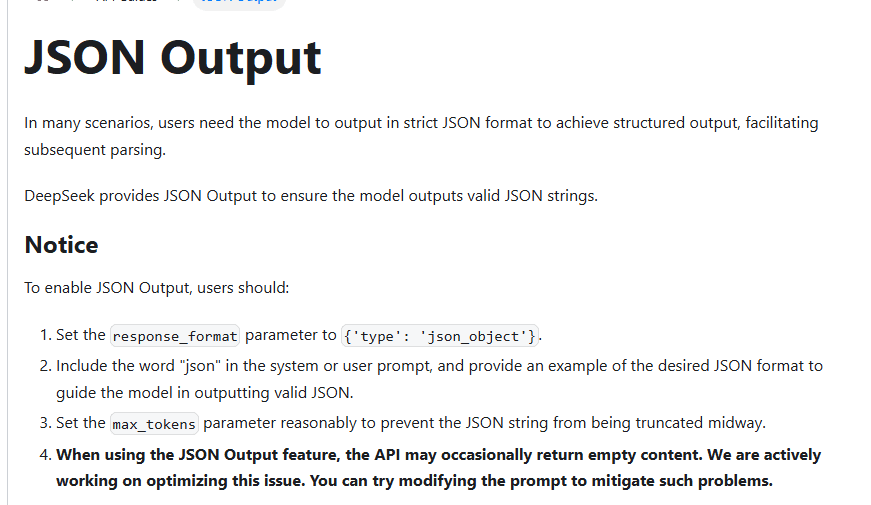
The reference says response_format.type accepts text or json_object, and text is the default. It also warns that enabling JSON Output without instructing the model to produce JSON can lead to a stream of whitespace until the output limit, making the request appear stuck. This is why the API control and the prompt instruction belong together.
Minimal raw HTTPS request
curl https://api.deepseek.com/chat/completions \
  -H "Authorization: Bearer $DEEPSEEK_API_KEY" \
  -H "Content-Type: application/json" \
  -d '{
    "model": "deepseek-v4-flash",
    "messages": [
      {
        "role": "system",
        "content": "Return JSON only. Use exactly this shape: {\"ticket_id\":\"T-204\",\"issue\":\"account_access\",\"reset_attempts\":3,\"order_id\":null,\"urgent\":true}"
      },
      {
        "role": "user",
        "content": "Ticket T-204: The customer cannot sign in after three failed password resets. No order ID was provided."
      }
    ],
    "response_format": {"type": "json_object"},
    "thinking": {"type": "disabled"},
    "max_tokens": 128,
    "stream": false
  }'
The explicit non-thinking setting is an editorial starting configuration for a small extraction task, not an official claim that thinking must be disabled for JSON. DeepSeek’s current model documentation says Flash, Pro, and Vision Exp support JSON Output and both thinking modes. The original July 27 matrix tested enabled and disabled modes on Flash and Pro only, before Vision Exp was released, instead of assuming one mode is universally better.
Valid JSON is not the same as schema-valid data
JSON.parse answers a narrow question: is this string valid JSON syntax? It does not prove that the top-level value is an object, that required keys exist, that unexpected keys are absent, or that values have the right types. A response can be valid JSON and still be unusable or unsafe for the application.
| Validation layer | Example failure that still passes earlier layers | Required action |
|---|---|---|
| Non-empty content | An empty string has no JSON value to parse | Reject or follow a bounded recovery policy |
| JSON syntax | {"urgent":"yes"} parses successfully | Run a schema validator after parsing |
| Top-level shape | [] is valid JSON but not the required object | Require a non-null, non-array object |
| Exact keys | A required field is missing or an unapproved field appears | Compare required and allowed key sets |
| Primitive types and enums | reset_attempts is a string or issue is outside the enum | Validate each property |
| Reference facts | The schema is valid but the ticket ID or count is wrong | Compare extractable facts with the source |
| Business rules | urgent is false when resets are three or more | Recompute deterministic rules locally |
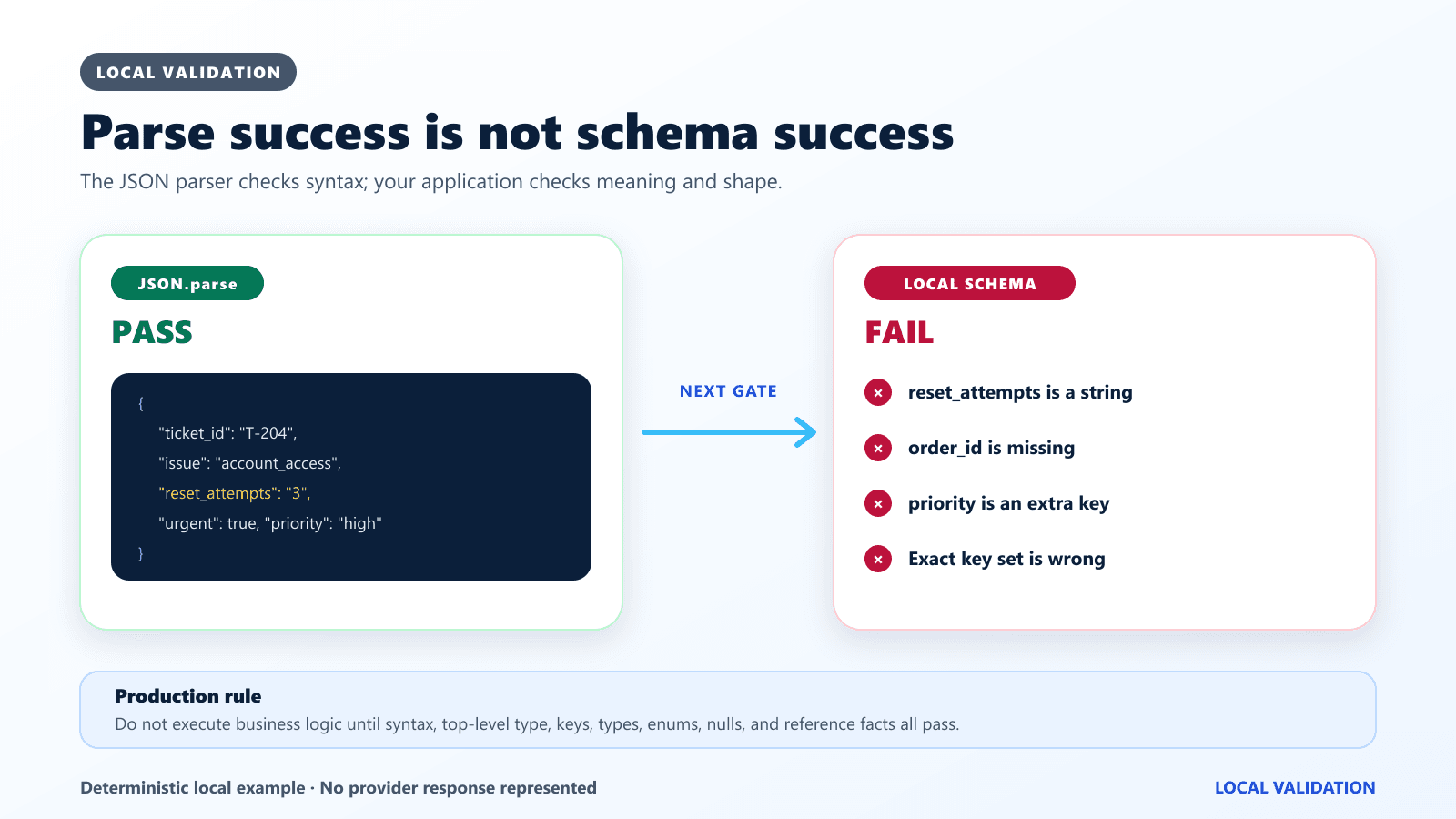
For the benchmark’s synthetic ticket, the exact object contains five keys: ticket_id, issue, reset_attempts, order_id, and urgent. The local validator checks the exact key set, types, the permitted issue enum, explicit null behavior, source facts, and the rule that three or more failed resets make the ticket urgent. That scoring is a local contract, not a provider-side JSON Schema guarantee.
Historical boundary: the benchmark uses Chat Completions json_object. It did not measure the separate Responses json_schema contract.
Original V4 test methodology
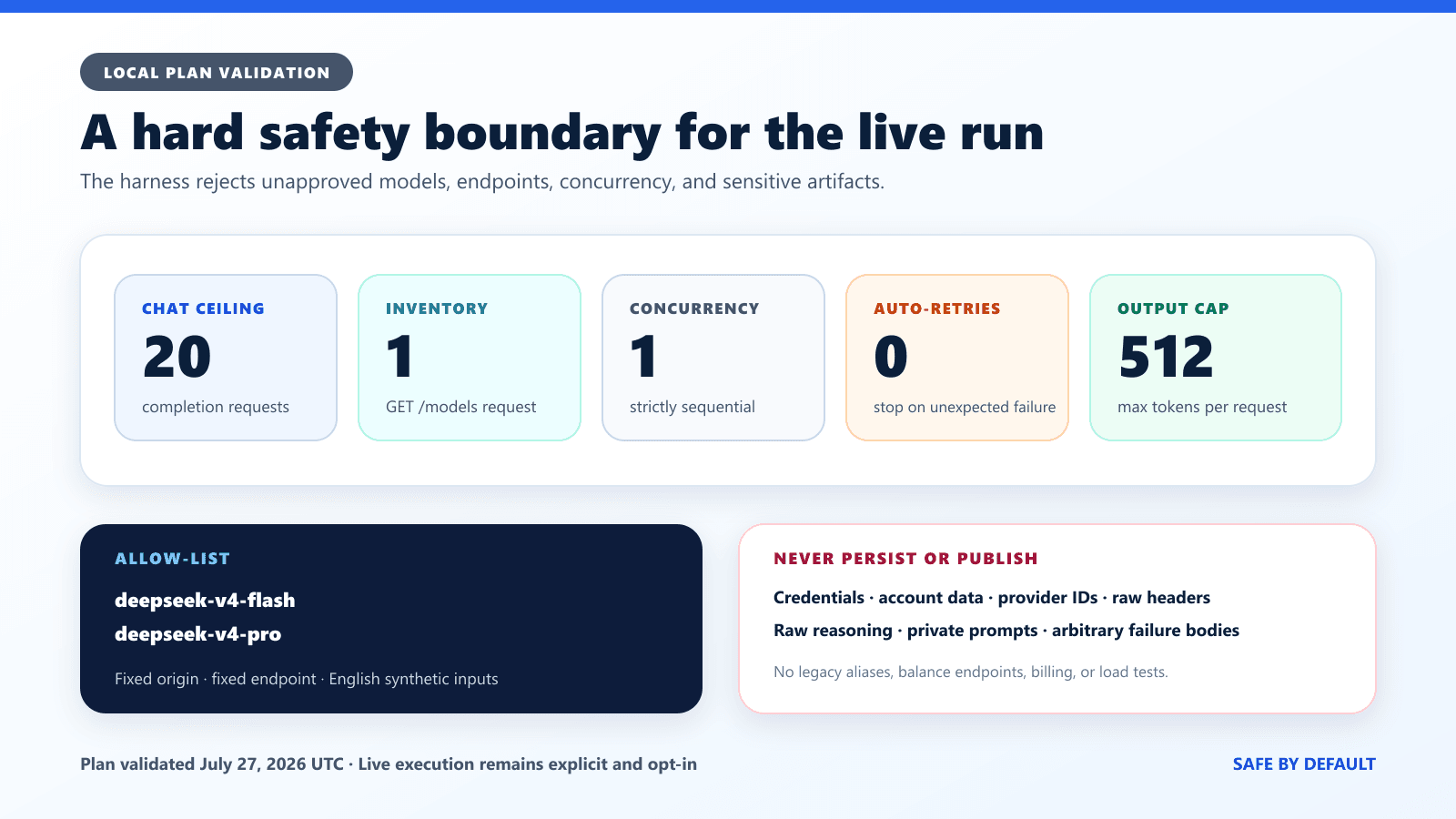
The bounded study added reproducible evidence without turning a correctness test into a load test. It used one authenticated model inventory request followed by exactly 20 sequential Chat Completions calls. Application concurrency was one, automatic live retries were disabled, and the safety policy stopped a segment after an unexpected non-success response or transport failure.
- Fixed origin:
https://api.deepseek.com. - Allowed completion endpoint:
/chat/completions. - Allowed models:
deepseek-v4-flashanddeepseek-v4-pro. - Maximum live concurrency: one.
- Automatic retries: zero.
- Per-request deadline: 60 seconds.
- Largest output allowance: 512 tokens.
- Inputs: synthetic, English-only, and free of private data.
- Excluded: account, balance, billing, key-management, alias, and deliberate rate-limit tests.
The bounded harness recorded only sanitized metadata: test label, date, public model name, request settings, status, elapsed time, finish reason, content presence and length, hashes, parser and validator flags, token counters, and streaming event counts. It did not publish the API key, Authorization header, balance, provider completion ID, system fingerprint, raw response headers, raw reasoning, or arbitrary failed output. The DeepSeek API key guide owns credential setup and rotation; this page does not reproduce those steps.
| Group | Purpose | Calls |
|---|---|---|
| A | Flash/Pro × thinking enabled/disabled, two descriptive repetitions | 8 |
| B | Prompt requirement ablation | 3 |
| C | Truncation, escaping, synthetic injection, and null edge cases | 5 |
| D | Streaming assembly on Flash and Pro | 2 |
| E | Strong prompt with response_format omitted | 2 |
The execution completed in three safety-bounded segments. Segment one stopped after B2 returned HTTP 400. After review, segment two submitted only the next unexecuted test, B3, and stopped when that bounded control also returned HTTP 400. Segment three resumed at C1 and completed C1–E2. No earlier completion was repeated: the final merged artifact contains one inventory request and each test ID A1–E2 exactly once, for 21 HTTP requests in total.
V4 Flash and Pro with thinking enabled or disabled
Official current catalog: the model inventory reference, Chat Completion model enum, and Models & Pricing page identify deepseek-v4-flash, deepseek-v4-pro, and deepseek-v4-flash-vision-exp. All three support JSON Output plus thinking and non-thinking modes, with thinking enabled by default. The historical matrix immediately below remains limited to Flash and Pro because it ran on July 27, before Vision Exp was released.
Official: DeepSeek’s Thinking Mode guide places intermediate reasoning in reasoning_content and the final answer in content. JSON parsing belongs on final content, not on reasoning_content. When a Chat Completions request carries tools, preserve every assistant reasoning_content value in subsequent requests between user turns, even when no tool call occurred; omitting it can produce HTTP 400. Without tools, previous reasoning content may be omitted. The benchmark records only whether reasoning exists plus its length and hash; it never publishes the reasoning text. The full implementation context belongs in the site’s DeepSeek Thinking Mode guide.
| Live test | Requested / returned model | Thinking | Rep | HTTP | Final content | JSON.parse | Exact schema | Reference facts | Finish | Completion tokens | Reasoning present / tokens | Elapsed |
|---|---|---|---|---|---|---|---|---|---|---|---|---|
| A1 — July 27, 2026 UTC | deepseek-v4-flash / deepseek-v4-flash | Disabled | 1 | 200 | Non-empty, 95 chars | Pass | Pass | Pass | stop | 31 | No / not reported | 885.183 ms |
| A2 — July 27, 2026 UTC | deepseek-v4-flash / deepseek-v4-flash | Disabled | 2 | 200 | Non-empty, 95 chars | Pass | Pass | Pass | stop | 31 | No / not reported | 1,085.063 ms |
| A3 — July 27, 2026 UTC | deepseek-v4-flash / deepseek-v4-flash | Enabled, high | 1 | 200 | Non-empty, 95 chars | Pass | Pass | Pass | stop | 77 | Yes / 45 | 1,249.275 ms |
| A4 — July 27, 2026 UTC | deepseek-v4-flash / deepseek-v4-flash | Enabled, high | 2 | 200 | Non-empty, 95 chars | Pass | Pass | Pass | stop | 140 | Yes / 108 | 1,738.955 ms |
| A5 — July 27, 2026 UTC | deepseek-v4-pro / deepseek-v4-pro | Disabled | 1 | 200 | Non-empty, 95 chars | Pass | Pass | Pass | stop | 31 | No / not reported | 997.402 ms |
| A6 — July 27, 2026 UTC | deepseek-v4-pro / deepseek-v4-pro | Disabled | 2 | 200 | Non-empty, 95 chars | Pass | Pass | Pass | stop | 31 | No / not reported | 1,195.830 ms |
| A7 — July 27, 2026 UTC | deepseek-v4-pro / deepseek-v4-pro | Enabled, high | 1 | 200 | Non-empty, 95 chars | Pass | Pass | Pass | stop | 147 | Yes / 115 | 2,423.323 ms |
| A8 — July 27, 2026 UTC | deepseek-v4-pro / deepseek-v4-pro | Enabled, high | 2 | 200 | Non-empty, 95 chars | Pass | Pass | Pass | stop | 102 | Yes / 70 | 2,032.048 ms |
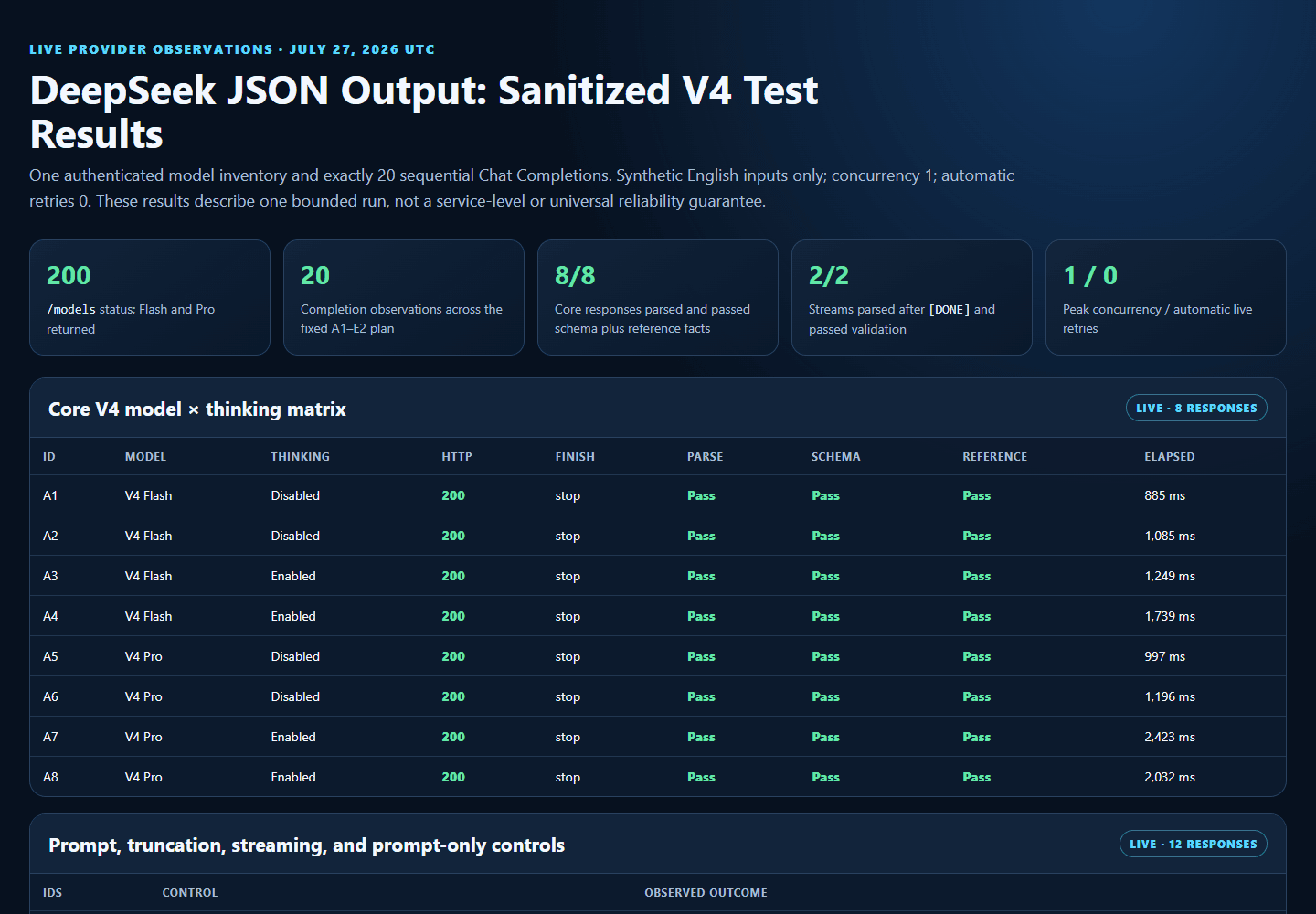
Across A1–A8, 8/8 calls returned HTTP 200, non-empty final content, directly parseable JSON, the exact five-key local schema, and all reference facts. All eight ended with finish_reason: "stop"; no core call returned empty, whitespace-only, or length-finished content. Each assembled final string was 95 characters.
Reasoning metadata was present in 4/4 thinking-enabled calls and absent in 4/4 explicitly disabled calls. The enabled calls reported 45, 108, 115, and 70 reasoning tokens; the disabled calls reported none. The final JSON, not the reasoning channel, was parsed and scored, and no raw reasoning is published.
Elapsed time ranged from 885.183 ms to 2,423.323 ms in this tiny sequential sample. Thinking-enabled calls also used more completion tokens here, but two repetitions cannot establish a permanent latency, cost, or quality ranking between Flash, Pro, or thinking modes.
Prompt ablation: the JSON word, an example, and neither
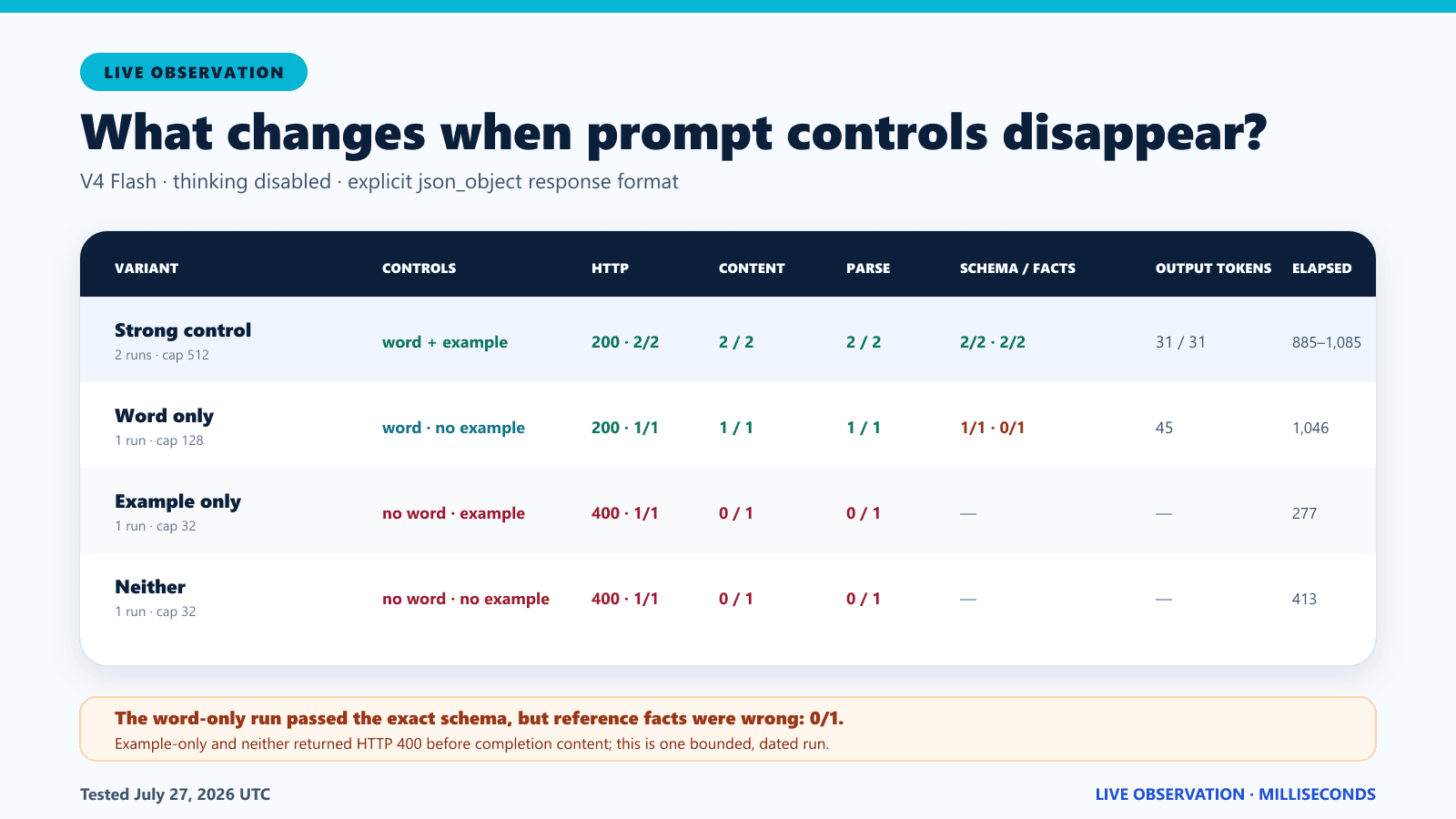
DeepSeek’s official JSON Output notice tells users to include the word json and provide an example. The bounded prompt ablation tests those pieces without hard-coding an expected failure. A strong control contains both. One case retains the word but removes the example; another retains an example while omitting the token json; the final case omits both. Low output caps bound the official whitespace-risk condition.
The correct interpretation is behavioral, not causal. If a weakened prompt happens to produce parseable content once, that does not cancel the official requirement. If it produces empty content, whitespace, invalid JSON, or finish_reason: "length", that result applies to the exact prompt, model, settings, and date tested. It does not prove that every future request will fail in the same way.
| Live test | JSON word | Example | Output cap | HTTP / elapsed | Content state | Whitespace-only | Length | Finish / completion tokens | JSON.parse | Schema / facts |
|---|---|---|---|---|---|---|---|---|---|---|
| A1 strong reference | Yes | Yes | 512 | 200 / 885.183 ms | Non-empty | No | 95 chars | stop / 31 | Pass | Pass / pass |
| B1 | Yes | No | 128 | 200 / 1,046.193 ms | Non-empty | No | 117 chars | stop / 45 | Pass | Pass / fail |
| B2 | No | Yes | 32 | 400 / 277.191 ms | No completion content | Not applicable | Not returned | Not returned | No content to parse | Not assessed |
| B3 | No | No | 32 | 400 / 413.451 ms | No completion content | Not applicable | Not returned | Not returned | No content to parse | Not assessed |
B1 retained the JSON instruction but removed the example. Its response parsed and passed the exact schema, yet failed the independent reference-fact check. This is a concrete demonstration that parseable, schema-valid JSON can still contain a wrong source fact; the failed value is not reproduced here.
B2 and B3 omitted the word json and returned HTTP 400 before completion content was available. They therefore produced neither an empty completion nor a whitespace-only completion: parsing, finish reason, and completion-token fields were unavailable. These were accepted as bounded controls in the reviewed artifact, but each still triggered the safety stop for its segment. No automatic retry was sent.
Prompt-only controls without response_format
Two additional controls kept the strong JSON prompt and example but omitted response_format. These are dated one-call observations of prompt behavior, not a replacement for the documented API control.
| Live test | Model | response_format | HTTP / elapsed | Content | Finish / tokens | Parse / schema / facts |
|---|---|---|---|---|---|---|
| E1 | deepseek-v4-flash | Omitted | 200 / 1,029.117 ms | Non-empty, 95 chars | stop / 31 | Pass / pass / pass |
| E2 | deepseek-v4-pro | Omitted | 200 / 1,360.094 ms | Non-empty, 95 chars | stop / 31 | Pass / pass / pass |
response_format unnecessary.Empty content, whitespace, and finish_reason length
Official: DeepSeek says JSON Output may occasionally return empty content and suggests modifying the prompt to mitigate the issue. Empty content is not invalid JSON—it contains no JSON value at all. Check for a string and then check content.trim().length before parsing. Do not let a JSON-decoding exception hide the more precise diagnosis that no final content was returned.
Official: the Chat Completion reference warns that a missing JSON instruction can produce whitespace until the token limit. Track empty and whitespace-only states separately. Whitespace is legal around a JSON value, but a response containing only whitespace has no value. A client should not strip Markdown fences or repair malformed output silently and then report a clean JSON success; that conceals the provider response your application actually received.
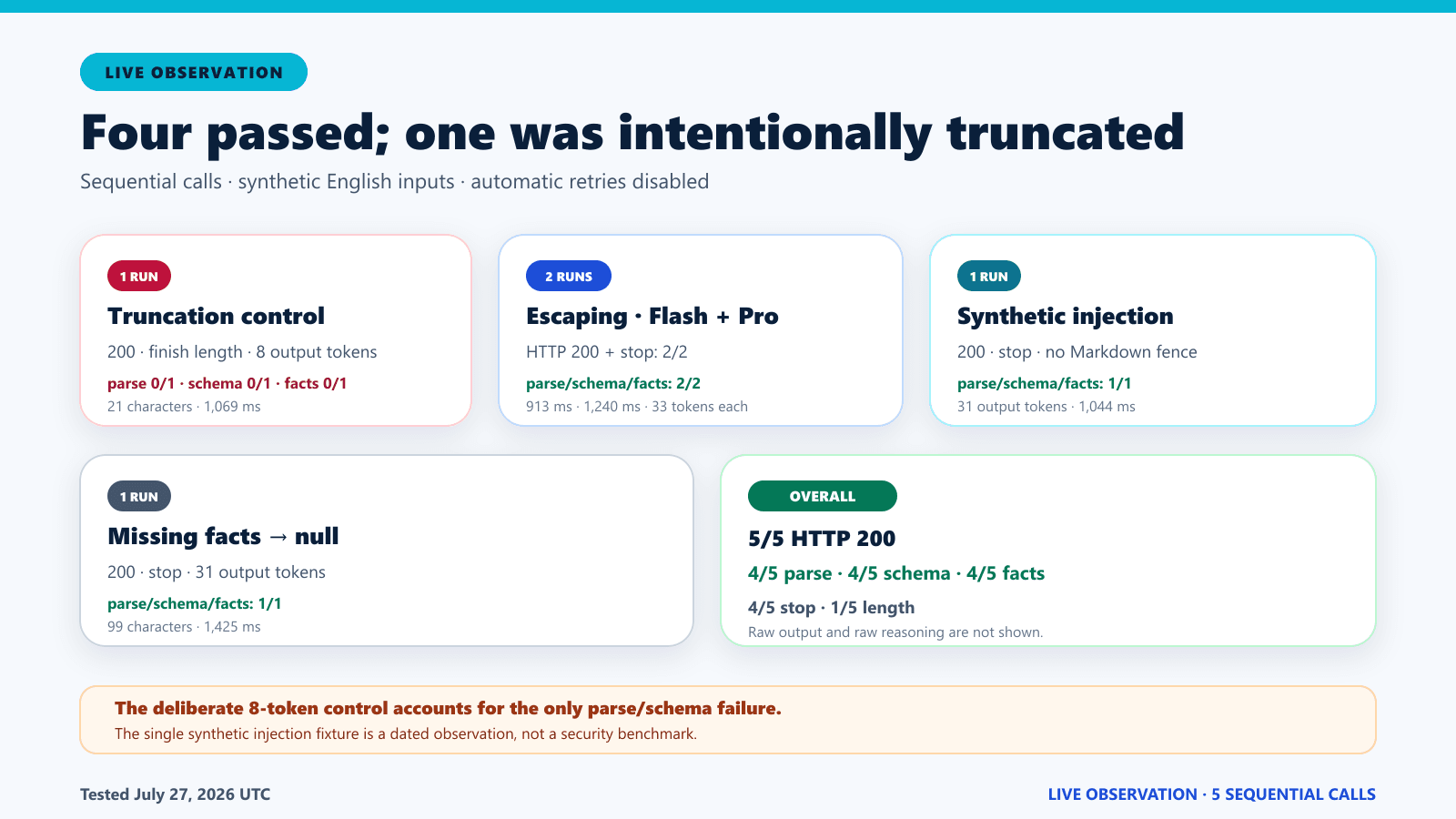
Official: finish_reason: "length" can mean generation reached max_tokens or the conversation reached the model context limit. The returned content may be partially cut off. A deliberate eight-token truncation control in the bounded matrix records finish reason, content length, and parse status, but one result cannot define how every large object will terminate.
Live — July 27, 2026 UTC: empty final content was observed in 0/18 successful completions, and whitespace-only final content was observed in 0/18. Across all 20 planned completion requests, 18 returned non-empty content; B2 and B3 returned HTTP 400 without completion content and are not counted as empty model outputs. This bounded observation does not contradict the official warning that empty content may occasionally occur.
| Live test | Purpose | Model | Output cap | HTTP | Content state / length | Whitespace-only | Finish reason | Completion tokens | JSON.parse |
|---|---|---|---|---|---|---|---|---|---|
| C1 | Deliberate truncation | deepseek-v4-flash | 8 | 200 | Non-empty / 21 chars | No | length | 8 | Fail |
Use bounded recovery, not blind JSON retries
Recovery should start by preserving the failure class. Empty content, whitespace-only content, invalid JSON, a schema mismatch, and finish_reason: "length" are different outcomes. A corrected prompt may be appropriate for empty or whitespace behavior; a larger but still reasonable output allowance may address a known truncation; and a schema mismatch may need a clearer example or smaller task. Do not send the identical request repeatedly without a finite attempt budget.
HTTP failures belong to a separate decision path. Correct 400, 401, 402, or 422 conditions before resubmitting. Apply bounded backoff to transient 429, 500, or 503 responses according to application policy, and remember that a network timeout does not prove the provider performed no work. If a completion can trigger an external write, keep parsing and validation separate from that write and use an application-level duplicate-work guard.
Escaping, nulls, and synthetic prompt injection
Structured-output code must survive ordinary JSON edge cases. Quotes and backslashes need escaping, newline characters must be encoded correctly, and missing facts should use an explicit contract such as null instead of an invented value. Unicode is valid JSON; store and transmit it as UTF-8, and validate its meaning at the application layer.
The benchmark also includes a synthetic input that tells the model to ignore the schema and produce Markdown. The local validator checks whether the final object still satisfies the exact contract. This is a narrow instruction-conflict control, not a security benchmark. Production systems need input isolation, authorization, output validation, least-privilege actions, and human review where consequences are material.
| Live test | Control | Model | HTTP / elapsed | Content | Parse | Schema | Facts | Missing / extra keys | Finish / output tokens |
|---|---|---|---|---|---|---|---|---|---|
| C1 | Eight-token truncation | deepseek-v4-flash | 200 / 1,068.862 ms | Non-empty, 21 chars | Fail | Fail | Fail | Not assessed after parse failure | length / 8 |
| C2 | Quotes, backslashes, and newline escaping | deepseek-v4-flash | 200 / 912.826 ms | Non-empty, 101 chars | Pass | Pass | Pass | None / 0 | stop / 33 |
| C3 | Quotes, backslashes, and newline escaping | deepseek-v4-pro | 200 / 1,239.678 ms | Non-empty, 101 chars | Pass | Pass | Pass | None / 0 | stop / 33 |
| C4 | Synthetic conflicting instruction | deepseek-v4-flash | 200 / 1,043.989 ms | Non-empty, 95 chars | Pass | Pass | Pass | None / 0 | stop / 31 |
| C5 | Missing facts represented as null | deepseek-v4-pro | 200 / 1,424.654 ms | Non-empty, 99 chars | Pass | Pass | Pass | None / 0 | stop / 31 |
The Flash and Pro escaping controls both preserved the synthetic path, quotes, and newline after parsing. C5 preserved the explicit nullable contract for missing reset-attempt and order facts. C4 returned the exact expected object despite a synthetic request to ignore the schema and use Markdown, but one narrow pass is not evidence of prompt-injection safety.
Streaming DeepSeek JSON safely
Official: with stream: true, DeepSeek sends data-only server-sent events and terminates the stream with data: [DONE]. If stream_options.include_usage is enabled, an additional usage chunk appears before [DONE]; its choices array is empty. A parser must not assume every event contains choices[0].
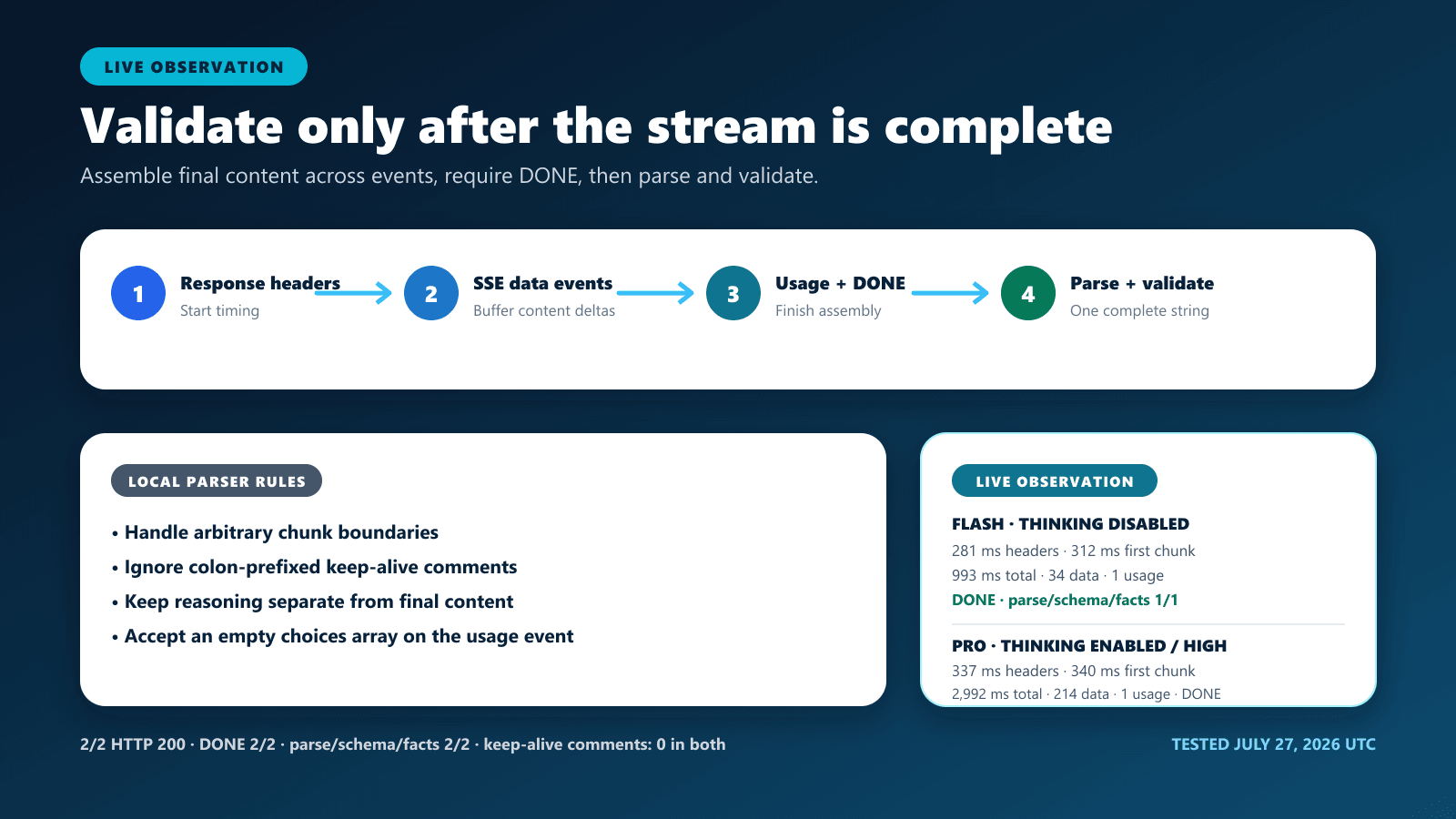
Streaming does not make each delta valid standalone JSON. The client should concatenate final-content deltas, keep reasoning deltas separate, ignore colon-prefixed SSE comments, recognize the usage-only event, require [DONE], and call JSON.parse only after the final content is assembled. If the stream ends without [DONE], treat the result as incomplete even when the collected text looks parseable.
| Live test | Model / mode | Headers / first data / total | SSE data events | Reasoning events | Keep-alive / invalid | Usage / DONE | Assembled final content | Finish / tokens | Parse / schema |
|---|---|---|---|---|---|---|---|---|---|
| D1 | deepseek-v4-flash / disabled | 280.960 / 312.028 / 993.286 ms | 34 | Not separately counted; reasoning absent | 0 / 0 | 1 / yes | 95 chars; SHA-256 d21923f03e8c029cead4670cd0eba9b115a4cf10db993f1e6f527404bd4c6f2f | stop / 31 completion | Pass / pass |
| D2 | deepseek-v4-pro / enabled, high | 336.731 / 340.433 / 2,992.096 ms | 214 | Not separately counted; reasoning present, 180 tokens | 0 / 0 | 1 / yes | 95 chars; SHA-256 d21923f03e8c029cead4670cd0eba9b115a4cf10db993f1e6f527404bd4c6f2f | stop / 212 completion | Pass / pass |
Both streams, 2/2, reached [DONE], included one usage-only event, ended with an empty trailing buffer, and contained zero invalid SSE data events. After final-content assembly, both strings were non-empty, had the same sanitized SHA-256 digest, parsed directly, passed the exact schema, and matched the reference facts.
D2 exposed reasoning metadata, but reasoning was kept out of the final-content buffer and no raw reasoning is published. Because this harness did not count content-delta and reasoning-delta events separately, the table reports the exact available all-data-event count rather than inventing a finer breakdown.
async function collectDeepSeekJsonStream(response) {
  if (!response.ok || !response.body) {
    await response.body?.cancel();
    throw new Error(`DeepSeek stream failed with HTTP ${response.status}`);
  }

  const reader = response.body.getReader();
  const decoder = new TextDecoder();
  let buffer = "";
  let finalContent = "";
  let doneSeen = false;
  let reasoningCharacters = 0;
  let usage = null;
  let finishReason = null;

  const processEvent = (eventText) => {
    const data = eventText
      .split("\n")
      .filter((line) => !line.startsWith(":"))
      .filter((line) => line.startsWith("data:"))
      .map((line) => line.slice(5).trimStart())
      .join("\n");

    if (!data) return;
    if (data === "[DONE]") {
      doneSeen = true;
      return;
    }

    const event = JSON.parse(data);
    if (event.usage && event.choices?.length === 0) {
      usage = event.usage;
      return;
    }

    const choice = event.choices?.[0];
    if (choice?.finish_reason != null) finishReason = choice.finish_reason;
    const delta = choice?.delta;
    if (typeof delta?.reasoning_content === "string") {
      reasoningCharacters += delta.reasoning_content.length;
    }
    if (typeof delta?.content === "string") {
      finalContent += delta.content;
    }
  };

  while (true) {
    const { value, done } = await reader.read();
    buffer += decoder.decode(value, { stream: !done });
    buffer = buffer.replaceAll("\r\n", "\n");

    let boundary = buffer.indexOf("\n\n");
    while (boundary !== -1) {
      processEvent(buffer.slice(0, boundary));
      buffer = buffer.slice(boundary + 2);
      boundary = buffer.indexOf("\n\n");
    }
    if (done) break;
  }

  if (buffer.trim()) processEvent(buffer);
  if (!doneSeen) throw new Error("DeepSeek stream ended before [DONE]");
  if (finishReason !== "stop") {
    throw new Error(`DeepSeek JSON did not complete normally: ${finishReason ?? "missing"}`);
  }
  if (!finalContent.trim()) throw new Error("DeepSeek returned empty final content");

  return {
    value: JSON.parse(finalContent),
    usage,
    reasoningCharacters,
    finish_reason: finishReason,
  };
}
The example counts reasoning characters but does not print or persist reasoning. Applications that need full thinking-mode history behavior should follow the dedicated Thinking Mode documentation rather than expanding this JSON parser into a general reasoning logger.
Production Node.js parsing and validation
The following dependency-free Node.js example makes one non-streaming request, refuses to run without a server-side environment variable, rejects redirects, checks the HTTP status, distinguishes empty content, treats length as incomplete, parses once, and applies the benchmark’s exact local contract. The complete reproducibility harness adds request ceilings, plan validation, artifact redaction, and offline fixtures. For SDK installation and TypeScript-specific behavior, use the DeepSeek Node.js and TypeScript guide.
const API_URL = "https://api.deepseek.com/chat/completions";
const EXPECTED_KEYS = [
  "issue",
  "order_id",
  "reset_attempts",
  "ticket_id",
  "urgent",
];
const ALLOWED_ISSUES = new Set([
  "account_access",
  "billing",
  "technical",
]);

function validateTicket(value) {
  const issues = [];
  if (!value || typeof value !== "object" || Array.isArray(value)) {
    return ["top-level value must be an object"];
  }

  const keys = Object.keys(value).sort();
  const missing = EXPECTED_KEYS.filter((key) => !keys.includes(key));
  const extra = keys.filter((key) => !EXPECTED_KEYS.includes(key));
  if (missing.length) issues.push(`missing keys: ${missing.join(", ")}`);
  if (extra.length) issues.push(`extra keys: ${extra.join(", ")}`);

  if (typeof value.ticket_id !== "string") {
    issues.push("ticket_id must be a string");
  }
  if (!ALLOWED_ISSUES.has(value.issue)) {
    issues.push("issue is outside the allowed enum");
  }
  if (
    value.reset_attempts !== null &&
    !Number.isInteger(value.reset_attempts)
  ) {
    issues.push("reset_attempts must be an integer or null");
  }
  if (value.order_id !== null && typeof value.order_id !== "string") {
    issues.push("order_id must be a string or null");
  }
  if (typeof value.urgent !== "boolean") {
    issues.push("urgent must be a boolean");
  }

  // Deterministic reference checks for this synthetic benchmark only.
  if (value.ticket_id !== "T-204") issues.push("ticket_id fact mismatch");
  if (value.issue !== "account_access") issues.push("issue fact mismatch");
  if (value.reset_attempts !== 3) issues.push("reset_attempts fact mismatch");
  if (value.order_id !== null) issues.push("order_id should be null");
  if (value.urgent !== true) issues.push("urgent business rule mismatch");
  return issues;
}

async function main() {
  const apiKey = process.env.DEEPSEEK_API_KEY;
  if (!apiKey) throw new Error("DEEPSEEK_API_KEY is not set");

  const response = await fetch(API_URL, {
    method: "POST",
    redirect: "manual",
    signal: AbortSignal.timeout(60_000),
    headers: {
      "Authorization": `Bearer ${apiKey}`,
      "Content-Type": "application/json",
    },
    body: JSON.stringify({
      model: "deepseek-v4-flash",
      messages: [
        {
          role: "system",
          content:
            "Return JSON only. Use exactly this example shape: " +
            "{\"ticket_id\":\"T-204\",\"issue\":\"account_access\"," +
            "\"reset_attempts\":3,\"order_id\":null,\"urgent\":true}",
        },
        {
          role: "user",
          content:
            "Ticket T-204: The customer cannot sign in after three " +
            "failed password resets. No order ID was provided.",
        },
      ],
      response_format: { type: "json_object" },
      thinking: { type: "disabled" },
      max_tokens: 128,
      stream: false,
    }),
  });

  if (!response.ok) {
    await response.body?.cancel();
    throw new Error(`DeepSeek returned HTTP ${response.status}`);
  }

  const payload = await response.json();
  const choice = payload.choices?.[0];
  if (choice?.finish_reason !== "stop") {
    throw new Error("DeepSeek JSON did not complete normally");
  }

  const content = choice?.message?.content;
  if (typeof content !== "string" || !content.trim()) {
    throw new Error("DeepSeek returned empty final content");
  }

  const value = JSON.parse(content);
  const issues = validateTicket(value);
  if (issues.length) {
    throw new Error(`Schema validation failed: ${issues.join("; ")}`);
  }

  console.log(value);
}

main().catch((error) => {
  console.error(error.message);
  process.exitCode = 1;
});
In a real product, replace the benchmark-specific checks with a maintained schema validator and business-rule layer. Keep the original response classification in telemetry: HTTP status, finish reason, content state, parser result, schema result, model, token counters, and latency. Do not log the API key, raw Authorization header, private prompts, or hidden reasoning. The DeepSeek Observability guide owns the broader logging and alerting design.
JSON Output versus Tool Calls
| Need | Structured final output | Tool Calls |
|---|---|---|
| Return structured final content to the application | Use Chat response_format: json_object or Responses text.format: json_schema | Usually unnecessary |
| Ask the model to select a function | Not the function-selection interface | Define tools and inspect tool-call output |
| Validate generated structure | Validate the returned object and business facts locally; Responses adds a provider-side schema contract | Validate generated function arguments |
| Execute an external action | Never execute merely because JSON parsed or matched a schema | Authorize and execute the selected function in application code |
| Handle side effects | Keep parsing separate from writes | Use least privilege, idempotency, and authorization |
DeepSeek’s API reference explicitly warns that generated tool arguments may be invalid JSON or contain hallucinated parameters, so they must be validated before a function runs. The DeepSeek Tool Calls guide owns function schemas, argument validation, and execution loops.
Troubleshooting DeepSeek JSON mode
| Symptom | Check first | Safe response |
|---|---|---|
Empty content | Confirm the prompt explicitly requests JSON and shows the shape | Do not parse; modify the prompt and retry only within a bounded policy |
| Whitespace-only output or apparently stuck request | Check that the final assembled prompt contains the word json | Cancel at the application deadline; correct the prompt before resubmitting |
JSON.parse throws | Inspect content state, finish reason, and output allowance | Do not silently strip fences or repair arbitrary output as a success |
| HTTP 200 but incomplete object | Check finish_reason for length | Increase a reasonable output allowance or reduce the requested structure |
| JSON parses but fields are wrong | Run exact schema, enum, reference-fact, and business-rule checks | Reject the object or request a corrected response |
| Unexpected extra keys | Compare against an explicit allow-list | Reject by default when extra properties affect downstream safety |
| Streaming parser fails on usage event | Check for an empty choices array with a top-level usage object | Record usage separately and continue until [DONE] |
| Thinking text is mixed with JSON | Parse final content, not reasoning_content | Keep the two channels separate and avoid logging raw reasoning |
| HTTP 400, 401, 402, 422, 429, 500, or 503 | Classify the HTTP failure before touching JSON parsing | Use the DeepSeek Error Codes guide |
Reproducibility and limitations
The public harness is safe by default: no argument prints usage, plan validation and offline fixtures cannot read an API key or access the network, and only an explicit live mode can call the fixed DeepSeek origin. The plan validator enforces the 20-call ceiling, sequential execution, model allow-list, output limits, exact prompt variants, and prohibited endpoint list.
| Offline check | Exact result |
|---|---|
| JavaScript syntax | Pass |
| Live-plan contract | Pass: one inventory request; 20 completion IDs exactly once; group counts 8/3/5/2/2; concurrency 1; retries 0; maximum output cap 512; total configured output allowance 5,704 |
| Offline safety mode | valid: true; provider requests 0; API key read false |
| Non-streaming fixtures | 8/8 passed: valid core, valid JSON with wrong schema, invalid JSON, truncated JSON, empty, whitespace-only, valid escaping, and valid nullable data |
| SSE fixture | Pass: 2 keep-alive comments, 4 data events, 1 usage-only event, [DONE] seen, reasoning redacted, and parse/schema/reference-fact checks all passed |
| Sanitized artifact scans | JSON scan passed; CSV scan passed; a deliberately injected leak was detected by the negative control |
The English-only harness, sanitized summary, fixtures, and editable visuals are available in the public DeepSeek JSON Output evidence directory on GitHub. Raw provider output and hidden reasoning are intentionally excluded, so the public artifact supports request-accounting and implementation review but not independent re-parsing of the omitted response text.
The live matrix remains intentionally small: two repetitions per core configuration and one call for most edge cases. It can document compatibility and reveal concrete failure shapes on the test date, but it cannot establish a universal parse rate, schema-adherence rate, security guarantee, or permanent model ranking. A timeout leaves provider work uncertain. A successful prompt-only control does not make response_format unnecessary. A successful synthetic injection control does not prove production prompt-injection safety.
Model behavior, validation, and documentation can change. Recheck DeepSeek’s primary sources and rerun a bounded compatibility matrix before a material production change. Use the DeepSeek API overview for the general request lifecycle, the DeepSeek Models page for model selection context, and the DeepSeek Pricing page for current copied pricing context.
Frequently asked questions
How do I make DeepSeek return JSON?
Set response_format to {"type":"json_object"}, explicitly use the word json in the system or user prompt, provide an example of the desired object, and choose a reasonable max_tokens allowance. Then check for non-empty final content, parse it, and validate it locally.
Does json_object enforce my JSON Schema?
No on Chat Completions: json_object documents valid JSON, not conformance to every application-specific schema. The separate Responses API supports text.format with type: "json_schema" and documents schema-conforming output. Even there, validate source facts, authorization, ranges, and business rules locally.
Why is DeepSeek JSON Output empty?
DeepSeek officially says empty content may occasionally occur and recommends modifying the prompt to mitigate it. Do not assign one universal cause. Record the exact prompt, model, settings, finish reason, content state, and date, then use a bounded recovery policy.
Why does DeepSeek JSON mode appear stuck?
The Chat Completion reference warns that omitting a JSON instruction can lead to whitespace until the output limit. Ensure the assembled prompt explicitly requests JSON, set an application deadline, and distinguish whitespace-only output from a connection that is still open.
Which current DeepSeek V4 models support JSON Output?
deepseek-v4-flash, deepseek-v4-pro, and deepseek-v4-flash-vision-exp all support JSON Output. Vision Exp can accept a supported image and return JSON as text. The July 27 study on this page tested Flash and Pro only, so it makes no measured reliability claim for Vision Exp. Model choice remains a workload decision; official feature support alone does not prove one model is always more schema-reliable.
Can I use DeepSeek JSON Output with Thinking Mode?
Flash, Pro, and Vision Exp support JSON Output and thinking mode. Parse the final answer from content and keep reasoning_content separate. If the request carries tools, replay every assistant reasoning value in subsequent requests between user turns; without tools, previous reasoning can be omitted. Thinking defaults to enabled, so set the toggle explicitly when reproducibility matters.
Can I parse each streaming JSON delta?
Not as a complete object. Concatenate final-content deltas, handle the optional usage-only event, wait for [DONE], and then parse and validate the assembled string. Keep reasoning deltas out of the final JSON buffer.
Should I remove Markdown fences before JSON.parse?
Not in the primary success path. Silent cleanup can hide a contract failure. Record that the original content was not directly parseable, improve the prompt, and decide explicitly whether a narrowly defined recovery parser is acceptable for your application.
Is JSON Output the same as Tool Calls?
No. JSON Output structures the assistant’s final content. Tool Calls let the model select a defined function and generate arguments. Both outputs require validation, but only authorized application code should execute an external action.
Official endpoint documentation and the current model catalog were rechecked August 24, 2026 UTC. Live observations and offline checks remain the reviewed July 27 Chat Completions artifacts for Flash and Pro only; Vision Exp was not included, and no secrets, account data, raw reasoning, or arbitrary failed output are published.