Last verified: April 4, 2026
DeepSeek Thinking Mode is not just a prompt style. In the current API, it is a distinct execution mode that changes output structure, feature support, and some parameter behavior. You can enable it either by calling model="deepseek-reasoner" or by setting thinking={"type":"enabled"}; in the OpenAI SDK, that second method goes inside extra_body. DeepSeek’s current docs also map both deepseek-chat and deepseek-reasoner to DeepSeek-V3.2 with a 128K context window, but the thinking path has a larger default and maximum output budget and returns reasoning_content separately from the final content. For the broader API surface, see our DeepSeek API Guide and the endpoint-level Create Chat Completion reference.
Quick answer: Use Thinking Mode when you need explicit reasoning behavior, larger reasoning/output budgets, or tool-use loops that benefit from intermediate reasoning. Use
deepseek-reasonerfor the clearest dedicated path, or enablethinkingondeepseek-chatwhen you want one model family and one endpoint shape. Parsereasoning_contentseparately fromcontent, do not carry oldreasoning_contentinto a fresh user turn, and only pass it back inside the same thinking + tool-call loop when the model is still solving the same question.
What DeepSeek Thinking Mode actually means in the current API
DeepSeek defines Thinking Mode as a mode where the model outputs chain-of-thought reasoning before the final answer. In API terms, that means your response object can contain three distinct assistant-side outputs: reasoning_content, content, and sometimes tool_calls. This is why Thinking Mode belongs next to real /chat/completions implementation logic, not inside a generic prompt-engineering article. If you want prompt ideas after the API mechanics are clear, see our DeepSeek Prompts page as a follow-up resource, not as the source of truth for API behavior.
DeepSeek’s current “Your First API Call” and Models & Pricing pages also make the current alias mapping explicit: deepseek-chat is the non-thinking path of DeepSeek-V3.2, while deepseek-reasoner is the thinking path of DeepSeek-V3.2. That is the key architectural change behind older R1-era confusion.
For model context behind this behavior, see our DeepSeek-V3.2 overview and the historical DeepSeek R1 guide.
Two ways to enable Thinking Mode
DeepSeek currently documents two official ways to enable thinking:
| Method | What you send | Best use case | Notes |
|---|---|---|---|
| Dedicated thinking alias | model="deepseek-reasoner" | Clearest, explicit thinking-mode path | Matches the current DeepSeek-V3.2 thinking alias |
| Thinking switch on chat alias | model="deepseek-chat" + thinking={"type":"enabled"} | When you want one model family and an explicit switch | In the OpenAI SDK, thinking goes inside extra_body |
This table reflects the current Thinking Mode guide and current model mapping docs.
Minimal Python example using model="deepseek-reasoner"
from openai import OpenAIclient = OpenAI(
    api_key="<DeepSeek API Key>",
    base_url="https://api.deepseek.com",
)response = client.chat.completions.create(
    model="deepseek-reasoner",
    messages=[
        {"role": "user", "content": "9.11 and 9.8, which is greater?"}
    ]
)print("Reasoning:", response.choices[0].message.reasoning_content)
print("Answer:", response.choices[0].message.content)
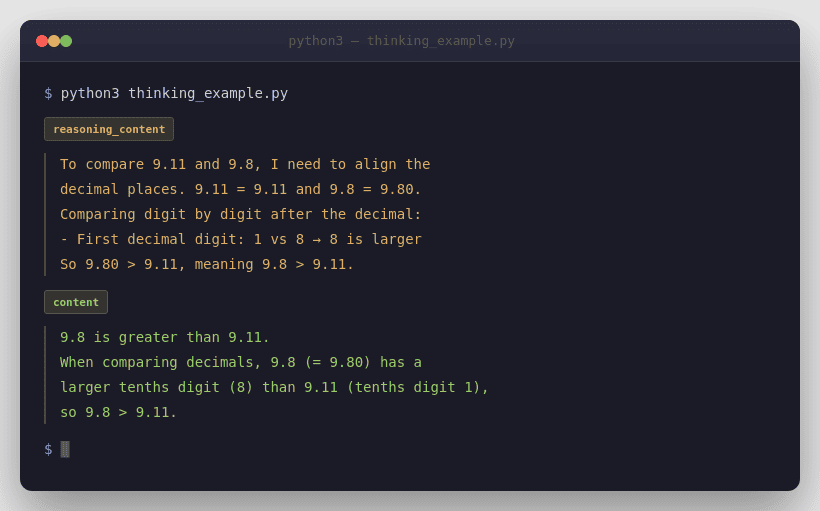
This follows DeepSeek’s official reasoning examples, where the model returns reasoning_content and final content at the same output level.
Minimal Python example using thinking={"type":"enabled"}
from openai import OpenAIclient = OpenAI(
    api_key="<DeepSeek API Key>",
    base_url="https://api.deepseek.com",
)response = client.chat.completions.create(
    model="deepseek-chat",
    messages=[
        {"role": "user", "content": "Explain why 9.11 is greater than 9.8."}
    ],
    extra_body={"thinking": {"type": "enabled"}}
)print("Reasoning:", response.choices[0].message.reasoning_content)
print("Answer:", response.choices[0].message.content)
DeepSeek explicitly says that when you use the OpenAI SDK, the thinking object must be passed through extra_body.
deepseek-chat vs deepseek-reasoner
As of April 4, 2026, DeepSeek’s current pricing page says both aliases point to DeepSeek-V3.2 with a 128K context limit, but they are still operationally different. deepseek-chat is the non-thinking mode with a default 4K / max 8K output budget. deepseek-reasoner is the thinking mode with a default 32K / max 64K output budget. Both currently support JSON Output, Tool Calls, and Chat Prefix Completion (Beta), but only deepseek-chat supports FIM (Beta).
| Attribute | deepseek-chat | deepseek-reasoner |
|---|---|---|
| Current mapping | DeepSeek-V3.2 non-thinking mode | DeepSeek-V3.2 thinking mode |
| Context length | 128K | 128K |
| Default output | 4K | 32K |
| Maximum output | 8K | 64K |
| JSON Output | Yes | Yes |
| Tool Calls | Yes | Yes, per current Thinking Mode / V3.2 docs |
| Chat Prefix Completion (Beta) | Yes | Yes |
| FIM (Beta) | Yes | No |
The one nuance worth calling out is that DeepSeek’s older deepseek-reasoner guide still says Function Calling is unsupported, while the newer Thinking Mode guide, current Models & Pricing page, and V3.2 release notes say Thinking Mode now supports tool calls. The safest current reading is to treat the newer docs as authoritative for current behavior, and the older page as historical context.
Output structure: reasoning_content vs content vs tool_calls
Thinking Mode adds one of the most important response-shape differences in the DeepSeek API. reasoning_content is the chain-of-thought output. content is the final user-facing answer. tool_calls is the structured request for your application to execute one or more functions. In streamed responses, these values arrive under delta, not under the final message shape.
| Field | What it is | How to use it |
|---|---|---|
reasoning_content | Intermediate reasoning output | Inspect, log, or reuse only in the documented thinking + tool-call loop |
content | Final answer text | Use for UI, storage, and normal next-turn chat history |
tool_calls | Proposed function calls | Execute in your app, then reply with tool messages |
These meanings come from the current Thinking Mode and Create Chat Completion docs.
Streaming behavior in Thinking Mode
DeepSeek’s streaming behavior changes meaningfully in Thinking Mode because you may receive reasoning chunks before answer chunks. In the official examples, the client accumulates delta.reasoning_content and delta.content separately.
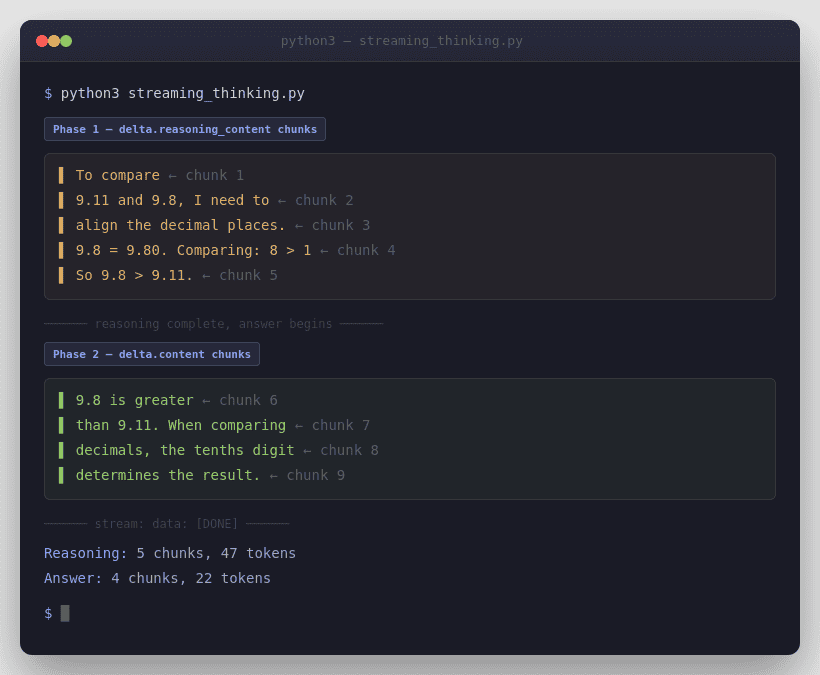
DeepSeek’s chat-completions reference also says streaming uses data-only SSE and ends with data: [DONE]. If you enable stream_options.include_usage, the API sends one extra chunk before [DONE] where choices is empty and usage contains request-level totals.
from openai import OpenAIclient = OpenAI(
    api_key="<DeepSeek API Key>",
    base_url="https://api.deepseek.com",
)stream = client.chat.completions.create(
    model="deepseek-reasoner",
    messages=[
        {"role": "user", "content": "Explain why 9.11 is greater than 9.8."}
    ],
    stream=True,
    stream_options={"include_usage": True},
)reasoning_content = ""
content = ""for chunk in stream:
    delta = chunk.choices[0].delta if chunk.choices else None
    if delta and getattr(delta, "reasoning_content", None):
        reasoning_content += delta.reasoning_content
    elif delta and getattr(delta, "content", None):
        content += delta.contentprint("Reasoning:", reasoning_content)
print("Answer:", content)
One more parser detail matters. DeepSeek’s current Rate Limit page says that under heavy load, non-stream requests may emit empty lines and stream requests may emit : keep-alive comments; the OpenAI SDK handles this, but custom parsers must ignore them. DeepSeek also says the server closes the connection if inference has not started after 10 minutes.
Parameters that still matter vs parameters that no longer matter
Thinking Mode is not just another sampling profile. DeepSeek explicitly says some classic parameters no longer affect the model in this mode, and some trigger errors. That is why copying a non-thinking request body into thinking mode can mislead you even when the JSON is valid.
| Parameter or feature | Status in Thinking Mode | What to know |
|---|---|---|
max_tokens | Matters | Includes chain-of-thought output |
stream | Matters | Parse reasoning and answer separately |
tools / tool_choice | Matters | Supported in current docs |
response_format | Matters | JSON Output is supported |
temperature | No effect | Accepted for compatibility, but ignored |
top_p | No effect | Accepted for compatibility, but ignored |
presence_penalty | No effect | Accepted for compatibility, but ignored |
frequency_penalty | No effect | Accepted for compatibility, but ignored |
logprobs | Error-prone | Triggers an error |
top_logprobs | Error-prone | Triggers an error |
| FIM (Beta) | Unsupported | Not available in Thinking Mode |
This behavior is documented explicitly in the current Thinking Mode guide and repeated in the older reasoning-model page.
Supported features in Thinking Mode
DeepSeek’s current Thinking Mode guide lists JSON Output, Tool Calls, Chat Completion, and Chat Prefix Completion (Beta) as supported. That matches the current V3.2 pricing page. That makes this page a useful companion to our Create Chat Completion, DeepSeek Error Codes, and pricing resources rather than a replacement for them.
JSON Output still follows the usual DeepSeek rule: you must set response_format={"type":"json_object"} and also tell the model in the prompt to produce JSON. DeepSeek’s chat-completions reference and JSON Output guide both warn that otherwise the request can appear stuck as the model emits whitespace until it hits the token limit, and that JSON can be truncated if max_tokens is too low.
Tool Calls in Thinking Mode
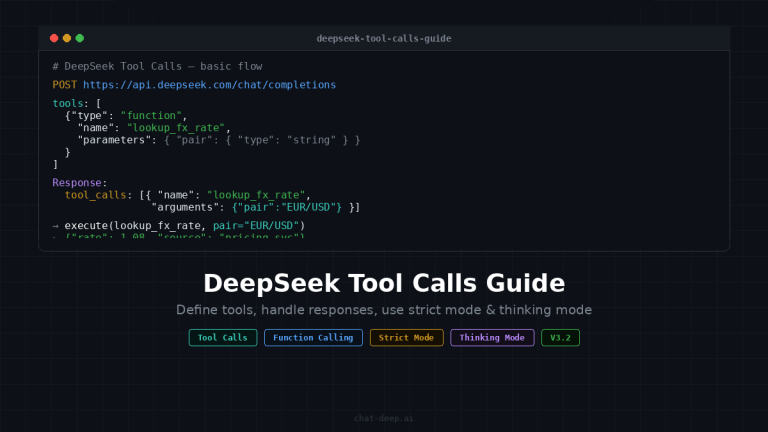
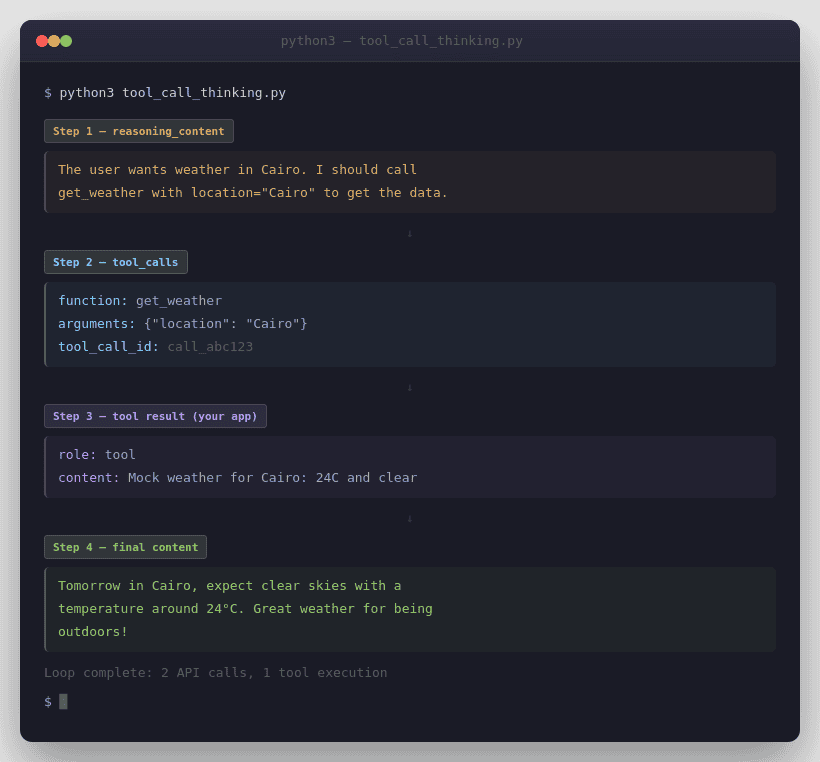
Current DeepSeek docs now treat tool calls as first-class in Thinking Mode. The official Tool Calls guide says support starts from DeepSeek-V3.2, the Thinking Mode guide says the user needs to pass reasoning_content back during the thinking + tool-call process, and the V3.2 release notes say V3.2 is the first model to integrate thinking directly into tool use.
import json
from openai import OpenAIclient = OpenAI(
    api_key="<DeepSeek API Key>",
    base_url="https://api.deepseek.com",
)tools = [
    {
        "type": "function",
        "function": {
            "name": "get_weather",
            "description": "Get the weather for a city.",
            "parameters": {
                "type": "object",
                "properties": {
                    "location": {"type": "string"}
                },
                "required": ["location"]
            }
        }
    }
]messages = [{"role": "user", "content": "What will the weather be in Cairo tomorrow?"}]while True:
    response = client.chat.completions.create(
        model="deepseek-chat",
        messages=messages,
        tools=tools,
        extra_body={"thinking": {"type": "enabled"}}
    )    assistant_message = response.choices[0].message
    messages.append(assistant_message)    if assistant_message.tool_calls is None:
        print(assistant_message.content)
        break    for tool_call in assistant_message.tool_calls:
        args = json.loads(tool_call.function.arguments)
        tool_result = f"Mock weather for {args['location']}: 24C and clear"        messages.append({
            "role": "tool",
            "tool_call_id": tool_call.id,
            "content": tool_result
        })
This loop matches the important official pattern: append response.choices[0].message directly, because it already carries the assistant fields the next sub-turn may need, including reasoning_content and tool_calls. Also remember that the model proposes tools, but your application executes them. The model does not run your functions for you.
If you need strict tool schemas, DeepSeek documents strict as a Beta feature. The current Tool Calls guide says you must use base_url="https://api.deepseek.com/beta", set strict: true on every function, and follow DeepSeek’s supported JSON Schema subset. It also says every object property must be listed in required, and additionalProperties must be false.
The reasoning_content conflict explained clearly
This is the most important implementation trap. The older deepseek-reasoner page says that if reasoning_content is included in the sequence of input messages, the API returns a 400 error and you should remove it before the next API request. The newer Thinking Mode page says something more specific: during the same question’s thinking + tool-call sub-turns, you need to send reasoning_content back so the model can continue reasoning; but when a new user question begins, prior reasoning_content should be removed.
The safest current rule is this: do not carry old reasoning_content into a normal fresh user turn.
Keep vs remove
reasoning_content
- New normal user turn: keep the previous assistant
content, remove oldreasoning_content.- Same question + tool-call sub-turn: keep
reasoning_contentand appendresponse.choices[0].messagedirectly so the model can continue reasoning.- If the loop drops
reasoning_contentat the wrong time: expect a400error.
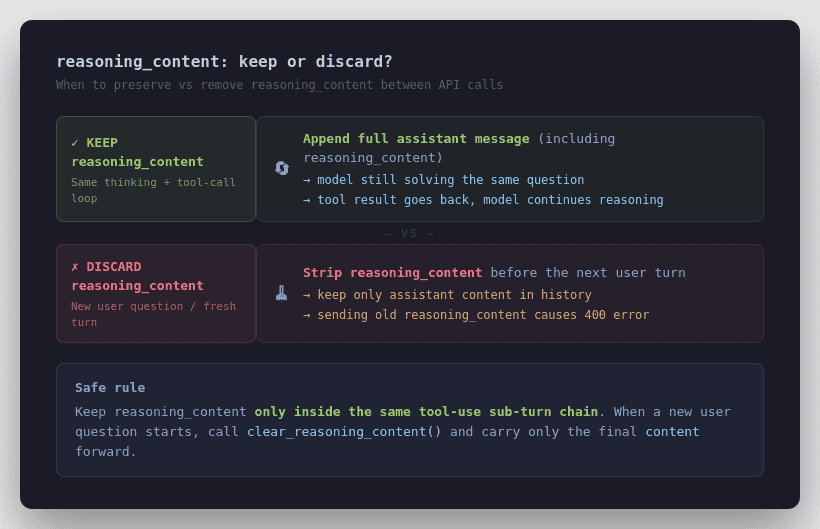
Only preserve it inside the same thinking + tool-call loop while the model is still working on the same problem. That interpretation is the one most consistent with the current Thinking Mode guide, V3.2 tool-use support, and DeepSeek’s own sample code.
Multi-turn conversation rules
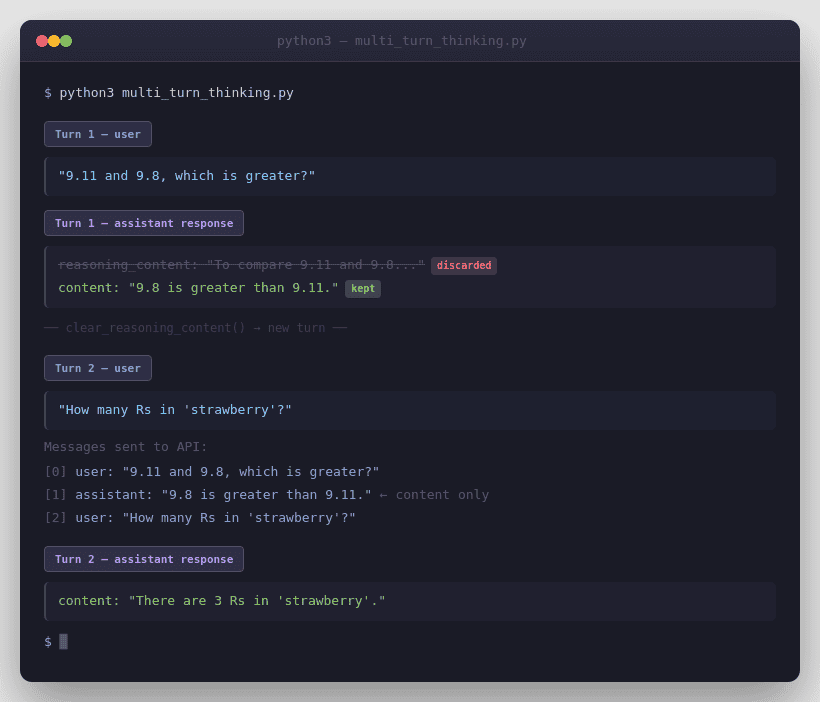
DeepSeek’s /chat/completions API is stateless. In ordinary multi-turn chat, you must resend relevant prior history yourself. In Thinking Mode, the official guidance is narrower still: for the next normal turn, send the previous final content, not the previous reasoning_content. That is why the official multi-turn examples append assistant content only for the next user question.
from openai import OpenAIclient = OpenAI(
    api_key="<DeepSeek API Key>",
    base_url="https://api.deepseek.com",
)# Turn 1
messages = [{"role": "user", "content": "9.11 and 9.8, which is greater?"}]
response = client.chat.completions.create(
    model="deepseek-reasoner",
    messages=messages
)# Carry only the final answer into the next normal turn
messages.append({
    "role": "assistant",
    "content": response.choices[0].message.content
})
messages.append({
    "role": "user",
    "content": "How many Rs are there in the word 'strawberry'?"
})response = client.chat.completions.create(
    model="deepseek-reasoner",
    messages=messages
)print(response.choices[0].message.content)
That is the official normal-turn pattern. If your code path is not inside a tool-call loop for the same task, assume reasoning_content should not be sent forward.
How to clear old reasoning_content
DeepSeek’s current Thinking Mode guide explicitly recommends discarding previous-turn reasoning_content to save bandwidth once a new user question begins. The official sample shows a small helper that nulls or removes the field before the next independent turn.
def clear_reasoning_content(messages):
    cleaned = []
    for message in messages:
        if isinstance(message, dict):
            message = {k: v for k, v in message.items() if k != "reasoning_content"}
        else:
            if hasattr(message, "reasoning_content"):
                message.reasoning_content = None
        cleaned.append(message)
    return cleaned
If you are using SDK message objects, the official pattern is to set message.reasoning_content = None. If you are storing plain dicts, removing the field entirely is the cleaner equivalent.
Chat Prefix Completion (Beta) in Thinking Mode
Thinking Mode also works with Chat Prefix Completion (Beta). DeepSeek’s current docs say the last item in messages must be an assistant message with prefix=True, and you must use base_url="https://api.deepseek.com/beta". The chat-completions reference also says that for deepseek-reasoner, reasoning_content can be used as Beta input for the CoT in that final assistant prefix message.
That makes prefix completion useful when you need tightly controlled continuation, such as forcing code output to begin inside a fenced block. But it is still a Beta path, so keep it narrower than your default production flow.
Cost, speed, and token considerations
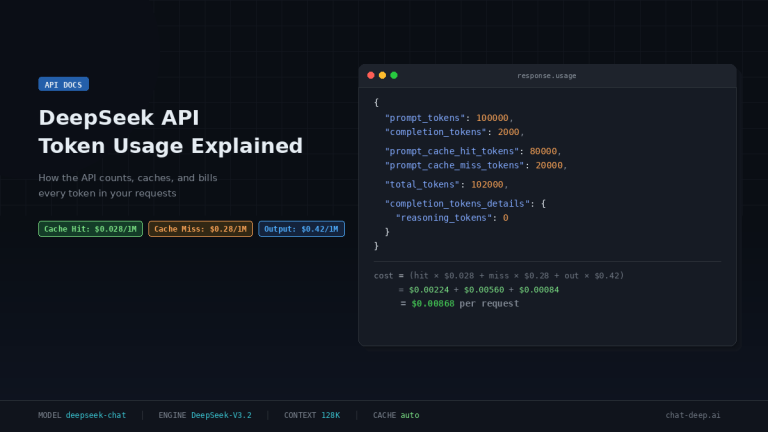
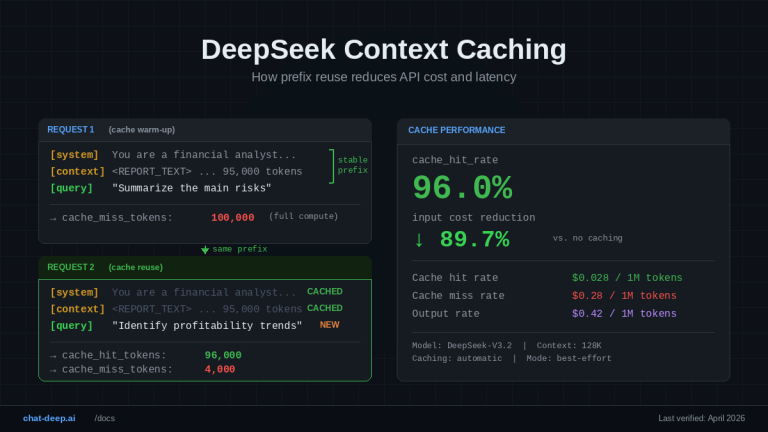
DeepSeek’s current list pricing is the same for deepseek-chat and deepseek-reasoner: $0.028 per 1M cache-hit input tokens, $0.28 per 1M cache-miss input tokens, and $0.42 per 1M output tokens. So there is no separate thinking-mode surcharge at the published per-token level. Use our pricing page and API cost calculator for site-level cost context.
In practice, though, thinking requests can cost more and feel slower. That is an inference from the official docs, not a separate pricing rule: the thinking alias has much larger default/max output budgets, the response schema exposes completion_tokens_details.reasoning_tokens, and reasoning/tool-use loops can add more generated material before the final answer. DeepSeek’s changelog also notes that complex reasoning tasks may consume more tokens.
Common errors and fixes
Most Thinking Mode failures are not authentication failures. They are state-handling failures: carrying reasoning_content into the wrong place, mixing unsupported parameters into a thinking request, or misreading streamed output.
For broader debugging patterns, see our DeepSeek Error Codes guide and DeepSeek not working troubleshooting.
| Error or symptom | Likely cause | Best fix |
|---|---|---|
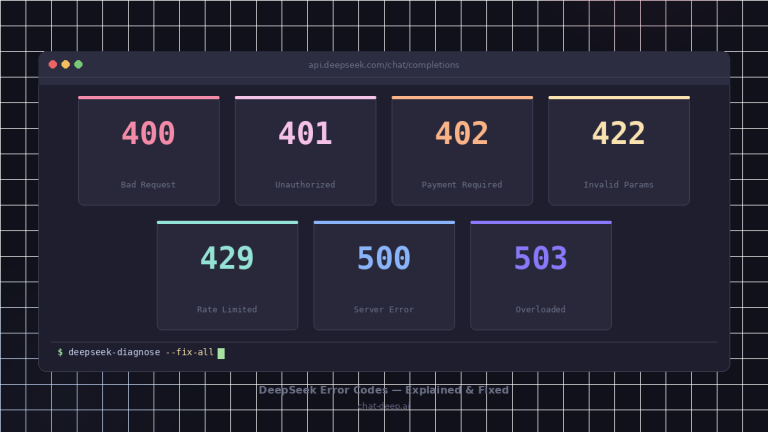
| 400 Invalid Format | Wrong thinking/tool-call message flow or malformed body | Rebuild from a minimal known-good example |
400 with reasoning_content | You sent it into a fresh normal turn, or mishandled a tool-call loop | Keep it only inside the same thinking + tool-call chain |
| 422 Invalid Parameters | Unsupported combinations or bad Beta tool schema | Remove ignored fields, validate Beta requirements |
temperature changes nothing | Working as documented | Thinking Mode accepts it for compatibility but ignores it |
logprobs / top_logprobs error | Unsupported in Thinking Mode | Remove them |
| Stream looks stuck | You are not handling keep-alives or you are using JSON Output incorrectly | Fix the parser and prompt JSON explicitly |
| Large token usage | Reasoning output plus larger budgets | Set max_tokens intentionally and watch reasoning_tokens |
| 429 Rate Limit Reached | You are sending requests too quickly | Pace and retry |
The error categories come from DeepSeek’s current Error Codes page, while the thinking-specific causes come from the current Thinking Mode, JSON Output, and Rate Limit docs.
Best practices checklist
Treat Thinking Mode as a different API behavior, not just a stronger prompt. Pin the model or the thinking switch deliberately, parse reasoning_content and content separately, keep tool loops distinct from ordinary next-turn chat, strip old reasoning_content before a fresh user question, and monitor reasoning_tokens so cost does not become invisible. When you want better prompt phrasing after the mechanics are correct, then send readers to DeepSeek Prompts.
When to use Thinking Mode
Use Thinking Mode when the task benefits from deliberate reasoning, multi-step tool use, or longer output budgets. It is a natural fit for agent workflows, reasoning-heavy coding tasks, and problems where you want explicit separation between internal reasoning traces and final answer text. That positioning is consistent with DeepSeek’s current tool-use and V3.2 documentation.
When normal chat mode is better
Normal chat mode is the better default when you want simpler request bodies, lower practical token usage, classic sampling behavior, or features like FIM (Beta) that Thinking Mode does not support. It is also the safer path when you do not need reasoning traces or tool-use sub-turn handling.
FAQ
What is DeepSeek Thinking Mode?
It is the current DeepSeek API mode where the model produces reasoning output before the final answer. In practice, that means you can receive reasoning_content, final content, and sometimes tool_calls in the response.
How do I enable Thinking Mode in the API?
DeepSeek currently documents two methods: call model="deepseek-reasoner", or keep model="deepseek-chat" and set thinking={"type":"enabled"}. In the OpenAI SDK, the thinking object must be passed inside extra_body.
What is the difference between deepseek-chat and deepseek-reasoner?
They currently map to DeepSeek-V3.2 non-thinking and thinking modes respectively. Both have a 128K context window, but they differ in default/max output budgets and feature behavior.
What is reasoning_content?
It is the chain-of-thought output exposed by DeepSeek in Thinking Mode. It is separate from the final answer content and must be handled differently in normal chat turns versus thinking + tool-call loops.
Why do temperature and top_p not seem to work?
Because DeepSeek explicitly says they are accepted for compatibility in Thinking Mode but have no effect. By contrast, logprobs and top_logprobs trigger errors.
Why am I getting a 400 error with reasoning_content?
Usually because you passed reasoning_content into the wrong stage of the conversation. Older docs warn against sending it into normal next-turn history, while newer docs require it during the same thinking + tool-call loop. The safest rule is: keep it only inside the same tool-use sub-turn chain, not in a fresh user turn.
Does Thinking Mode support tool calls?
Yes in the current docs. The Thinking Mode guide, Tool Calls guide, current Models & Pricing page, and V3.2 release notes all say tool use is supported in Thinking Mode, even though the older reasoning-model page still reflects an earlier limitation.
Is Thinking Mode more expensive than chat mode?
There is no separate published per-token surcharge right now; both aliases have the same current list price. But Thinking Mode can cost more in practice because it uses larger output budgets and can generate reasoning tokens before the final answer.
Conclusion
The cleanest way to think about DeepSeek Thinking Mode is this: it changes the API workflow, not just the wording of your prompt. It affects response shape, streaming parsing, tool-call loops, parameter behavior, and when reasoning_content must be removed. If you treat it that way in production code, Thinking Mode becomes much easier to debug and much less likely to produce avoidable 400-level mistakes.
Next technical reads
- DeepSeek Chat Completions API — request schema, streaming, JSON Output, and response parsing
- DeepSeek API Guide — broader setup and endpoint overview
- DeepSeek Error Codes — 400/422/429 debugging patterns
- DeepSeek Pricing — current token rates and billing context