
Last updated: August 24, 2026
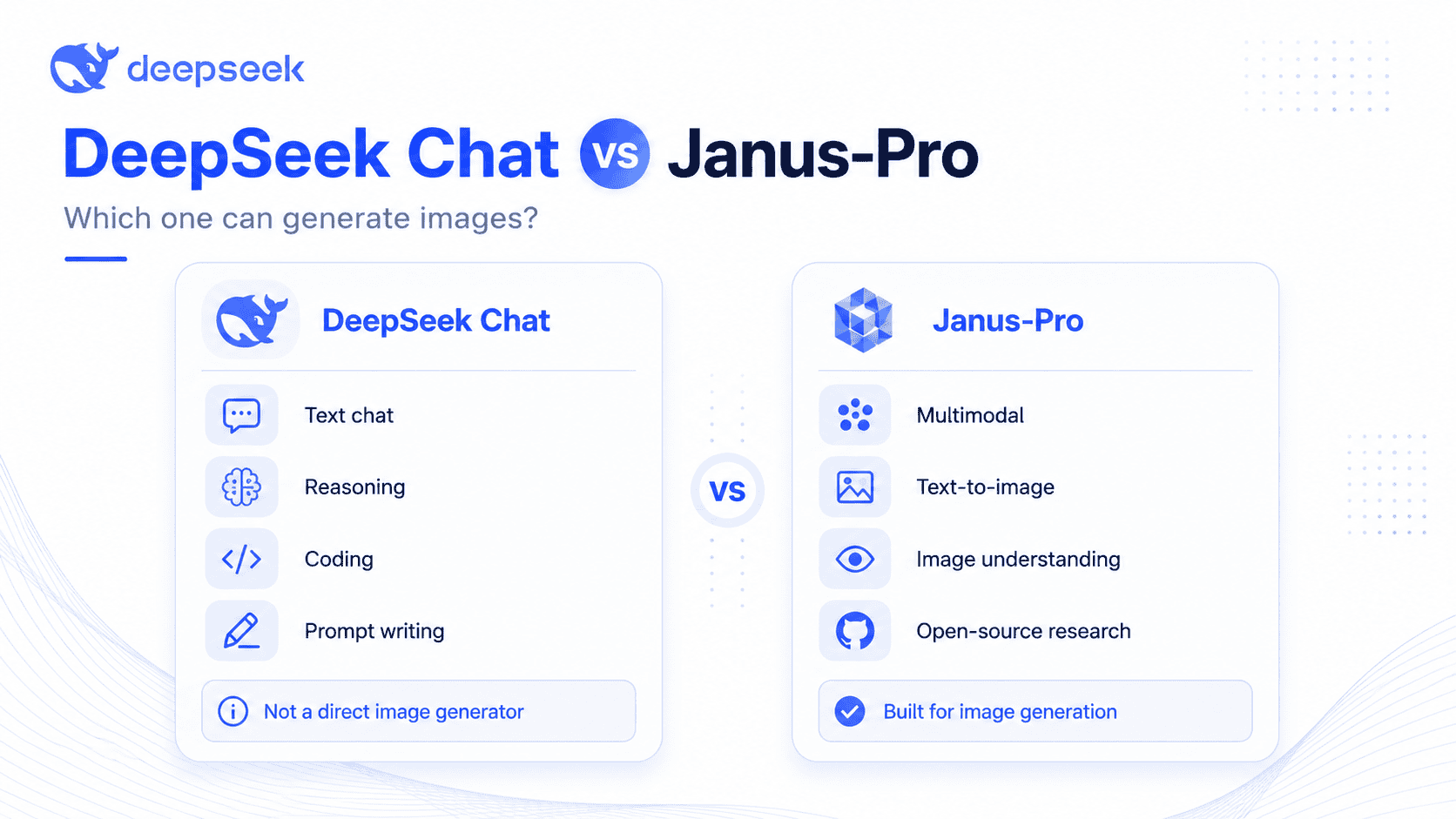
Quick answer: The regular DeepSeek chat experience and hosted V4 API are not consumer image generators. DeepSeek’s current API docs list the text-only deepseek-v4-flash and deepseek-v4-pro, plus the experimental deepseek-v4-flash-vision-exp. Vision Exp can understand supported images and return text, but it does not generate images. For actual DeepSeek text-to-image generation, Janus-Pro remains the relevant separate model family through local setup, supported demos, or third-party interfaces.
Many people search for deepseek generate images because they see mixed claims online. Some articles talk about DeepSeek Chat, some talk about Janus-Pro, and some third-party websites advertise a “DeepSeek image generator.” These are not always the same thing. This guide explains the difference, how to generate images using DeepSeek Janus-Pro, when to use another AI image generator, and what limits you should expect.
Why People Are Confused About DeepSeek Image Generation
The confusion comes from the word “DeepSeek” being used for several different things. There is the DeepSeek chatbot, the DeepSeek API, reasoning models such as DeepSeek-R1 or DeepSeek V4-style models, and separate multimodal projects such as Janus, JanusFlow, and Janus-Pro.
DeepSeek’s API documentation currently lists three hosted IDs: text-only deepseek-v4-flash and deepseek-v4-pro, plus experimental deepseek-v4-flash-vision-exp for text-and-image input with text output. The Vision guide accepts a public image URL, Base64 data URL, or image file_id; the Files API is limited to supported image files and is not general PDF/DOCX ingestion. These are image-understanding routes, not a consumer-style image-generation endpoint. Flash and Pro remain text-only, and FIM does not support Vision.
Janus-Pro is different. DeepSeek’s Janus GitHub repository says Janus-Pro was released as an advanced version of Janus with significant improvements in multimodal understanding and visual generation. The repository also links to online demos and provides model downloads for Janus-Pro-1B and Janus-Pro-7B.
That means a simple “yes” or “no” answer is misleading. DeepSeek V4 Vision Exp can analyze supported images, but its output is text rather than a new or edited image. DeepSeek’s separate Janus-Pro models can perform text-to-image generation.
Can DeepSeek Generate Images?
Yes, but only in the right context.
| Option | Can it generate images? | Best for | Limitations |
|---|---|---|---|
| DeepSeek V4 Flash / Pro | No | Writing, reasoning, coding, prompt creation | Text-only hosted models; no image-generation output |
| DeepSeek V4 Vision Exp | No | Understanding screenshots, charts, photos, and other supported images | Experimental; text and images in, text out; no new or edited image output |
| DeepSeek Janus-Pro-7B | Yes | Text-to-image experiments, multimodal research, open-source workflows | Technical setup, lower polish than consumer image tools |
| Hugging Face Janus-Pro demos | Yes, when available | Trying Janus-Pro without local installation | Queues, downtime, space limits, variable interface quality |
| Local Janus-Pro setup | Yes | Developers, researchers, private experiments | Requires Python, dependencies, GPU/VRAM, and setup work |
| DeepSeek prompts + another image generator | Indirectly | Beginners, marketers, creators | DeepSeek writes the prompt; another tool creates the image |
The practical answer is this: use Vision Exp when the task is to understand an existing supported image and receive a text answer. If you want to generate images using a DeepSeek model, look for Janus-Pro or a reputable interface that runs Janus-Pro. You can also ask a DeepSeek chat model to write detailed prompts for tools like DALL·E, Midjourney, Flux, Stable Diffusion, Gemini, or ChatGPT image tools, but the final image is made by that separate image model.
What Is DeepSeek Janus-Pro?
DeepSeek Janus-Pro is a unified multimodal model family. “Multimodal” means it is designed to work across more than one type of input or output, such as text and images.
According to the Hugging Face model card, Janus-Pro is an autoregressive framework that unifies multimodal understanding and generation. It decouples visual encoding into separate pathways while still using a unified transformer architecture. In simpler words, Janus-Pro handles image understanding and image generation through separate visual routes, which helps reduce conflicts between those tasks.
The Janus-Pro series includes Janus-Pro-1B and Janus-Pro-7B. The official Janus repository lists both models for download, and the Janus-Pro paper describes the model family as scaling across 1B and 7B sizes.
Janus-Pro is not just a chatbot with an image button. It is a model family aimed at multimodal understanding and visual generation. That makes it more interesting for developers and AI researchers than for casual users who simply want a polished drag-and-drop design tool.
How to Generate Images with DeepSeek Janus-Pro
There are three realistic ways to use DeepSeek for image generation.
Method 1: Use a Hugging Face Janus-Pro Demo
This is the easiest route for most non-technical users.
- Go to Hugging Face.
- Search for deepseek-ai/Janus-Pro-7B or an official/reputable Janus-Pro space.
- Open the demo or text-to-image section if it is available.
- Enter a detailed prompt.
- Wait for the model to generate the image.
- Save or download the result if the interface allows it.
The official Hugging Face page for Janus-Pro-7B tags the model as multimodal and text-to-image, links it to the Janus-Pro paper, and lists spaces that use the model.
Safety note: only use trusted official or reputable Hugging Face spaces. Do not enter private images, sensitive data, payment details, or login credentials into unknown websites claiming to be a “DeepSeek image generator.”
Method 2: Run Janus-Pro Locally
This method is better for developers and technical users.
DeepSeek’s Janus GitHub repository provides installation guidance, model paths, inference examples, and a local Gradio demo command for Janus-Pro. The repository notes a Python environment requirement and provides model downloads through Hugging Face.
A local setup usually requires:
- Python and the required packages
- The Janus repository files
- Janus-Pro model files
- A capable GPU and enough VRAM
- Familiarity with command-line tools
- Time to troubleshoot dependencies
The benefit is control. You can run experiments locally, avoid depending on a public demo queue, and integrate Janus-Pro into your own workflow. The downside is complexity. For many casual users, this is more work than using a dedicated image generator.
Method 3: Use DeepSeek to Write Better Prompts for Other Image Generators
For many users, this is the most practical workflow.
The regular DeepSeek chatbot can help you create stronger prompts for another image generator. In this workflow, DeepSeek does not create the image directly. Instead, it writes a structured prompt that you paste into DALL·E, Midjourney, Flux, Stable Diffusion, Gemini, ChatGPT image tools, or another image model.
Reusable prompt template:
Create a detailed image-generation prompt for [tool name] showing [subject], [style], [composition], [lighting], [camera/medium], [mood], and [negative prompt if supported].
Example 1: Product mockup
Create a premium product mockup prompt for a matte black smart water bottle on a stone kitchen counter, soft morning light, minimalist luxury style, shallow depth of field, realistic reflections, clean background, no text, no distorted logos.
Example 2: Social media illustration
Create a square social media illustration of a small business owner using AI tools at a desk, friendly modern vector style, warm colors, clear composition, simple background, space at the top for headline text.
Example 3: Realistic landscape concept
Create a cinematic image prompt for a desert research station at sunset, wide-angle composition, dramatic clouds, realistic lighting, subtle futuristic architecture, natural colors, high detail, no people, no text.
This is often the fastest way to use DeepSeek prompts for image generation without dealing with Janus-Pro setup.
DeepSeek Janus-Pro Image Generation Limits
Janus-Pro is impressive, but it is not perfect.
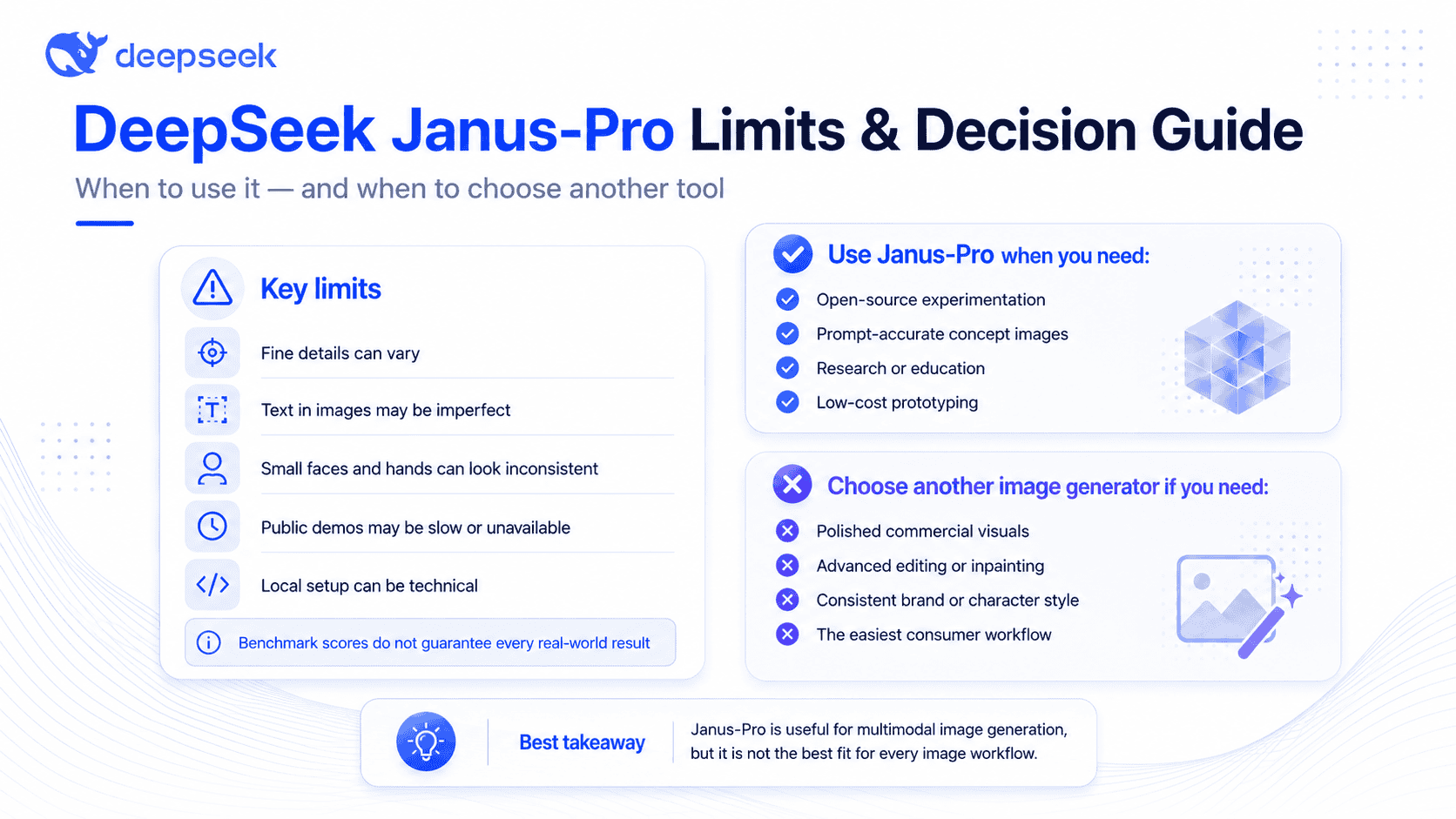
The Janus-Pro paper reports strong results on benchmarks such as GenEval and DPG-Bench. For example, Janus-Pro-7B is reported at 0.80 overall on GenEval and 84.19 overall on DPG-Bench, but benchmark scores do not guarantee that every real-world prompt will look better than results from commercial tools.
Important limits include:
- Output quality can vary by prompt, demo, settings, and hardware.
- Fine details may be weaker than dedicated high-end image generators.
- Small faces, hands, complex objects, and text inside images may be imperfect.
- The Janus-Pro paper notes a 384 × 384 input-resolution limitation for multimodal understanding, which can affect fine-grained tasks such as OCR.
- Public demos can be slow, unavailable, or limited.
- Local setup is technical.
Janus-Pro is best understood as a capable open multimodal model, not necessarily as a polished consumer image design product like Midjourney or ChatGPT image tools.
Is DeepSeek Image Generation Free?
It depends on how you use it.
Open-source model access may be free, but that does not mean every interface is free. Hugging Face demos may have queues, usage limits, or temporary downtime. Running Janus-Pro locally may not require paying a per-image fee, but you still need hardware, electricity, storage, and setup time.
DeepSeek’s Janus repository says the Janus models are released to support academic and commercial communities and that use is subject to the license section. The Hugging Face model card states that the code repository is MIT licensed and that Janus-Pro model use is subject to the DeepSeek Model License.
Before using DeepSeek AI images commercially, check the current license terms of the specific model, demo, or third-party service you use.
Is DeepSeek Better Than DALL·E, Midjourney, Flux, or Stable Diffusion?
Not in every situation.
| Tool/model | Strengths | Weaknesses | Best for |
|---|---|---|---|
| DeepSeek Janus-Pro | Open multimodal model, text-to-image capability, research-friendly | Less polished consumer UX, technical setup, resolution/detail limits | Experiments, open-source workflows, prompt-following tests |
| DALL·E / ChatGPT image tools | Easy interface, strong instruction following, good for everyday users | Less open-source control | General users, marketing drafts, quick visuals |
| Midjourney | Highly polished artistic results | Limited model transparency, subscription workflow | Stylized art, aesthetic concepts, brand visuals |
| Flux | Strong image quality in many open workflows | Setup varies by platform | Creative and technical users |
| Stable Diffusion | Huge ecosystem, local control, extensions | Setup and model choice can be complex | Custom workflows, local generation, fine-tuning |
Janus-Pro’s benchmark results are notable, but benchmarks are not the same as user experience. A designer may prefer Midjourney. A developer may prefer Stable Diffusion or Flux. A researcher may prefer Janus-Pro because it is open and multimodal.
Best Use Cases for DeepSeek Image Generation
DeepSeek Janus-Pro is most useful for:
- Prompt-accurate concept images
- Research and experimentation
- Developers testing open multimodal models
- Low-cost prototyping
- Educational projects
- Multimodal AI demos
- Prompt writing for other image tools
It is also useful when you want to understand how open multimodal models are evolving. Janus-Pro is especially interesting because it combines understanding and generation in one framework instead of treating image generation as a completely separate product.
When You Should Use Another AI Image Generator Instead
Use another AI image generator if you need:
- High-resolution polished commercial visuals
- Advanced image editing
- Inpainting or outpainting
- Consistent characters across many images
- Brand-style consistency
- The easiest possible user interface
- Fast professional marketing assets
- Reliable text rendering inside images
DeepSeek Janus-Pro can be useful, but it may not be the best first choice for a marketer who needs polished campaign images by the end of the day. In that case, using DeepSeek to write prompts and then generating the final image in a dedicated image tool may be the better workflow.
How to Get Better Results from DeepSeek Image Prompts
Use a clear prompt formula:
Subject + environment + style + composition + lighting + camera/medium + mood + quality/detail instructions + constraints
Example:
A futuristic electric bicycle parked outside a modern glass café, rainy evening street, realistic commercial photography, three-quarter angle, soft reflections on pavement, warm interior lighting, 50mm lens, premium technology mood, high detail, no text, no people.
Tips:
- Be specific about the subject.
- Describe the environment.
- Add the style or medium.
- Mention lighting and mood.
- Define composition.
- Avoid asking for too much text inside the image.
- Generate multiple variations.
- Refine one element at a time.
- Use negative prompts only if the interface supports them.
This applies whether you use Janus-Pro directly or use DeepSeek to create prompts for another AI image generator.
Safety, Privacy, and Official-Source Checklist
Before using any “DeepSeek image generator” website, check:
- Is it an official DeepSeek source, official GitHub repository, or official Hugging Face model page?
- Does the site clearly explain who operates it?
- Does it ask for payment details before showing what it does?
- Are you uploading private images or sensitive personal data?
- Are license and commercial-use terms clear?
- Does the website make exaggerated claims that are not supported by official sources?
- Does it pretend to be official without linking to DeepSeek, GitHub, or Hugging Face?
DeepSeek itself also reminds users to rely on official accounts for DeepSeek news and says statements from other channels do not reflect its views.
Final Verdict: Can DeepSeek Generate Images?
So, can DeepSeek generate images?
The clearest answer is: DeepSeek V4 Flash and Pro are text-only; Vision Exp understands images but returns text; Janus-Pro is the separate DeepSeek family that can generate images.
If you are a casual user, the easiest options are to try a reputable Janus-Pro demo or use DeepSeek to create better prompts for a dedicated image generator. If you are a developer or researcher, the official Janus GitHub repository and Hugging Face model pages are the best places to start.
For the query deepseek generate images, the key is knowing which DeepSeek tool you mean. Flash and Pro handle text; Vision Exp handles supported image input and returns text; Janus-Pro is the separate model family built for multimodal understanding and visual generation.
FAQ
Can DeepSeek generate images?
DeepSeek has separate routes. V4 Flash and Pro are text-only, and Vision Exp can understand supported images but returns text rather than generating an image. Janus-Pro is the DeepSeek model family that can generate images through local setup, supported demos, or third-party interfaces.
Can DeepSeek V3 or V4 generate images?
DeepSeek V4 Flash and Pro do not accept image input or generate images. V4 Vision Exp accepts supported images and returns text, but does not generate or edit images. For DeepSeek text-to-image generation, Janus-Pro is the relevant separate model family.
What is DeepSeek Janus-Pro?
DeepSeek Janus-Pro is a unified multimodal model family for image understanding and image generation. It uses separate visual encoding pathways for understanding and generation while keeping a unified transformer architecture. The main public model sizes are Janus-Pro-1B and Janus-Pro-7B.
Is DeepSeek Janus-Pro free?
The model may be accessible for free through open model pages or demos, but actual use depends on the platform. Hugging Face spaces may have usage limits or queues, and local use requires suitable hardware. Always check the current license and terms before commercial use.
Can I use DeepSeek to make AI art?
Yes. You can use Janus-Pro to generate AI images, or you can use regular DeepSeek to write detailed art prompts for another image generator. For most beginners, using DeepSeek as a prompt-writing assistant and generating the final image in a dedicated tool is often easier.
Can DeepSeek generate images on iPhone or Android?
Not usually through the normal DeepSeek chat experience as a simple built-in image button. However, you may be able to access a Janus-Pro demo through a mobile browser if the demo is live and mobile-friendly. Be careful with unknown apps or websites claiming to be official DeepSeek image tools.
Is DeepSeek image generation better than ChatGPT?
It depends on the task. Janus-Pro is interesting because it is an open multimodal model with reported benchmark strengths. ChatGPT image tools may be easier for everyday users who want polished results, editing features, and a smoother interface. Benchmark performance and real-world user experience are not always the same.
What is the best way to generate images with DeepSeek?
For beginners, the best method is either a reputable Janus-Pro demo or using DeepSeek to create prompts for another image generator. For developers, the best path is the official Janus GitHub repository and the Janus-Pro-7B model page on Hugging Face.
Are DeepSeek image generator websites official?
Not always. Some third-party sites may use the DeepSeek name without being official. Before entering data, uploading images, or paying, check whether the site links to official DeepSeek resources, the deepseek-ai GitHub organization, or the official deepseek-ai Hugging Face model pages.
Can DeepSeek edit existing images?
Vision Exp can analyze a supported existing image and return text, but it does not return an edited image. Janus-Pro is a multimodal understanding and generation model, not a polished editing suite. For inpainting, outpainting, object removal, or precise edits, use a dedicated image editor or image-generation platform.
Can I use DeepSeek-generated images commercially?
Commercial use may be possible under the DeepSeek Model License, but it is subject to license conditions, use restrictions, platform terms, and local legal requirements. Check the exact model, demo, or provider terms before using generated images commercially.