
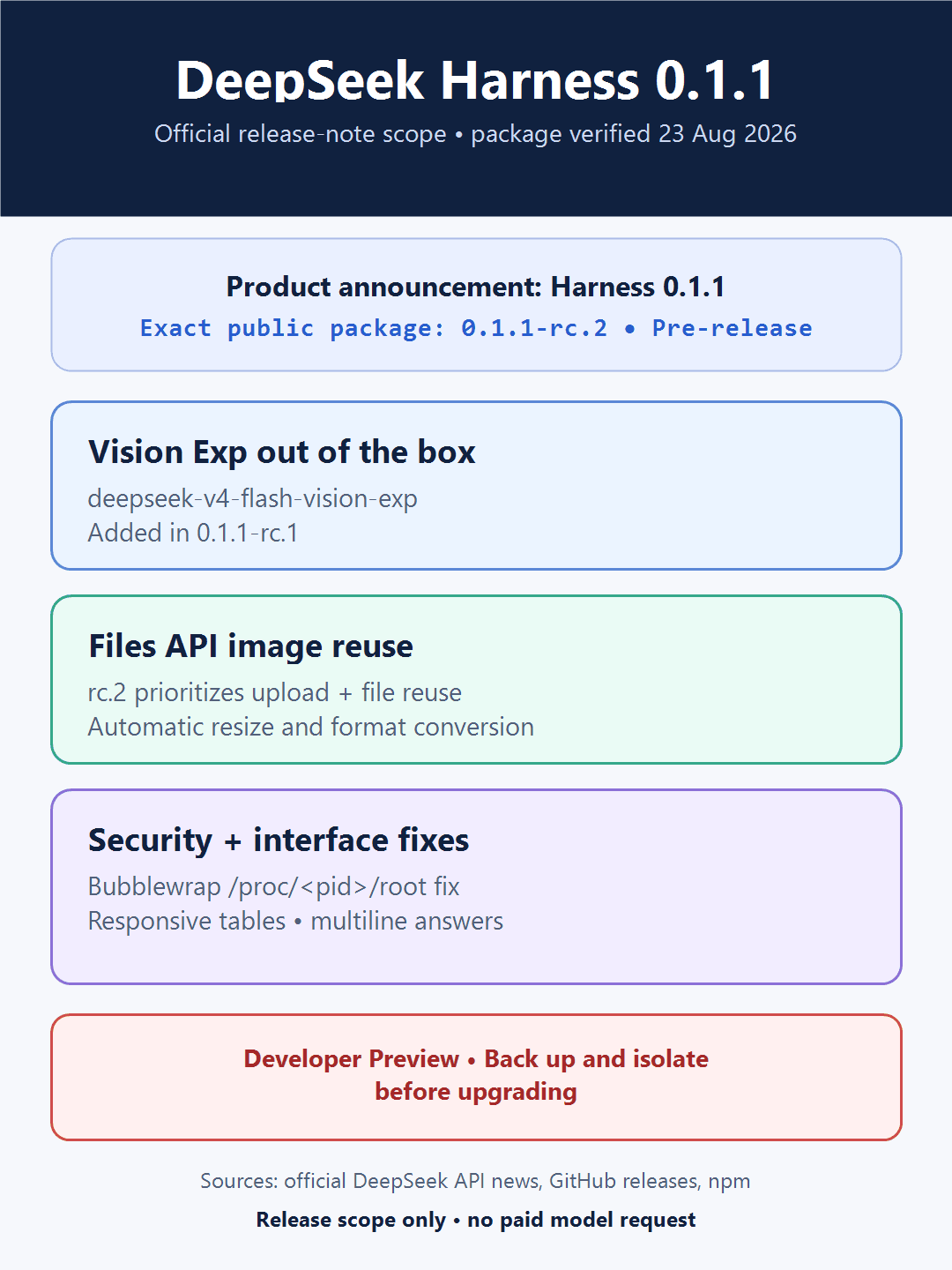
DeepSeek Harness (dsh) is DeepSeek AI’s open-source agent harness. DeepSeek’s August 21 announcement calls the current generation Harness 0.1.1 and says it supports deepseek-v4-flash-vision-exp out of the box. At the package level, however, the exact public build verified on August 23, 2026 is still the pre-release 0.1.1-rc.2, not a stable 0.1.1 npm package.
This distinction matters when you copy a command. The official README uses the moving command npx @deepseek-ai/dsh web. For a reproducible install today, this guide pins the version that actually exists in the official npm registry: npx @deepseek-ai/dsh@0.1.1-rc.2 web. Recheck the official release and npm pages before using the same pin later.
Developer-preview safety note: GitHub marks both 0.1.1 release-candidate tags as Pre-release, and the project warns that compatibility-breaking changes are expected. Back up or isolate your Harness home before upgrading, start in a disposable workspace, keep the Web UI on loopback, and review every requested action.
Current DeepSeek Harness version at a glance
| Item | Verified current state | Important boundary |
|---|---|---|
| DeepSeek announcement | “DeepSeek Harness 0.1.1,” announced August 21, 2026 with out-of-the-box Vision support | This is the product/release name used by the API announcement. |
| Exact GitHub/npm build | dsh-v0.1.1-rc.2 / @deepseek-ai/dsh@0.1.1-rc.2 | It is a pre-release; do not invent a stable @0.1.1 package. |
| npm tags checked August 23 | latest and next both pointed to 0.1.1-rc.2 | Tags can move. Use an exact pin when reproducibility matters. |
| Vision model | deepseek-v4-flash-vision-exp | It is experimental and is the DeepSeek model that accepts image input. |
| Default Web UI | http://127.0.0.1:3080 | A loopback page is local; hosted-model inference is not automatically local-only. |
| Project status | Developer Preview; GitHub release is marked Pre-release | Expect changes to commands, UI, plugins and stored data. |
Before you install or upgrade dsh
- Create a backup. Copy the Harness home and any important workspace to a location outside the directory the agent may edit. Do not rely on version control alone.
- Use a separate test workspace. Keep credentials, production data, private keys, customer files and unrelated repositories out of it.
- Stop the old Harness process. Confirm the previous Web UI and listener are no longer running before starting a different package version.
- Use a separate provider key. Prefer a temporary or restricted key and enter it only in Settings → Models.
- Keep the UI on loopback. Do not expose port 3080 to a public network unless you have deliberately built authentication, TLS and access controls around it.
- Plan a rollback. Preserve the exact previous command and home backup. The project is moving quickly, and this page does not claim a verified rc.8-to-rc.2 storage migration.
Fresh install: the exact commands
Open a new terminal and verify that Node.js, npm and npx are available:
node --version
npm --version
npx --version
Change into the disposable project directory you want Harness to use. Then choose one launch style.
Official moving command
npx @deepseek-ai/dsh webThis follows npm’s current latest tag. During the August 23 check, it resolved to 0.1.1-rc.2, but that can change without this page changing.
Reproducible pin verified on August 23, 2026
npx @deepseek-ai/dsh@0.1.1-rc.2 webThe official README says the command starts the Web UI at http://127.0.0.1:3080 by default and opens it in the default browser for a local launch. Add --no-open when you want the server to start without opening a browser:
npx @deepseek-ai/dsh@0.1.1-rc.2 web --no-openDo not use npx @deepseek-ai/dsh@0.1.1 web unless the official registry actually publishes that exact package. It was not present in the version history checked for this update.
Upgrade from rc.8 without losing your rollback
- Record the old pinned command and stop the rc.8 process.
- Back up the active Harness home. If you use
DSH_HOME, record its value without publishing the path or contents. - Prefer a separate test home for rc.2 instead of modifying the only copy of your existing data.
- Start
0.1.1-rc.2with the exact pinned command above. - Verify the Web UI, settings, selected workspace, permissions and model list before running a real task.
- Only after that check should you decide whether to reuse or migrate existing data. The absence of a new warning in the rc.1/rc.2 notes is not proof that every older home is compatible.
If the new build fails, stop it and return to the isolated backup and the old pinned command. Do not “fix” a storage error by deleting the only copy of the Harness home.
Configure Vision Exp in DeepSeek Harness
Open Settings → Models, configure the DeepSeek provider and select deepseek-v4-flash-vision-exp for tasks that need image understanding. Keep the key in the model settings; do not paste it into the chat, a repository file, screenshots or terminal history.
| Input path | Official API support | Harness 0.1.1-rc.2 behavior |
|---|---|---|
| Image URL | Public HTTP(S) URL accepted by Vision Exp | Useful when the image is already safely hosted and accessible. |
| Base64/data URL | JPEG, PNG, GIF or WebP inline image | Simple for a local image, but encoded data counts toward the request-body limit. |
Files API file_id | Upload an image once, then reference it again | rc.2 prioritizes Files API uploads and can reuse an uploaded image. |
| Automatic preprocessing | The Vision API applies its own image processing limits | rc.2 adds automatic resize and format conversion according to model requirements. |
| PDF, DOCX or ZIP | Not a supported general-file workflow in the current DeepSeek Files API | Convert the needed page or visual to a supported image first; do not describe Files API as a document store. |
Vision Exp is for visual understanding, not an image generator. Flash and Pro remain text models. For raw API shapes, image limits and the distinction between image input and general files, use our Vision Exp model guide and DeepSeek API guide.
What changed after rc.8
| Release | Official release-note scope | Operational meaning |
|---|---|---|
0.1.1-rc.1 | Adds DeepSeek-V4-Flash-Vision-Exp to the DeepSeek adapter | Harness can select the official Vision model without a separate vision provider integration. |
0.1.1-rc.1 | Closes a Bubblewrap escape path through /proc/<pid>/root | Linux users should not remain on rc.8 merely because their existing install still launches. |
0.1.1-rc.1 | Responsive Markdown-table, cache-hit display, subagent-navigation and multiline-answer improvements | Verify these UI paths again after upgrading; do not apply the old rc.7 mobile observation to rc.2. |
0.1.1-rc.2 | Prefers Files API image uploads and reuses uploaded files | Repeated image workflows can avoid sending the same image payload every time. |
0.1.1-rc.2 | Automatic image resize and format conversion | The adapter prepares images for the selected model, but provider limits and billing still apply. |
A low-risk first Vision task
Use a non-sensitive screenshot from the disposable workspace and ask for an observation-only task:
Describe the visible interface, list possible accessibility issues, and propose changes. Do not edit files or run commands until I approve a specific plan.
Before sending, confirm that Vision Exp is selected and that the screenshot contains no keys, tokens, personal data, production URLs or customer information. Image tokens are billable model input even though the Files API upload itself may be free.
Local UI, workspace and provider boundaries
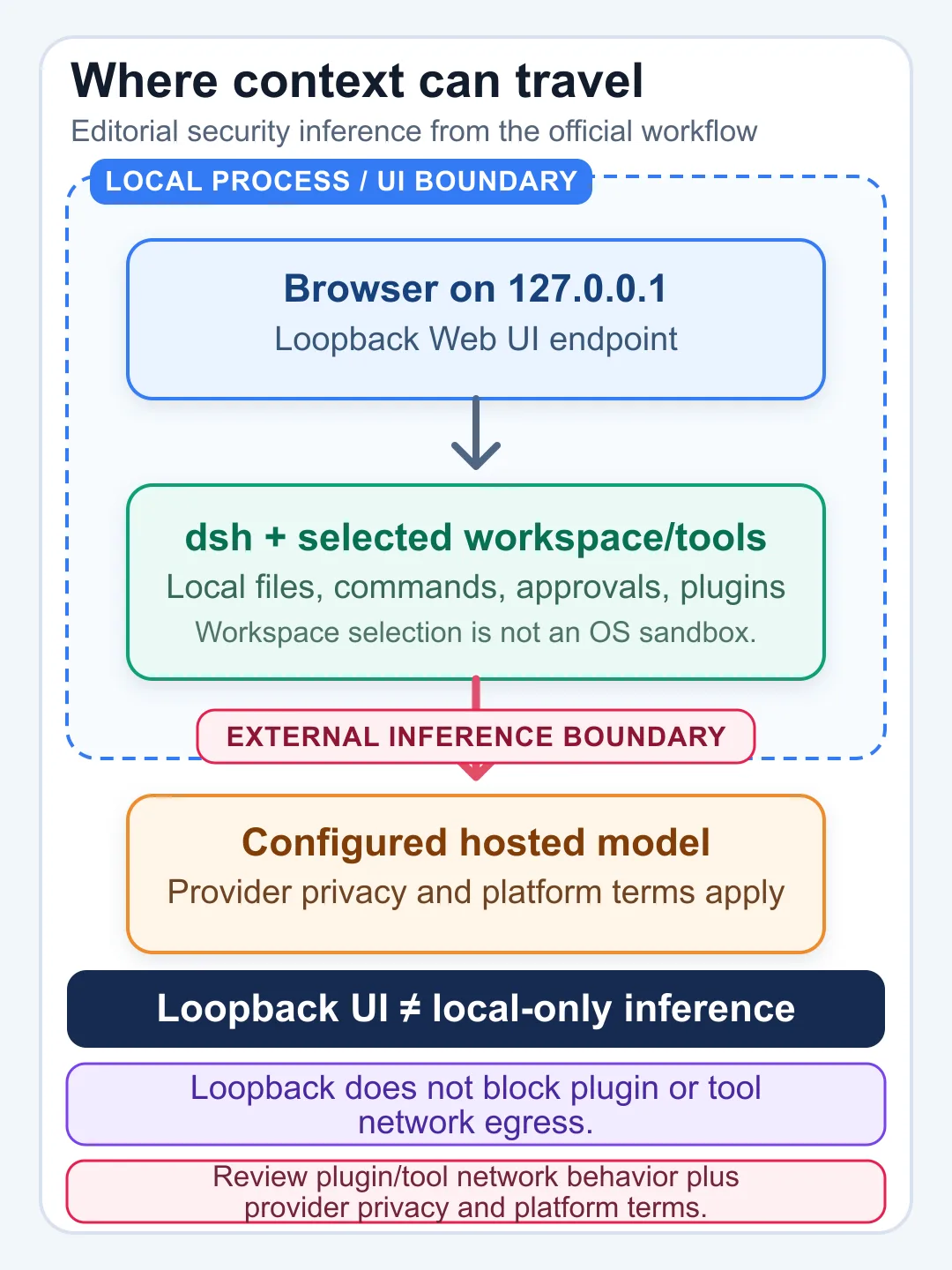
Three boundaries are easy to confuse:
- Web UI boundary: a default
127.0.0.1listener is reachable only from the local machine unless networking is changed. - Workspace boundary: the selected project tells Harness where to work, but it is not proof of an operating-system sandbox. Review the actual permission and sandbox configuration.
- Provider boundary: prompts, relevant file content and images may be sent to the configured hosted model provider. Local UI does not mean local inference.
For production architecture, use an API gateway or backend that keeps provider keys out of browsers and mobile clients. See our DeepSeek gateway and proxy architecture and DeepSeek AI agents guide.
Historical local evidence: what it proves and what it does not
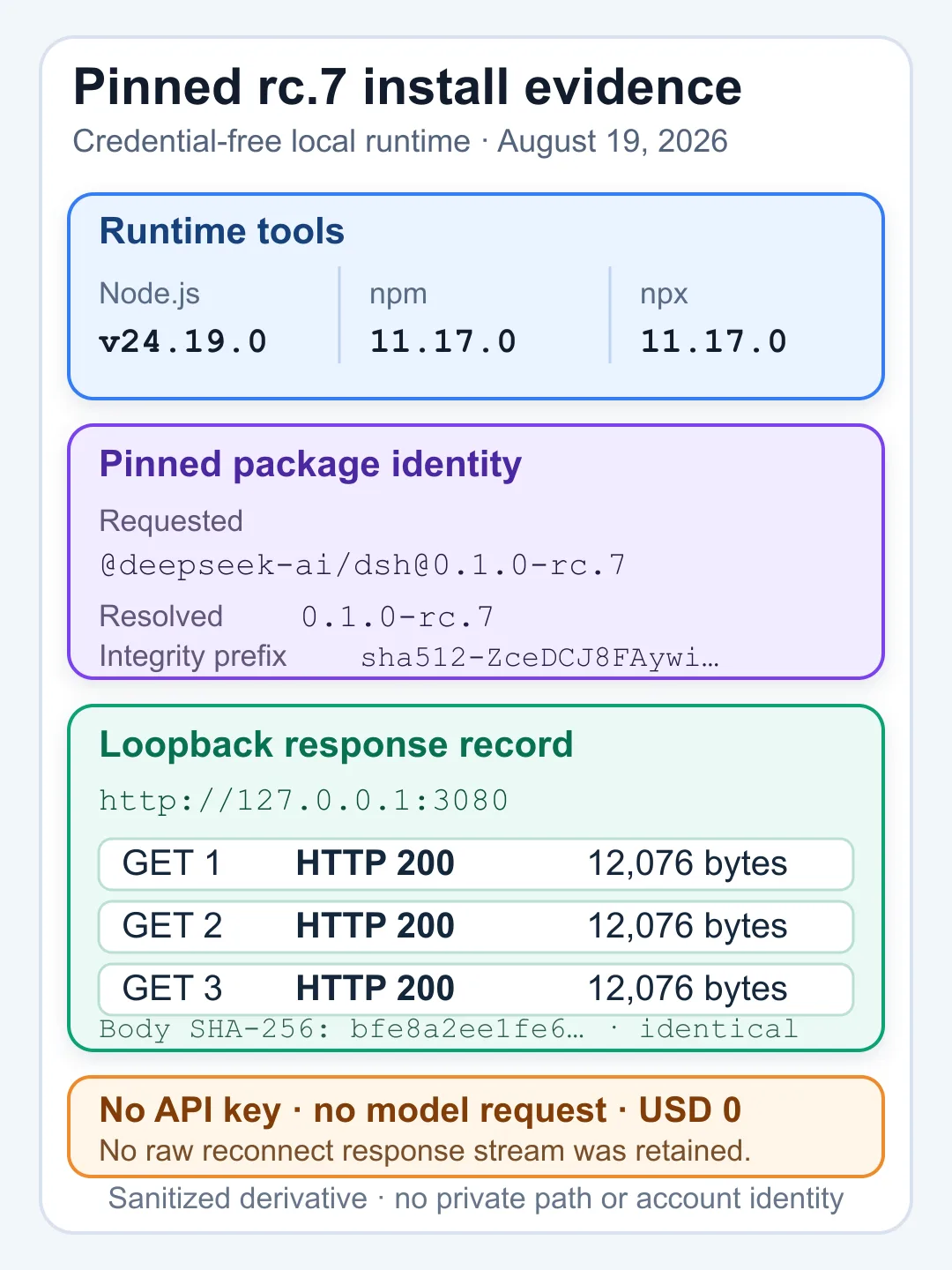
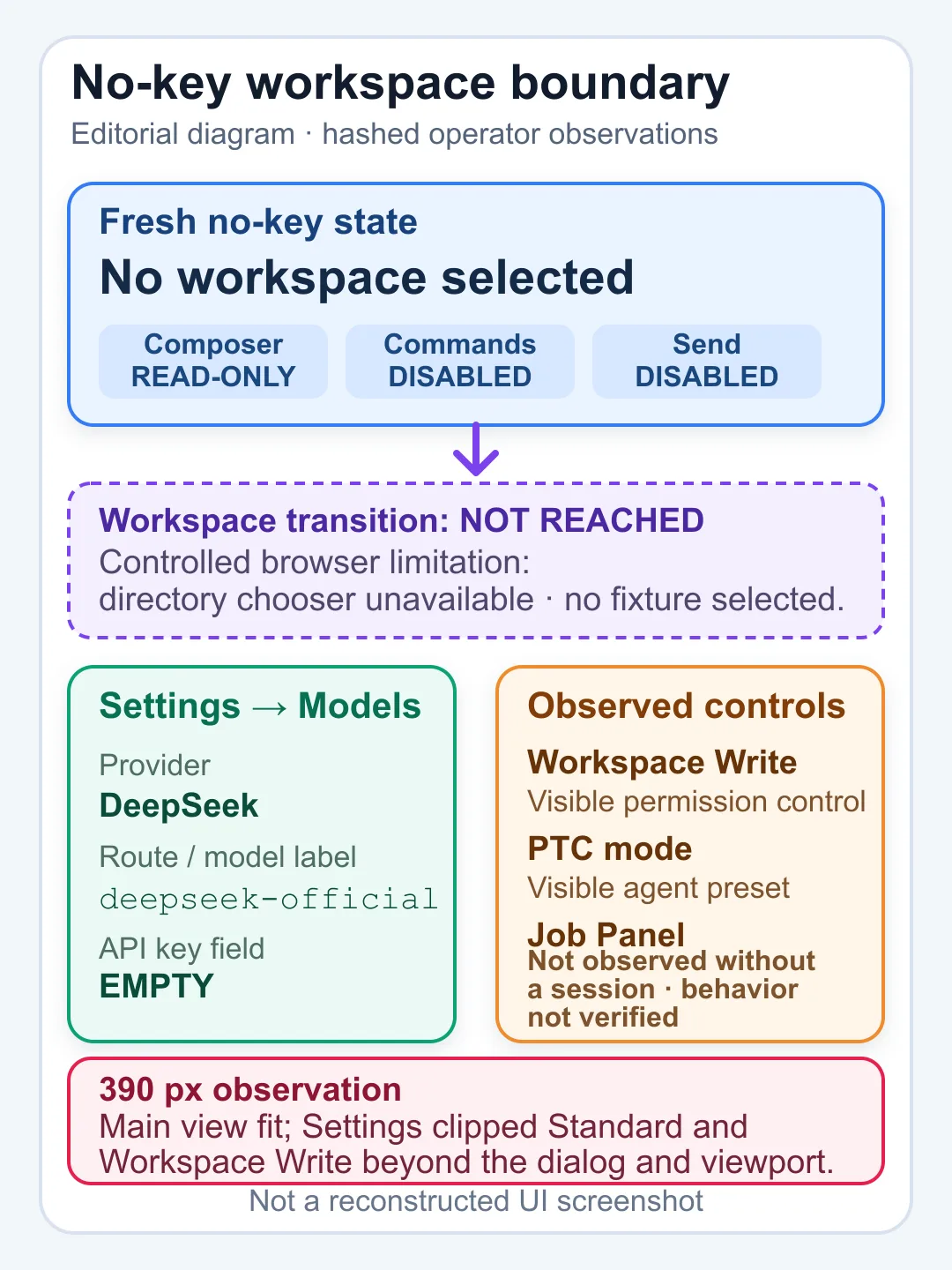
The following images document an isolated rc.7 Windows check from August 19, 2026. They are retained for audit history. They are not evidence that rc.2 was executed, that Vision was tested, or that an older home migrates cleanly.
Historical rc.8 release map
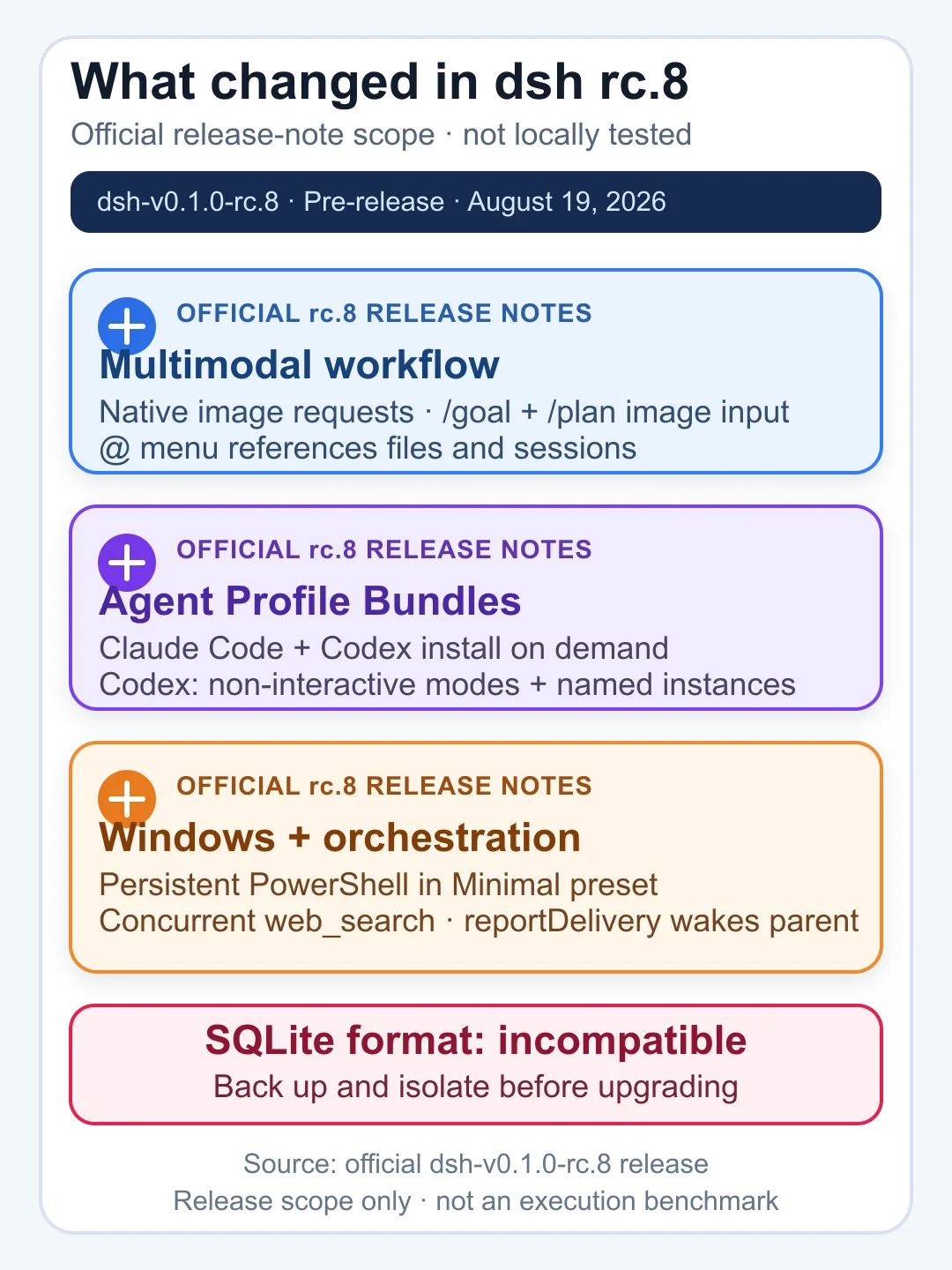
The current update performed read-only checks of the official API announcement, GitHub releases, tagged README and npm versions page. It did not install or execute rc.2, enter or read an API key, send an image, make a paid DeepSeek request, or test data migration. Cost for this editorial verification was USD 0.
How to verify your own installation
- Confirm the terminal shows no install or startup error and prints the expected local URL.
- Open
http://127.0.0.1:3080and confirm the page title and main navigation load. - Open Settings → Models and confirm
deepseek-v4-flash-vision-expis available before claiming Vision support. - Verify that a new session starts with no unintended workspace or credential exposure.
- Test a disposable text-only task first, then a non-sensitive image task.
- Review the requested file, shell and network actions before approving them.
- Check desktop and mobile layout, especially Markdown tables, long paths, code blocks and
@references. - Stop the process and confirm the listener is gone when testing is complete.
Troubleshooting DeepSeek Harness 0.1.1
npx is not recognized
Install Node.js, close the old terminal and open a new one. Confirm that node, npm and npx all return versions before retrying the Harness command.
The command still launches rc.8
Do not rely on memory or a screenshot. Use the exact version pin npx @deepseek-ai/dsh@0.1.1-rc.2 web. If you intentionally use the unversioned command, check the official npm tag again because latest can move.
The Web UI does not open on port 3080
Read the terminal output before changing ports or firewall rules. Another process may already use the port, the package may have failed before binding, or a proxy/security control may have blocked startup. Do not expose the port publicly as a shortcut.
Vision Exp is missing from Settings
Verify that you are running a 0.1.1 release-candidate build rather than rc.8 and that the DeepSeek provider is selected. The exact official model id is deepseek-v4-flash-vision-exp. Avoid hard-coded two-model allowlists in any gateway or custom provider configuration.
An image is rejected or not understood
Confirm the selected model is Vision Exp and the file is JPEG, PNG, GIF or WebP. General documents such as PDF and DOCX are not interchangeable with image uploads. Try a small non-sensitive image first and inspect the error before repeating the request.
An old session or home fails after upgrading
Stop the new process and work from a copy, not the only home. Return to the isolated backup and old pinned command if necessary. The project is a developer preview, and this guide does not claim a universal storage migration path.
Should you use DeepSeek Harness now?
Harness is appropriate for controlled experimentation when you can isolate the workspace, review actions and tolerate pre-release changes. The 0.1.1 line materially improves visual-agent workflows and includes an important sandbox fix, but “out-of-the-box Vision support” does not remove provider limits, cost, privacy review, workspace controls or human approval.
DeepSeek Harness FAQ
What is DeepSeek Harness?
DeepSeek Harness, or dsh, is DeepSeek AI’s open-source agent harness. It uses a plugin-based architecture and can coordinate model, file, shell, browser and subagent capabilities according to its configured profiles and permissions.
Is DeepSeek Harness 0.1.1 stable?
No. DeepSeek’s API announcement calls the release Harness 0.1.1, but the exact public GitHub/npm builds checked on August 23 are 0.1.1-rc.1 and 0.1.1-rc.2, both marked Pre-release. The project remains a Developer Preview.
What is the current exact install command?
The official moving command is npx @deepseek-ai/dsh web. For the exact package verified on August 23, use npx @deepseek-ai/dsh@0.1.1-rc.2 web. Recheck npm before copying that pin at a later date.
Does DeepSeek Harness support Vision Exp?
Yes. The official 0.1.1 announcement and rc.1 release notes add out-of-the-box support for deepseek-v4-flash-vision-exp. The rc.2 adapter prefers Files API uploads, reuses uploaded images and improves image preprocessing.
Which image formats can Vision Exp use?
The official Vision API supports JPEG, PNG, GIF and WebP. Images can be supplied by Base64/data URL, an external URL or a Files API file_id. General PDFs, DOCX files and ZIP archives are not supported image formats.
Does DeepSeek Harness keep my code and images local?
Do not assume that. The default Web UI is local, but a hosted model provider needs the context and images submitted for inference. Review the provider’s privacy and platform terms before using confidential data.
Where does Harness get file access?
The invoking directory is the default filesystem location, but a fresh Web UI has no selected workspace until you add one. A selected workspace is not by itself proof of an operating-system sandbox; inspect the active permission and sandbox policy.
How should I handle API keys?
Enter the key only in Settings → Models. Do not place it in prompts, repository files, command arguments, screenshots or published logs. Use a temporary or restricted key when available and revoke it after testing.
Can I reuse an rc.8 home after upgrading?
Do not assume universal compatibility. Back up the home, test 0.1.1-rc.2 with an isolated copy and keep the old pinned command available. This guide does not claim a verified rc.8-to-rc.2 migration or rollback mechanism.
Official sources
- DeepSeek-V4-Flash-Vision-Exp release announcement
- DeepSeek Vision API guide
- DeepSeek Harness official repository
- Official dsh-v0.1.1-rc.1 release
- Official dsh-v0.1.1-rc.2 release
- Tagged rc.2 README and source
- Official npm package versions
- DeepSeek Privacy Policy
- DeepSeek Open Platform Terms of Service
Last verified against the official release, repository, npm and Vision documentation on August 23, 2026. Chat-Deep.ai is an independent guide and is not DeepSeek AI.