The DeepSeek API uses the OpenAI-compatible base URL https://api.deepseek.com. Its current V4 API catalog has three IDs: text-only deepseek-v4-flash and deepseek-v4-pro, plus the experimental multimodal deepseek-v4-flash-vision-exp for image understanding. All three support Chat Completions and the Responses API.
This independent DeepSeek API guide provides working cURL, PowerShell, Python, and Node.js examples; explains the current V4 models, Vision image input, pricing, thinking mode, streaming, tools, errors, and context caching; and publishes redacted results from our own API checks. DeepSeek’s official model, pricing, Vision, Responses, Files, Thinking Mode, and Tool Calls documentation was last verified on ; dated API test results remain tied to their recorded run dates. Chat-Deep.ai is not the official DeepSeek Platform.
DeepSeek API quick reference
| Setting | Current value |
|---|---|
| OpenAI-compatible base URL | https://api.deepseek.com |
| Chat endpoint | POST /chat/completions |
| Responses endpoint | POST /responses — supported by Flash, Pro, and Vision Exp |
| Image upload endpoint | POST /files — supported image formats only, not general documents |
| Current model IDs | deepseek-v4-flash, deepseek-v4-pro, deepseek-v4-flash-vision-exp |
| Current model versions | DeepSeek-V4-Flash-0731, DeepSeek-V4-Pro-0813, DeepSeek-V4-Flash-Vision-Exp |
| Authentication | Authorization: Bearer $DEEPSEEK_API_KEY |
| Context window | 1M tokens for all three current V4 API models |
| Maximum output | 384K tokens for all three current V4 API models |
| Image input | Vision Exp only: public URL, Base64 data URL, or image file_id |
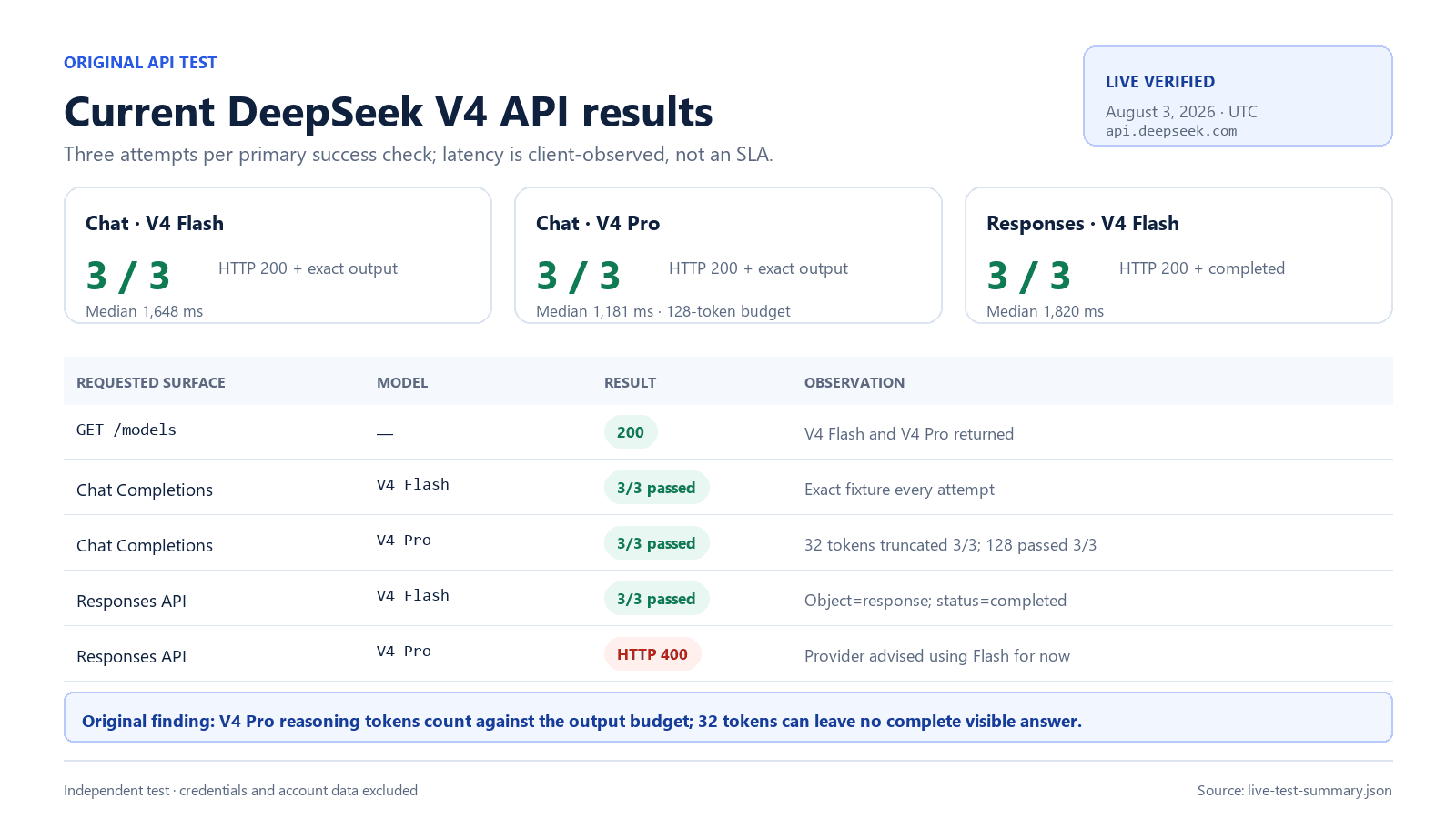
| Dated live verification | August 3: Chat Flash and Pro passed 3/3; Responses Flash passed 3/3; Responses Pro returned HTTP 400 before the August 13 GA release. |
| Current official contract | August 21: Pro-0813 is GA, Vision Exp is experimental, and all three support Responses. |
Create an official DeepSeek API key or jump to the 60-second quickstart. For account setup and key safety, use our dedicated DeepSeek API key guide.
On this page
DeepSeek API quickstart in 60 seconds
1. Create and store an API key
Sign in to the official DeepSeek Platform, create a key, and copy it once. Never paste a real key into browser tools, frontend JavaScript, screenshots, public repositories, or support messages.
Store the key in an environment variable for the current terminal session:
# macOS or Linux
export DEEPSEEK_API_KEY="replace-with-your-key"
# Windows PowerShell
$env:DEEPSEEK_API_KEY = "replace-with-your-key"2. Send a minimal request
This cURL request uses the current Flash model and explicitly disables thinking for a short connectivity check:
curl --silent --show-error --fail \
  https://api.deepseek.com/chat/completions \
  -H "Authorization: Bearer $DEEPSEEK_API_KEY" \
  -H "Content-Type: application/json" \
  -d '{
    "model": "deepseek-v4-flash",
    "messages": [
      {"role": "user", "content": "Reply with exactly: API_OK"}
    ],
    "thinking": {"type": "disabled"},
    "max_tokens": 16
  }'
A successful response is HTTP 200. Read the answer from choices[0].message.content and token counts from usage. The API can include other documented response fields, so production code should validate required fields without rejecting harmless additions.
3. Separate authentication, balance, and service health
A valid key is not proof of sufficient credit, and a funded account is not proof that every model is healthy. Use the read-only DeepSeek balance endpoint for current funding availability and DeepSeek status for incident checks.
For collection methods, coverage, exclusions, and downloadable observations, see our DeepSeek reliability report and dataset limitations. Its published example contains no eligible measured API attempts; the available timings describe home-page and status checks, not API inference speed or an API uptime percentage.
DeepSeek V4 models and current API status
DeepSeek's August 13, 2026 change log rolled out DeepSeek-V4-Pro-0813 as GA on App, Web, and API. The deepseek-v4-pro request ID did not change. Flash continues to serve DeepSeek-V4-Flash-0731 in public beta behind deepseek-v4-flash. DeepSeek now also lists the experimental deepseek-v4-flash-vision-exp, serving DeepSeek-V4-Flash-Vision-Exp for multimodal image understanding.
| Capability | deepseek-v4-flash | deepseek-v4-pro | deepseek-v4-flash-vision-exp |
|---|---|---|---|
| Version listed by DeepSeek | DeepSeek-V4-Flash-0731 | DeepSeek-V4-Pro-0813 | DeepSeek-V4-Flash-Vision-Exp |
| Current release status | Official API release in public beta | GA on App, Web, and API | Experimental API model |
| Context window | 1M tokens | 1M tokens | 1M tokens |
| Maximum output | 384K tokens | 384K tokens | 384K tokens |
| Thinking and non-thinking | Supported | Supported | Supported |
| Image input | Not supported | Not supported | Supported |
| Responses API | Supported | Supported | Supported |
| JSON output | Supported | Supported | Supported |
| Tool calls | Supported | Supported | Supported |
| Anthropic API format | Supported | Supported | Supported |
| FIM completion | Non-thinking only | Non-thinking only | Not supported |
| Documented account concurrency | 2,500 | 500 | 2,500 |
Dated test boundary: our August 3 live test returned HTTP 400 for Pro Responses before the August 13 GA rollout. That result remains valid evidence for its test date, but it is not the current support contract. The current Responses API reference lists all three V4 model IDs. Vision Exp was not part of that August 3 test.
The older names deepseek-chat and deepseek-reasoner were scheduled for discontinuation on July 24, 2026. New code should use the V4 model IDs. Our live compatibility table records what the legacy names actually returned at the verification time without treating a past schedule as present availability.
DeepSeek Vision image input: URL, Base64, and file_id
Use deepseek-v4-flash-vision-exp for image understanding; deepseek-v4-flash and deepseek-v4-pro are text-only. The hosted API accepts JPEG, PNG, GIF, and WebP through three image-delivery methods:
| Method | Best fit |
|---|---|
| Public URL | A stable image DeepSeek can fetch |
| Base64 data URL | A private or local image used once |
Files API file_id | A larger or reusable stored image |
The content-block shape changes between Chat Completions, Responses, and Anthropic-compatible Messages, and the byte, dimension, role, and retention rules differ by method. Use the dedicated DeepSeek API image input guide for current request examples, limits, security notes, and troubleshooting. This page remains the general API quickstart for authentication, text requests, streaming, tools, caching, and errors.
Working DeepSeek API examples
Every example in this section is designed to run as shown after the environment variable is set. The validation table records the exact runtime, dependency version, exit status, HTTP status, and observed output from the published blocks.
Windows PowerShell
$headers = @{
  Authorization = "Bearer $env:DEEPSEEK_API_KEY"
  "Content-Type" = "application/json"
}

$body = @{
  model = "deepseek-v4-flash"
  messages = @(
    @{ role = "user"; content = "Reply with exactly: API_OK" }
  )
  thinking = @{ type = "disabled" }
  max_tokens = 16
} | ConvertTo-Json -Depth 5

$response = Invoke-RestMethod `
  -Method Post `
  -Uri "https://api.deepseek.com/chat/completions" `
  -Headers $headers `
  -Body $body

$response.choices[0].message.content
Python with the OpenAI SDK
Install the current OpenAI Python package with python -m pip install --upgrade openai, then run:
import os
from openai import OpenAI

client = OpenAI(
    api_key=os.environ["DEEPSEEK_API_KEY"],
    base_url="https://api.deepseek.com",
)

response = client.chat.completions.create(
    model="deepseek-v4-flash",
    messages=[
        {"role": "user", "content": "Reply with exactly: API_OK"}
    ],
    max_tokens=16,
    extra_body={"thinking": {"type": "disabled"}},
)

print(response.choices[0].message.content)
For setup, typed parsing, streaming, async calls, and environment troubleshooting, see the full DeepSeek Python SDK guide.
Node.js with the OpenAI package
Install the dependency with npm install openai. Save this as an ES module such as deepseek.mjs:
import OpenAI from "openai";

const client = new OpenAI({
  apiKey: process.env.DEEPSEEK_API_KEY,
  baseURL: "https://api.deepseek.com",
});

const response = await client.chat.completions.create({
  model: "deepseek-v4-flash",
  messages: [
    { role: "user", content: "Reply with exactly: API_OK" },
  ],
  thinking: { type: "disabled" },
  max_tokens: 16,
});

console.log(response.choices[0].message.content);
Use the dedicated DeepSeek Node.js and TypeScript guide for strict TypeScript typing, server frameworks, and production project structure.
Exact code validation results
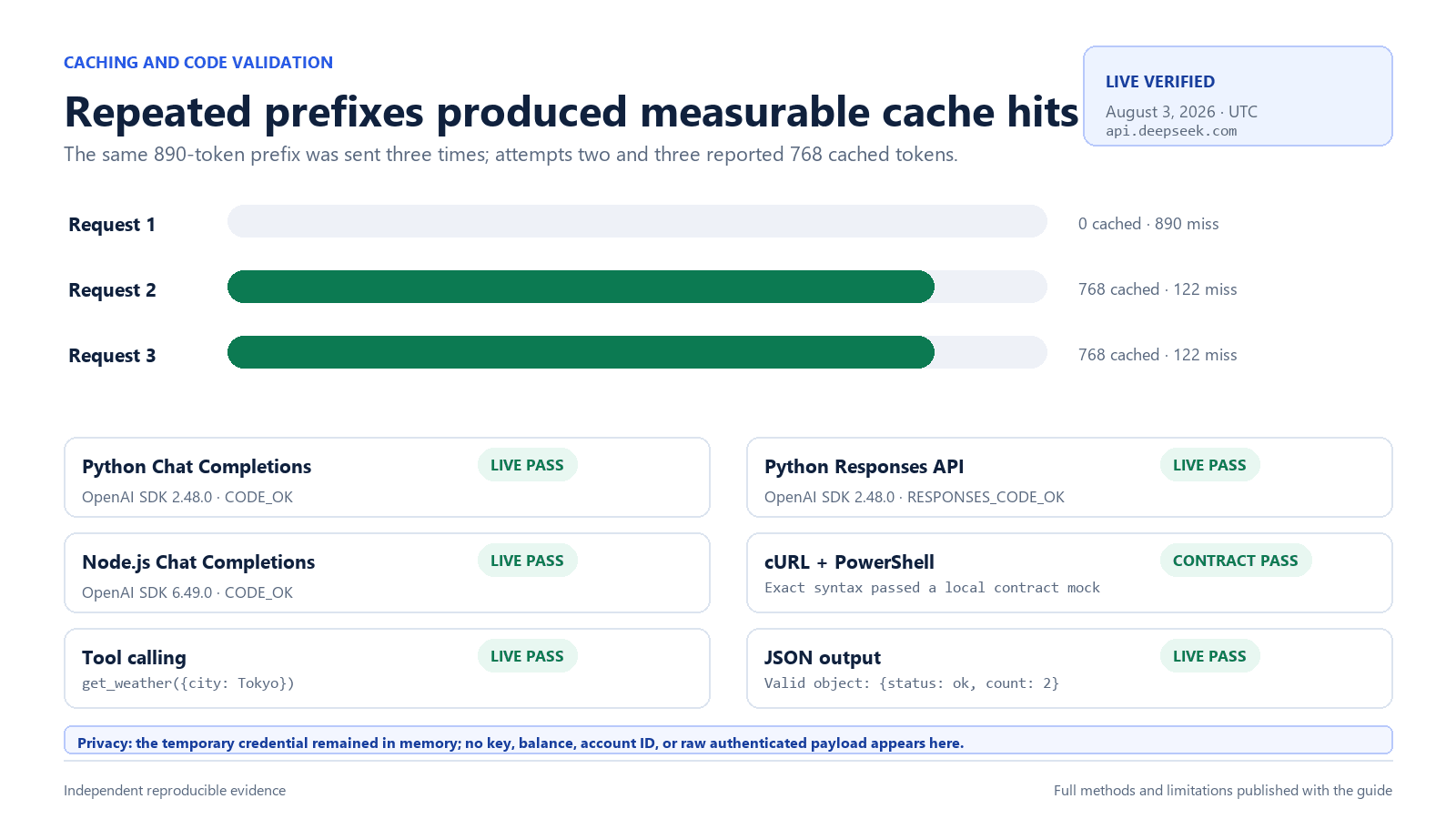
We copied each block from the saved article without rewriting it. Python and Node.js were executed against the live API with the temporary environment variable; cURL and PowerShell were executed unchanged against a local contract endpoint because the Windows test runner’s TLS stack failed before it could deliver those two live requests. The key, full response body, request ID, and account data were not published.
| Example | Environment | Dependency | HTTP | Observed output | Result |
|---|---|---|---|---|---|
| cURL | curl 7.55.1 on Windows 11 | None | Local mock 200 | API_OK | Contract pass; not a live API run |
| PowerShell | PowerShell 5.1.21996.1 on Windows 11 | None | Local mock 200 | API_OK | Contract pass; not a live API run |
| Python | Python 3.12.13 on Windows 11 | openai 2.48.0 | Live 200 | API_OK | Pass |
| Node.js | Node.js 24.14.0 on Windows 11 | openai 6.49.0 | Live 200 | API_OK | Pass |
The Python and Node.js blocks were executed live exactly as published. The cURL and PowerShell request shapes, headers, JSON bodies, and output selectors passed unchanged against a local contract endpoint, but are not presented as live executions because the runner’s Windows TLS stack failed before those requests reached DeepSeek.
DeepSeek Responses API: support and differences
For the frozen model-by-case evidence behind those capabilities, read the 48-result Responses compatibility audit: 34 PASS and 14 FAIL across Flash and Pro, with Web Search run as a separate six-result track.
DeepSeek's native Responses API supports deepseek-v4-flash, deepseek-v4-pro, and deepseek-v4-flash-vision-exp at the same https://api.deepseek.com base URL. The interface remains stateless, so clients must resend the required conversation history. The August 3 test table below is retained as dated pre-GA evidence and predates Vision Exp.
import os
from openai import OpenAI

client = OpenAI(
    api_key=os.environ["DEEPSEEK_API_KEY"],
    base_url="https://api.deepseek.com",
)

response = client.responses.create(
    model="deepseek-v4-flash",
    instructions="Reply with exactly API_OK.",
    input="Run the connectivity check.",
)

print(response.output_text)
DeepSeek's Responses API is stateless. It does not support previous_response_id, conversation, or server-side store; the response reports store: false. Unsupported parameters may be silently ignored, so a request returning HTTP 200 does not prove that every requested feature was applied. Validate the returned behavior and fields.
| Responses feature | DeepSeek status | Production implication |
|---|---|---|
input, instructions, stream | Supported | Use at least input or instructions. |
| Function and web-search tools | Supported | Validate actual tool events and outputs. |
apply_patch custom tool | Supported for Codex compatibility | Other custom tool names return 400. |
previous_response_id and conversation | Not supported | Send the required history yourself. |
store | Not supported | Responses remain stateless and report false. |
input_image | Vision Exp only | Use a public URL, Base64 data URL, or image file_id; Flash and Pro remain text-only. |
Generic input_file | Not supported | The Files API accepts supported images for Vision, not general documents. |
file_search, code interpreter, computer use, MCP | Ignored | HTTP success does not mean these tools ran. |
prompt_cache_key | Not supported | DeepSeek manages context caching automatically. |
If the goal is a first-party agent interface rather than direct HTTP integration, continue with the DeepSeek Harness 0.1.1 series setup guide. The latest verified official GitHub release/tag is dsh-v0.1.1-rc.2, a pre-release; do not infer that a stable 0.1.1 package exists.
Responses API streaming
Responses streaming uses semantic server-sent events with increasing sequence numbers. It ends with response.completed, response.incomplete, or response.failed; unlike Chat Completions streaming, it does not end with data: [DONE].
stream = client.responses.create(
    model="deepseek-v4-flash",
    instructions="Answer in one short sentence.",
    input="What is an API?",
    stream=True,
)

for event in stream:
    if event.type == "response.output_text.delta":
        print(event.delta, end="", flush=True)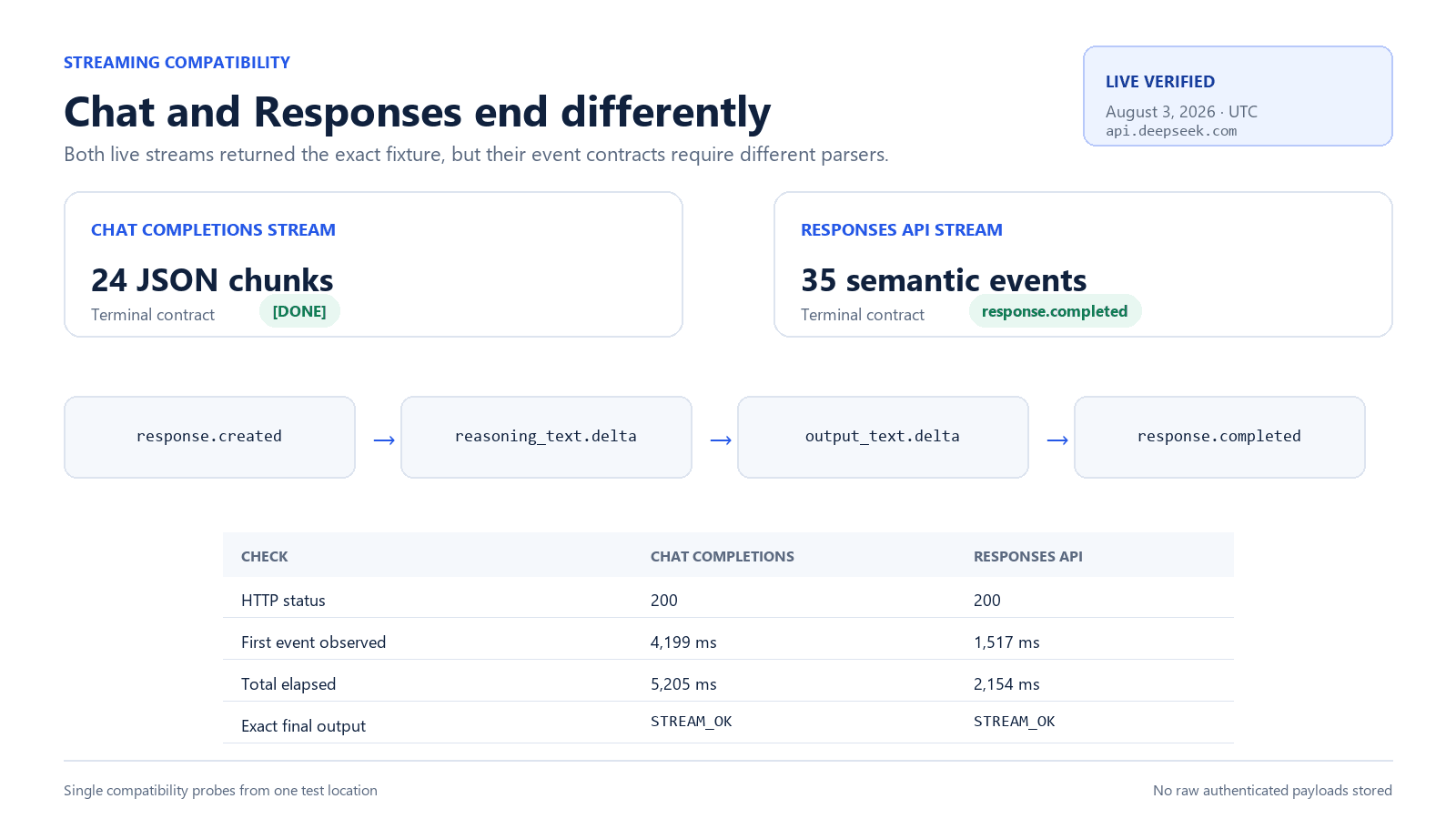
Thinking mode and reasoning effort
Thinking mode is enabled by default. In the OpenAI Chat Completions format, toggle it with {"thinking":{"type":"enabled"}} or disabled, and control depth with reasoning_effort. With the Python OpenAI SDK, pass the DeepSeek-specific thinking object through extra_body.
response = client.chat.completions.create(
    model="deepseek-v4-pro",
    messages=[
        {"role": "user", "content": "Which is larger: 9.11 or 9.8?"}
    ],
    reasoning_effort="high",
    extra_body={"thinking": {"type": "enabled"}},
)

print(response.choices[0].message.reasoning_content)
print(response.choices[0].message.content)| Requested effort | Flash maps to | Pro maps to |
|---|---|---|
low | low | low |
medium | high | high |
high | high | high |
xhigh | high | high |
max | max | max |
The published effort-mapping table above is specifically for Flash and Pro; it should not be generalized to Vision Exp without model-specific documentation. For Flash and Pro, the documented direct Chat effort values are low, high, and max; compatibility inputs medium and xhigh map to high. Thinking is enabled by default with high effort. In thinking mode, temperature, top_p, presence_penalty, and frequency_penalty have no effect even though compatibility behavior may avoid an error.
If a thinking-mode Chat Completions request does not include tools, prior reasoning_content may be omitted and is ignored if supplied. If the request includes tools, preserve every complete reasoning_content value returned by the assistant in all subsequent requests between user messages—even when the model did not make a tool call. DeepSeek documents a 400 error when required reasoning content is omitted. See our thinking mode guide for the complete message loop.
Streaming, JSON output, and tool calls
Chat Completions streaming
Set stream: true to receive data-only SSE chunks. Chat Completions streaming ends with data: [DONE]. DeepSeek may send : keep-alive comments while a request waits for inference; a custom parser must ignore those comments rather than treating them as JSON.
For end-to-end timing, measure request start, response headers, first reasoning token, first answer token, and final event separately. A single “latency” number hides the difference between queueing and generation.
JSON output
Chat Completions: set response_format to {"type":"json_object"}, include the word “json” in the prompt, show the desired shape, and validate the result. Responses API: use text.format with type: "json_object" or type: "json_schema"; schema mode also requires a name and a valid JSON Schema object. Allow enough output tokens to avoid truncation, and validate every response. The full implementation is in our DeepSeek JSON output guide.
Tool calls
Tool calling lets the model request a function; your application remains responsible for validating arguments, authorizing the action, running the function, and returning the result. DeepSeek’s current model table lists tool-call support for Flash, Pro, and Vision Exp. Strict tool schemas are a beta feature that require the https://api.deepseek.com/beta base URL and a supported JSON Schema subset. Use the DeepSeek tool-calling guide for a complete safe loop.
Multi-turn requests and context caching
Chat Completions and Responses are stateless: the application sends the history needed for each turn. Keep only relevant messages, summarize when appropriate, and budget the entire repeated prefix. DeepSeek's context cache is automatic. In response usage, cached input is reported separately; no manual cache key is required.
Cache hits depend on repeated prefixes. Preserve stable system instructions and shared context at the beginning, then append changing user data. Do not treat caching as a privacy boundary; use documented user_id isolation and keep personal data out of identifiers. See the context caching guide for measurement and cost calculations.
Observed cache result: we sent the same 890-token prefix three times. The first request reported 0 cache-hit tokens and 890 misses. Requests two and three each reported 768 cache-hit tokens and 122 misses, an 86.3% hit share for this fixture. That is a dated observation, not a guarantee that every repeated prompt will be cached.
DeepSeek API endpoints and compatibility
| Purpose | Method and path | Notes |
|---|---|---|
| Chat Completions | POST /chat/completions | Text for all three models; image blocks only with Vision Exp |
| Responses API | POST /responses | Supported by Flash, Pro, and Vision Exp; images use input_image; stateless |
| Upload an image | POST /files | JPEG, PNG, GIF, or WebP with purpose user_data; returns a reusable file_id |
| List models | GET /models | Use for a dated account-visible catalog, not as the only capability test |
| Text completion / FIM | POST /beta/completions | Flash and Pro in non-thinking mode only; Vision Exp is not supported |
| Account balance | GET /user/balance | Read-only account funding state |
| Anthropic format | https://api.deepseek.com/anthropic | Separate compatibility surface with documented mappings |
OpenAI compatibility does not mean every OpenAI endpoint, parameter, tool, modality, or persistence feature exists. Keep compatibility tests in CI, pin SDK versions where appropriate, and inspect DeepSeek's current API documentation before adopting a new client feature. Our OpenAI SDK migration guide covers the required configuration changes.
DeepSeek API pricing
DeepSeek bills input and output tokens, with a lower input rate for cache hits. Images are converted to input tokens and billed at the model’s input rate. Both tables use USD per one million tokens. The first table contains the current rates; the second table preserves the historical Flash and Pro rates that were effective through August 16, 2026 at 15:59 UTC, before Vision Exp appeared in the current catalog.
Current pricing: DeepSeek applies peak rates from Monday through Friday during 01:00–04:00 and 06:00–10:00 UTC. All other times, including all day Saturday and Sunday, are off-peak. Peak rates are twice the current off-peak rates.
| Model | Current rate period | Cache-hit input | Cache-miss input | Output |
|---|---|---|---|---|
deepseek-v4-flash | Off-peak | $0.007 | $0.22 | $0.66 |
deepseek-v4-flash | Peak | $0.014 | $0.44 | $1.32 |
deepseek-v4-pro | Off-peak | $0.022 | $0.66 | $1.98 |
deepseek-v4-pro | Peak | $0.044 | $1.32 | $3.96 |
deepseek-v4-flash-vision-exp | Off-peak | $0.007 | $0.22 | $0.66 |
deepseek-v4-flash-vision-exp | Peak | $0.014 | $0.44 | $1.32 |
| Model | Cache-hit input | Cache-miss input | Output |
|---|---|---|---|
deepseek-v4-flash | $0.0028 | $0.14 | $0.28 |
deepseek-v4-pro | $0.003625 | $0.435 | $0.87 |
Always confirm the official current pricing before budgeting.
Use our DeepSeek API pricing guide for billing interpretation or the DeepSeek API cost calculator to model cache-hit, cache-miss, and output tokens without sending a request.
Original DeepSeek API test results
We ran a preregistered, low-cost compatibility suite from a managed test environment (network region not asserted) between 2026-08-03T23:16:24Z and 2026-08-03T23:26:05Z. Calls were sequential with concurrency one, a 60-second timeout, and no automatic retries. The temporary API key remained in process memory and was never written to evidence files.
Frozen test evidence: the tables in this section report the August 3 run exactly as observed. The “Two model IDs” result, the Pro Responses limitation, the effort mapping quoted inside the result matrix, and phrases such as “use Flash for now” are scoped to that pre-GA test date. Vision Exp was not part of that run. DeepSeek changed the current contract after the test; the August 21 present-day guidance appears above.
| Test | Model or control | Expected | Observed | HTTP | Result |
|---|---|---|---|---|---|
| List current models | GET /models | Authenticated catalog | Two model IDs: deepseek-v4-flash and deepseek-v4-pro | 200 | Pass |
| Chat Completions | deepseek-v4-flash | Exact short answer | 3/3 exact outputs; median complete time 1,648 ms | 200 in 3/3 | Pass |
| Chat Completions | deepseek-v4-pro | Exact short answer | 3/3 exact outputs at 128 tokens; the 32-token control truncated in 3/3 | 200 in 6/6 | Pass with output-budget finding |
| Responses API | deepseek-v4-flash | Supported | 3/3 completed responses with the exact fixture | 200 in 3/3 | Pass |
| Responses API | deepseek-v4-pro | Documented state checked live | Rejected with the provider’s early-August availability message; use Flash for now | 400 | Expected current limitation observed |
| Streaming terminal event | Flash Responses | Semantic terminal event, no [DONE] | response.completed; no [DONE] | 200 | Pass |
| Thinking effort mapping | Flash and Pro | Official mapping or dated deviation | All eight documented Flash/Pro request values returned 200. Current published mapping: Flash low→low, high→high, xhigh→high, max→max; Pro low/high→high and xhigh/max→max. | 200 in 8/8 documented cases | Pass; mapped effort is not returned in the response |
| Function call | deepseek-v4-flash | Valid named function and JSON arguments | get_weather with {"city":"Tokyo"}; finish_reason=tool_calls | 200 | Pass |
| Invalid authentication control | Synthetic non-secret value | 401 | Redacted authentication_error | 401 | Pass |
| Invalid parameter control | Safe malformed test | 4xx documented error | Unsupported model returned invalid_request_error | 400 | Pass |
Timing, tokens, and cost
| Test | Runs | Median response headers | Median complete | Input tokens | Output tokens | Reasoning tokens | Calculated cost |
|---|---|---|---|---|---|---|---|
| Flash Chat Completions | 3 | 985 ms | 1,648 ms | 288 total | 75 total | 57 total | $0.00006132 derived |
| Pro Chat Completions | 3 | 344 ms | 1,181 ms | 51 total | 101 total | 83 total | $0.00011006 derived |
| Flash Responses API | 3 | 694 ms | 1,820 ms | 285 total | 113 total | 95 total | $0.00007154 derived |
These tests establish point-in-time contract behavior, not a provider SLA, universal latency ranking, or regional availability claim. The Pro output-budget control shows why reasoning workloads need headroom. The legacy aliases still routed to Flash on the test date, but explicit V4 IDs remain the production recommendation. The undocumented medium effort value was accepted but is not represented here as supported. Costs are deterministic estimates from observed usage and the dated standard list prices, not invoice readings.
For a dedicated evaluation of very large Chat Completions requests rather than short contract checks, see the reproducible long-context API benchmark with matched V4 Flash and Pro cases and downloadable data.
Download the sanitized test harness, runnable examples, assertions, and redacted result format from the DeepSeek API request builder repository on GitHub. No credential, raw authenticated response, request identifier, or account value is included.
DeepSeek API request builder and error decoder
Choose an API surface, one of the three current model IDs, thinking settings, image source when using Vision Exp, and common features to generate cURL, PowerShell, Python, Node.js, or raw JSON. The tool also explains common HTTP errors. It runs entirely in your browser, never asks for an API key, never uploads an image, never sends an API request, and does not store your selections.
Interactive developer tool
DeepSeek API Request Builder
Configure a request once, then generate ready-to-review cURL, PowerShell, Python, Node.js, and JSON examples.
DEEPSEEK_API_KEY.
2. Copy the generated code
3. Decode a DeepSeek API error
429: Rate or concurrency limit reached
The account is sending too many simultaneous or rapid requests.
- Honor Retry-After when the header is present.
- Add exponential backoff with jitter and cap retries.
- Queue requests and reduce concurrency.
Retry guidance: Retry after a delay; do not retry in a tight loop.
The generated code deliberately contains an environment-variable reference instead of a credential. For Vision examples it accepts only a URL, a complete Base64 data URL, or a previously created image file_id; it does not read or upload local files. Review generated requests before running them, particularly experimental models, beta features, tools, and any operation that can trigger external actions.
DeepSeek API errors and production checklist
| HTTP status | Official meaning | First action |
|---|---|---|
| 400 | Invalid request format | Inspect the error and validate the JSON body. |
| 401 | Authentication failed | Check key loading, revocation, base URL, and Bearer header without logging the key. |
| 402 | Insufficient balance | Stop unchanged retries and check account funding. |
| 422 | Invalid parameters | Compare the request with the current endpoint schema. |
| 429 | Rate or concurrency limit reached | Reduce concurrency and use bounded backoff with jitter. |
| 500 | Server error | Retry safely after a short delay and preserve observability. |
| 503 | Server overloaded | Use bounded retry, a queue, and a degradation plan. |
DeepSeek documents account-level concurrency of 2,500 for Flash, 500 for Pro, and 2,500 for Vision Exp. Exceeding the applicable limit returns 429. Requests can remain connected while waiting; non-streaming responses may receive empty lines and streaming responses may receive keep-alive comments. If inference has not started after ten minutes, the server closes the connection.
- Keep API keys in a secret manager or protected server environment, never client-side code.
- Set connect, first-byte, idle, and overall timeouts intentionally instead of one ambiguous timeout.
- Retry only transient failures with exponential backoff, jitter, a maximum attempt count, and duplicate-work protection.
- Validate structured output and tool arguments before using them.
- Track model, endpoint, HTTP status, duration, token fields, cache fields, and finish reason without storing prompts by default.
- Use application-generated pseudonymous
user_idvalues; do not put personal information in them. - Keep a feature-compatibility test because unsupported Responses parameters can be silently ignored.
- Monitor the official change log and re-run contract tests before changing models or SDK versions.
For deeper handling, use the DeepSeek error-code guide, rate-limit guide, API testing guide, and observability guide.
DeepSeek API FAQ
Is the DeepSeek API free?
The DeepSeek API is usage-billed according to input, output, and cache-hit token rates. An account may have granted credit, but availability and amount are account-specific. Check the official Billing page and current pricing rather than assuming a permanent free tier.
What is the DeepSeek API base URL?
The OpenAI-compatible base URL is https://api.deepseek.com. The separate Anthropic-compatible base URL is https://api.deepseek.com/anthropic.
Which DeepSeek API model ID should I use?
Use deepseek-v4-flash for efficient text workloads, deepseek-v4-pro for harder text reasoning and coding, or the experimental deepseek-v4-flash-vision-exp when the request must understand images. Avoid starting new integrations with the retired or legacy aliases deepseek-chat and deepseek-reasoner.
Does DeepSeek support the OpenAI Responses API?
Yes. The native Responses API supports deepseek-v4-flash, deepseek-v4-pro, and deepseek-v4-flash-vision-exp. The API is stateless, so send the required history in each request. Vision images use input_image parts. The August 3 Pro rejection shown above remains a dated pre-GA observation.
Does the DeepSeek API support images and files?
Vision Exp supports JPEG, PNG, GIF, and WebP images supplied by public URL, Base64 data URL, or an image file_id from the Files API. Flash and Pro are text-only. General document and arbitrary file input remains unsupported: do not confuse a supported image file_id with generic input_file, PDF, DOCX, spreadsheet, or archive support.
Can I use the OpenAI SDK with DeepSeek?
Yes. Set your DeepSeek key and change base_url or baseURL to https://api.deepseek.com. Compatibility is not universal: test the endpoints, parameters, tools, and modalities your application actually uses.
What is the DeepSeek API context window?
DeepSeek's current model table lists a 1M-token context window and 384K maximum output for V4 Flash, V4 Pro, and Vision Exp. A request exceeding the context limit can return HTTP 400, so reserve space for the requested output, image tokens, and tool messages.
Is the DeepSeek API the same as DeepSeek Chat?
No. The API is a metered developer service on the DeepSeek Platform, while the web and app products provide an end-user chat interface. Model availability, billing, limits, and release timing can differ.
Why does the DeepSeek API return 429?
HTTP 429 means the applicable rate or concurrency limit was reached. Concurrency is calculated at account level across keys. Reduce parallel work, queue requests, and retry with bounded exponential backoff and jitter.
If you are deciding what to build rather than debugging a request, browse DeepSeek use cases by task. For questions about this independent publication, our guides and tests, or privacy—not the official API contract—see the Chat-Deep.ai site FAQ.
Official sources and update log
- DeepSeek API change log
- Models and pricing
- Vision guide
- Files API guide
- Using the Responses API
- Responses API reference
- Thinking mode guide
- Rate Limit and Isolation
- Official error codes
- Create Chat Completion reference
| Date | Editorial and test update |
|---|---|
| 2026-08-24 | Clarified the weekday-only peak windows, the tools-enabled reasoning_content replay rule even when no tool call occurs, and the verified Harness 0.1.1-series pre-release tag; no new live API tests were run. |
| 2026-08-21 | Added Vision Exp to the current catalog, pricing, endpoints, FAQ, and request builder; documented image URL, Base64 data URL, and Files API file_id inputs; kept generic files unsupported; and clearly separated current facts from the frozen August 3 test evidence. |
| 2026-08-14 | Updated Pro-0813 GA status, enabled Flash and Pro in the Responses request builder, aligned the current reasoning-effort mapping, added the August 16 peak/off-peak rate schedule, and preserved the August 3 test suite as frozen pre-GA evidence. |
| 2026-08-05 | Updated the request builder with endpoint-specific reasoning controls, the current Chat mapping, Responses API effort values, Responses text.format support for json_object and json_schema, and the documented 384K output ceiling. |
| 2026-08-03 | Added July 31 Flash-0731 status, Responses API compatibility, current pricing and reasoning mapping; re-ran code, model, endpoint, streaming, tool, and error controls. |
| 2026-07-28 | Previous verification of Chat Completions, current model IDs, pricing, and production guidance. |
Editorial standard: Published prices and capabilities are sourced from DeepSeek's primary documentation. Live-test statements are limited to the exact dated observations shown above. Planned features are described as plans, not as completed releases.