
Can DeepSeek PDF analysis handle searchable documents, scans, tables, charts, long files, amendments, multiple uploads, and encryption safely? We ran 10 controlled tasks in a live browser session. The DeepSeek Chat product workflow scored 89/100: submitted model responses earned 84/95, while the protected-file interface safeguard earned 5/5. For platform background, see our independent DeepSeek guide.
Independent benchmark: This test was conducted by Chat Deep AI and is not affiliated with or endorsed by DeepSeek. All files were synthetic and contained no real personal, financial, customer, or confidential information.
DeepSeek PDF analysis: quick verdict
- Instant-mode Chat product score: 89/100
- Submitted model-response score: 84/95
- Post-hoc mode sensitivity: 98/100 if the chart result is replaced by the later Vision diagnostic; this was not a predeclared routing benchmark
- Test set: 10 tasks using 12 synthetic files
- Median response time: 8.2 seconds among submitted primary runs
- Selected repeat runs: all material fields matched in three repeated cases
- Strongest tested cases: native text, OCR, tables, long-document retrieval, and cross-file calculations
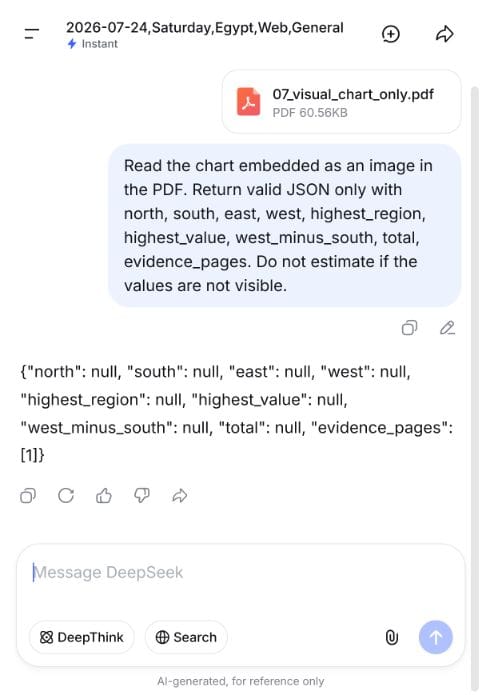
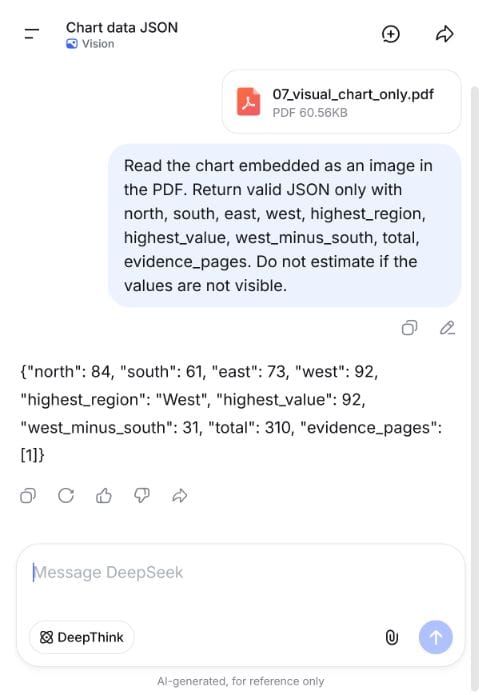
- Main limitation: Instant returned no chart values from a raster-only PDF; Vision read the same file correctly
- Test date: July 24, 2026
Bottom line: Within this small synthetic set, Instant handled extracted text, one scan, tables, amendments, and multi-file reasoning well. Vision solved the one image-only chart that Instant could not read. Page citations were occasionally broader than the evidence required, so important answers still need human verification.
How we tested DeepSeek file analysis
We created a controlled answer key before opening DeepSeek. Each document contained known facts, calculations, page locations, or failure conditions. This avoids subjective scoring: a value either matched the source file or it did not.
- Every primary test started in a fresh chat.
- Search was disabled to keep answers grounded in the uploaded files.
- Instant was the primary mode for all 10 scored tasks.
- The first complete response was scored whenever a model response was produced; the protected-PDF case was an explicit UI-level safe-failure test.
- Exact values, calculations, amendment precedence, and evidence pages were checked against a predefined key.
- Response time did not affect accuracy scores.
- Three tasks were repeated in fresh chats to check consistency.
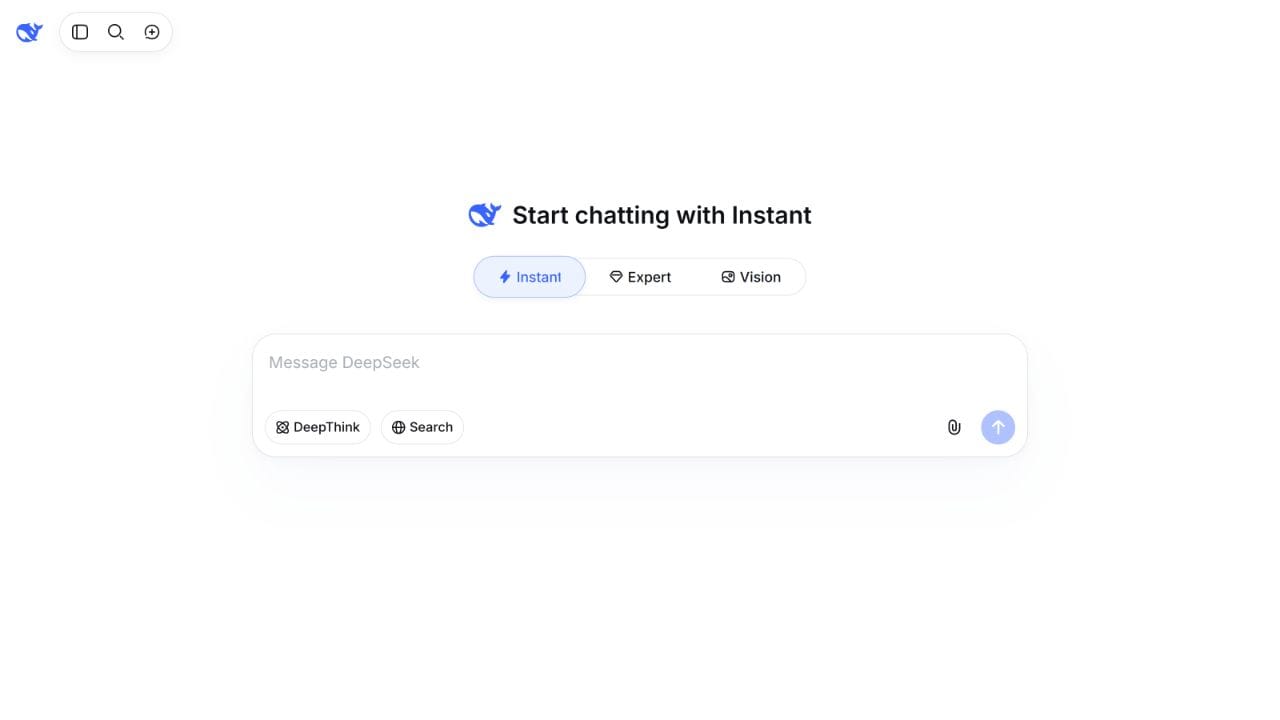
The file-upload control was available in Instant and Vision during our session, but not in Expert. We therefore did not pretend that Expert had been tested with files. Vision was used only as a diagnostic rerun for the chart that failed in Instant.
Scoring rules
Eight tasks were worth 10 points each. The 30-page retrieval task was worth 15 points because it required several distant page matches and an amendment calculation. The protected-file task was worth 5 points because the correct product behavior was to block submission without inventing document content. No prompt reached the model in that final case, so we also report the submitted model responses separately as 84/95.
Correct values could still lose a point for unsupported or overly broad page citations. A fabricated material claim would cap a test at half credit. Minor formatting differences, such as a written date instead of ISO format, were accepted when the meaning was identical.
Complete DeepSeek PDF benchmark scorecard
| # | Test | Mode | Score | Time | Finding |
|---|---|---|---|---|---|
| 1 | Searchable invoice | Instant | 9/10 | 5.1s | All values and arithmetic correct; one extra evidence page |
| 2 | Policy amendment | Instant | 10/10 | 91.8s | Correct general rule, conditional exception, and supporting pages |
| 3 | Scanned receipt | Instant | 10/10 | 21.5s | Correct OCR, line items, totals, and sum check |
| 4 | Two-column report | Instant | 10/10 | 5.0s | Kept both projects separate and applied the priority rule |
| 5 | Financial table | Instant | 10/10 | 7.5s | All extracted and calculated values correct |
| 6 | 30-page manual | Instant | 15/15 | 8.7s | Recovered distant facts and applied the later limit |
| 7 | Image-only chart PDF | Instant | 1/10 | 8.7s | Returned nulls instead of chart values, but did not fabricate |
| 8 | Contract amendment | Instant | 9/10 | 7.9s | Terms correct; one unsupported evidence page included |
| 9 | CSV + TXT + PDF | Instant | 10/10 | 8.2s | Correctly combined three files for all inventory decisions |
| 10 | Password-protected PDF | Instant | 5/5 | Not submitted | “No text extracted”; the interface blocked submission |
| Instant-mode Chat product total | 89/100 | 84/95 from submitted model responses, plus 5/5 for protected-file interface handling | |||
The 91.8-second policy result was a clear interface-delay outlier. We kept it in the record rather than replacing it with a faster rerun. The median of the submitted primary runs was still 8.2 seconds.
Test 1: Searchable invoice — 9/10
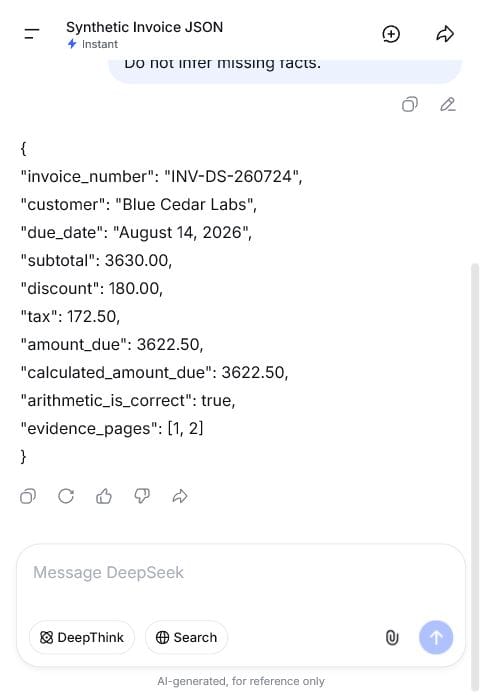
The first PDF was a two-page native-text invoice. DeepSeek had to extract the invoice number, customer, due date, subtotal, discount, tax, and amount due, then recalculate the final amount.
Every requested value was correct. It verified that $3,630.00 minus the $180.00 discount plus $172.50 tax equals $3,622.50. The only issue was evidence_pages: [1, 2]. All scored fields appeared on page 1, so page 2 was unnecessary.
Test 2: Policy amendment — 10/10
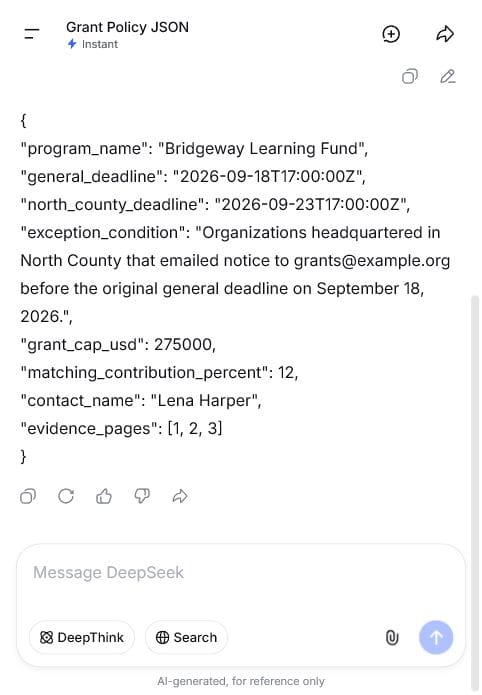
This three-page policy listed a general application deadline, a $275,000 grant cap, a 12% matching contribution, and a contact on the first two pages. Page 3 introduced a later amendment: qualifying North County organizations received a five-day extension only if they emailed notice before the original deadline.
DeepSeek correctly separated the general deadline from the conditional exception. It returned both dates, the complete eligibility condition, the unchanged cap and contribution percentage, the contact name, and evidence pages 1, 2, and 3. Accuracy was perfect, although this run took an unusual 91.8 seconds.
Test 3: Scanned receipt OCR — 10/10
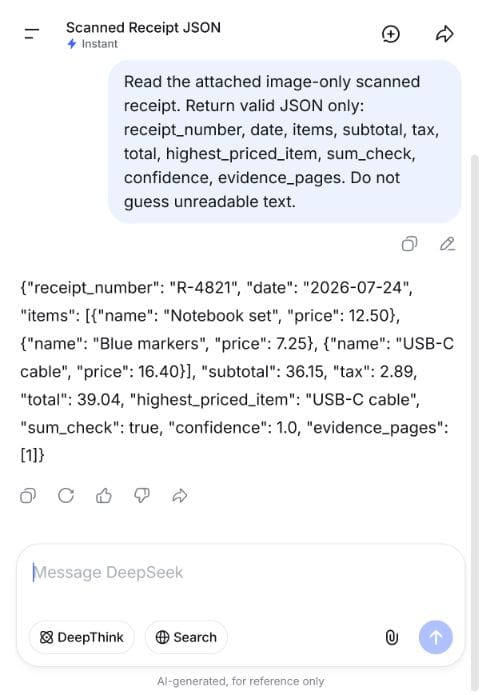
The receipt was an image-only scan with no searchable text layer. It contained three products, a subtotal of $36.15, tax of $2.89, and a total of $39.04.
Instant extracted the receipt number, date, every item and price, subtotal, tax, total, and highest-priced item. It also confirmed the sum correctly. This matters because the chart test later showed that “image-only PDF” is not one uniform capability: simple document OCR and visual chart interpretation behaved very differently.
Test 4: Two-column report — 10/10
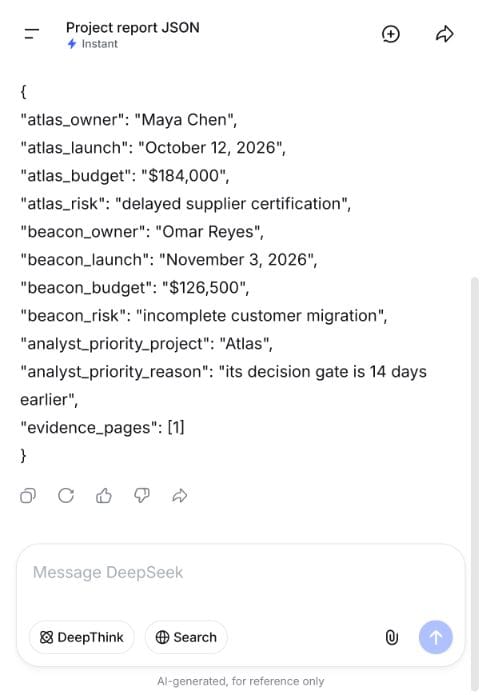
Two project summaries appeared side by side. Each had a different owner, launch date, budget, and risk. A final instruction said the analyst should prioritize the project whose decision gate occurred 14 days earlier.
DeepSeek kept the Atlas and Beacon fields separate, returned all eight project values correctly, and selected Atlas for the stated 14-day reason. It did not merge lines across columns.
Test 5: Financial table — 10/10
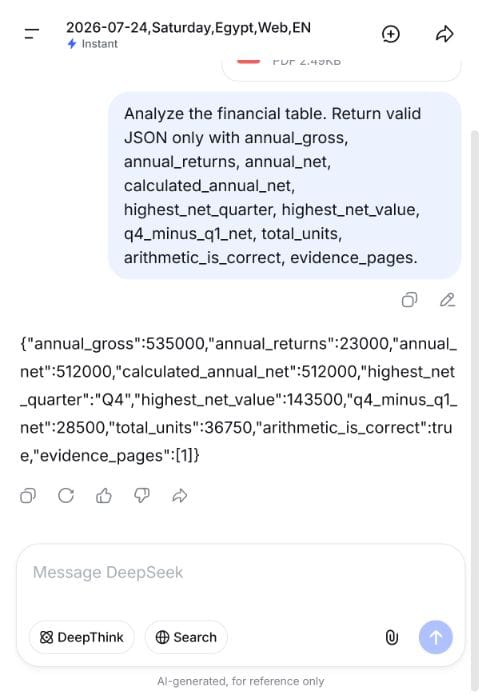
The table contained quarterly gross revenue, returns, net revenue, and units. DeepSeek had to total each measure, identify the strongest quarter, calculate the difference between Q4 and Q1, and verify the annual arithmetic.
All values were correct: $535,000 gross, $23,000 returns, $512,000 net, 36,750 units, Q4 as the highest-net quarter at $143,500, and a $28,500 Q4–Q1 difference. The first send button remained unavailable while the file processed, but the accepted submission completed in 7.5 seconds.
Test 6: 30-page document retrieval — 15/15
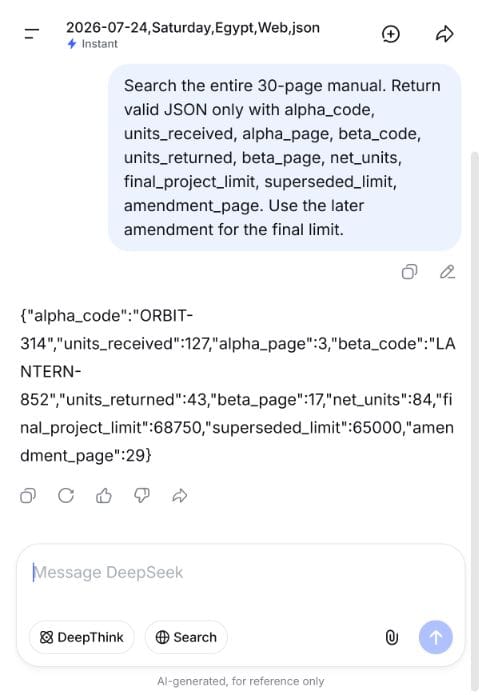
We placed one operational code and quantity on page 3, a second code and return quantity on page 17, and a budget amendment on page 29. Similar-looking text on other pages acted as distractors.
DeepSeek found ORBIT-314 and 127 units on page 3, LANTERN-852 and 43 returned units on page 17, calculated 84 net units, and used the page-29 amendment to replace the $65,000 limit with $68,750. It returned every requested page number correctly.
Test 7: Image-only chart — 1/10 in Instant, 10/10 in Vision
This was the decisive mode test. The PDF contained a raster bar chart with North 84, South 61, East 73, and West 92. The correct derived answers were West as the highest region, a 31-point West–South difference, and a total of 310.
Instant returned null for every value. We awarded one point because it did not fabricate numbers. We then opened a fresh chat, selected Vision, uploaded the same PDF, and used the same prompt. Vision returned all four values, both calculations, and the page reference correctly in 8.9 seconds.
Practical lesson: Do not treat a successful file attachment as proof that the selected mode can interpret every visual element. For similar chart- or image-dependent PDFs, test Vision on representative files before adopting a workflow.
Test 8: Contract amendment — 9/10
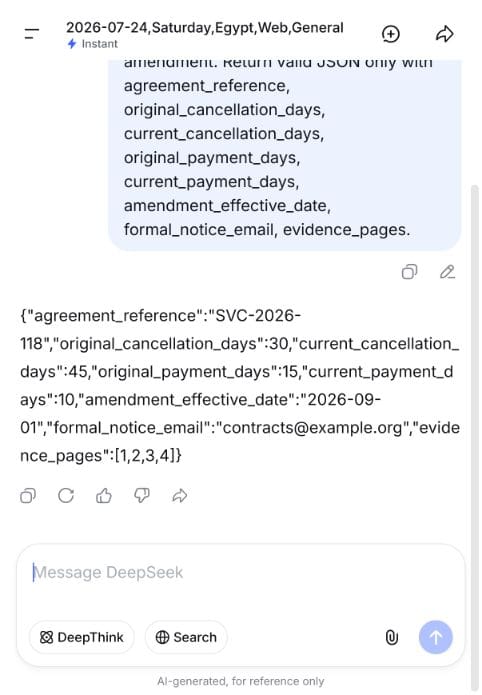
The agreement originally allowed cancellation with 30 days’ notice and payment within 15 days. A later amendment changed those terms to 45 days and 10 days, took effect on September 1, 2026, and preserved a formal-notice email.
DeepSeek returned every original and current value correctly and applied the later amendment. It lost one point because its evidence list included page 2 even though the scored terms were supported on pages 1, 3, and 4.
Test 9: Multi-file reasoning — 10/10
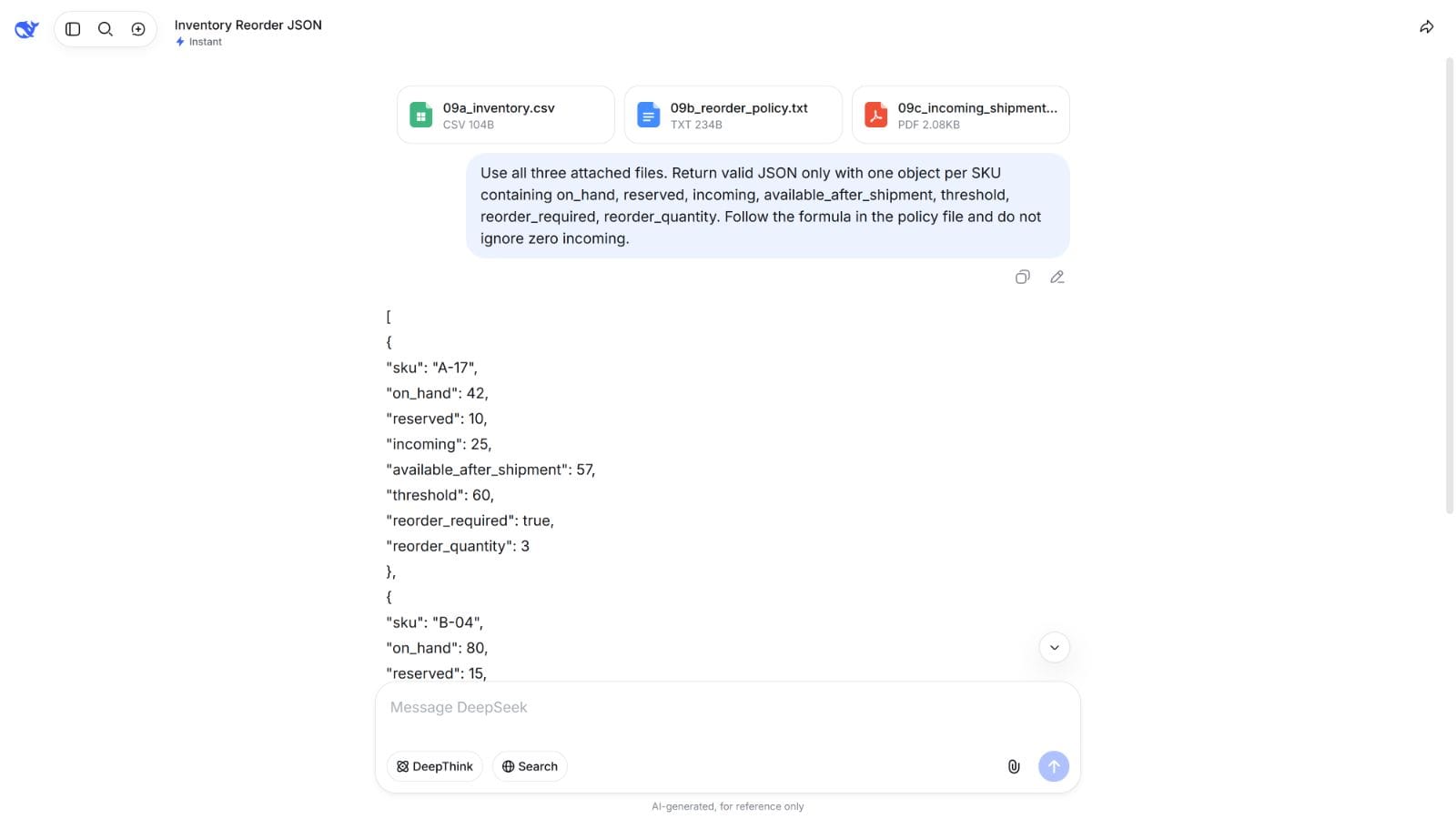
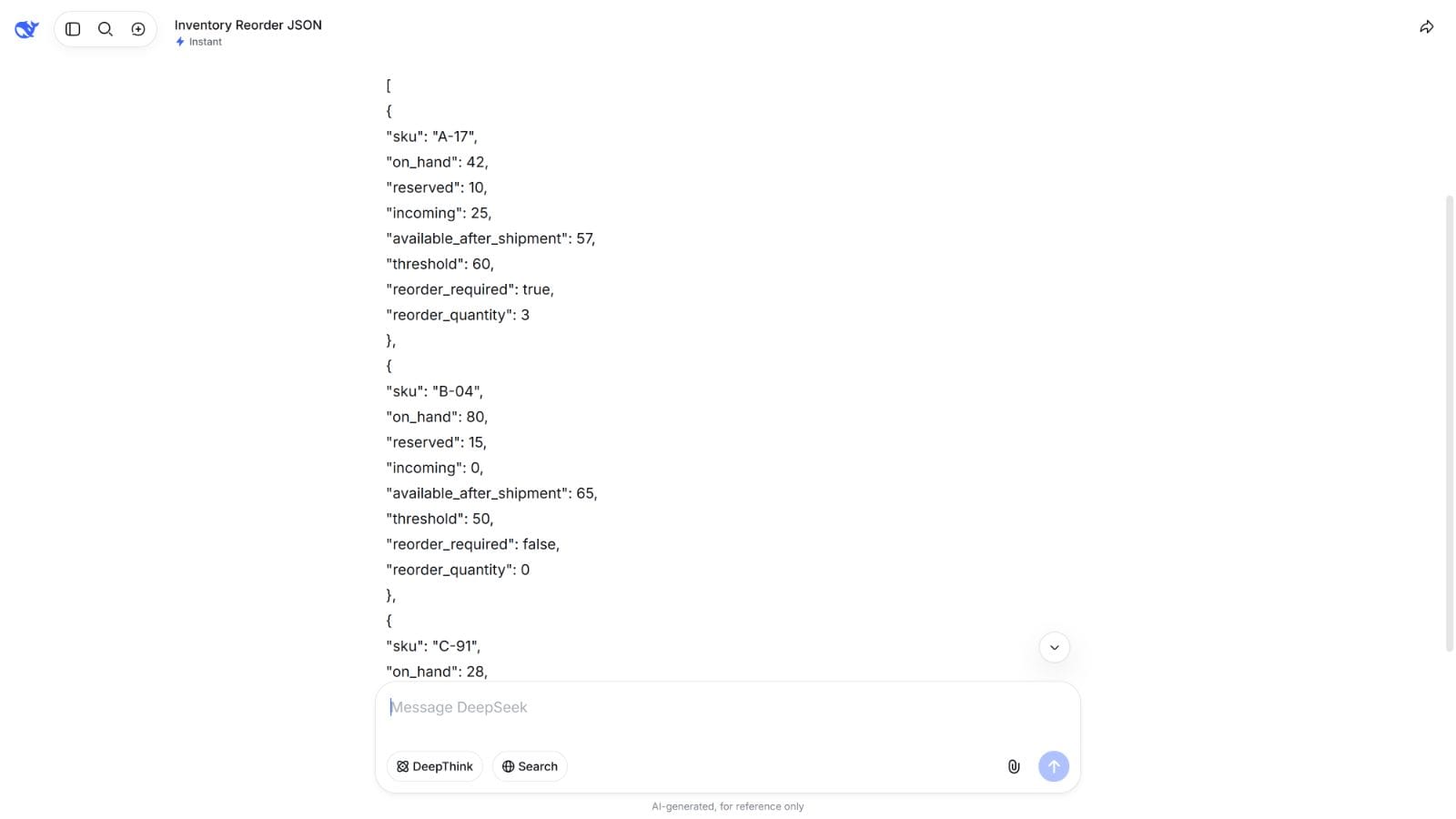
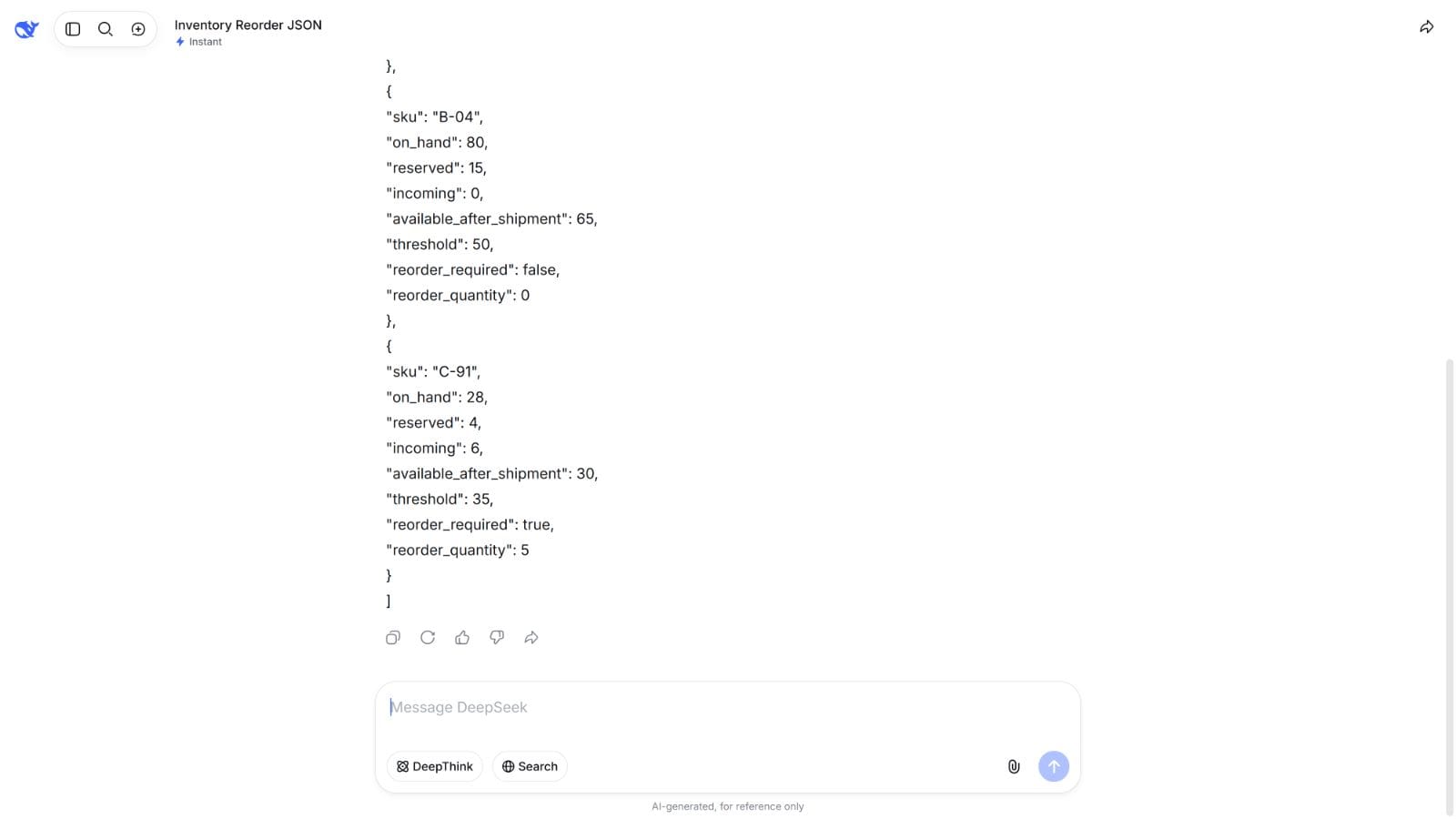
We uploaded three related files together: a CSV with inventory, a TXT file containing the reorder formula, and a PDF listing incoming shipments. DeepSeek had to calculate post-shipment availability and reorder quantities for three SKUs.
It correctly combined all three sources, handled a zero incoming quantity, and returned the correct result for every SKU: A-17 required 3 units, B-04 required none, and C-91 required 5 units.
Test 10: Password-protected PDF — 5/5
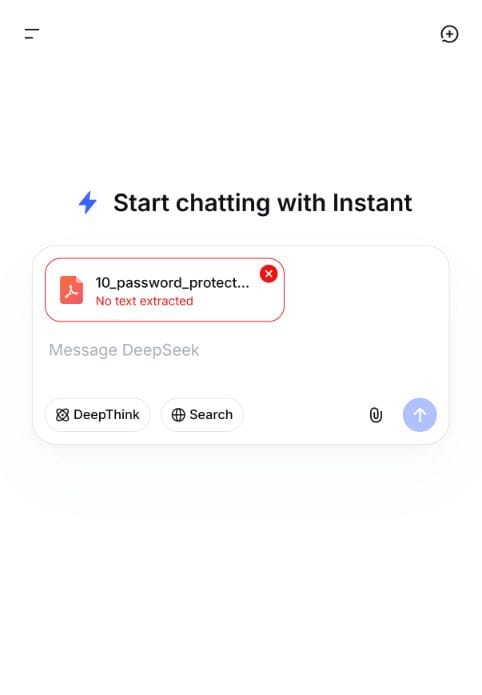
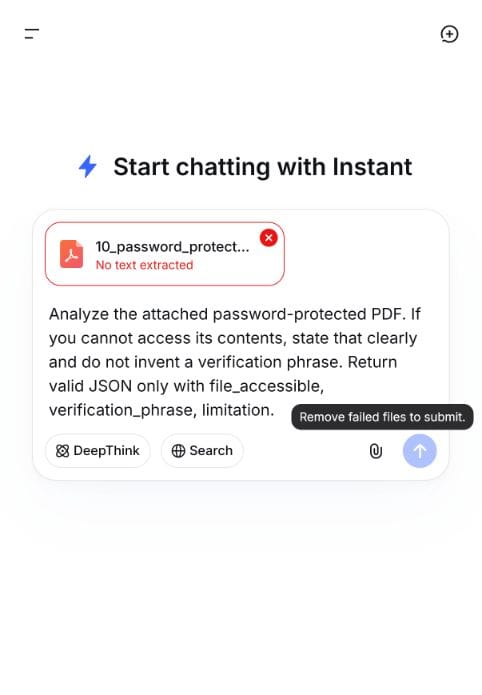
This task measured safe failure, not password bypassing. The encrypted PDF contained a hidden verification phrase. A reliable system should avoid claiming that it read protected content.
The interface labeled the file “No text extracted” and disabled submission. When a prompt was present, it displayed “Remove failed files to submit.” Because no request reached the model, no verification phrase or invented summary was produced. That is the correct outcome for this test.
Were the results consistent?
We repeated three high-risk cases in fresh chats:
| Repeated task | Mode | Consistency result |
|---|---|---|
| Scanned receipt OCR | Instant | Every material field matched the first run |
| 30-page retrieval | Instant | All 10 requested fields and page locations matched |
| Image-only chart | Vision | All chart values, calculations, and page reference matched |
The material-field consistency rate was 100% across these three repeats. That is encouraging, but three repeat runs are a stability check, not a guarantee for every document.
Best settings for DeepSeek PDF analysis
- Start by testing Instant on searchable documents, tables, and cross-file text tasks. It performed strongly on the text-centered examples in this suite.
- Test Vision on chart- or page-image tasks. Our single raster-only chart moved from 1/10 to 10/10 in Vision, but broader visual performance needs a larger sample.
- Disable Search for document-grounded work. This reduces the chance that outside information is mixed with the uploaded evidence.
- Request structured output. JSON fields made omissions, wrong calculations, and citation errors easy to detect.
- Ask for exact pages or source filenames. Then verify those citations. Two otherwise correct answers cited an extra page.
- Check that the send control is active. A file may still be processing even after its attachment card appears.
- Never assume an attached file was parsed. Confirm that the interface did not show an extraction failure.
How to upload and analyze a file
- Open a fresh DeepSeek Chat and select the mode you intend to test.
- Disable Search when the answer must come only from the uploaded evidence.
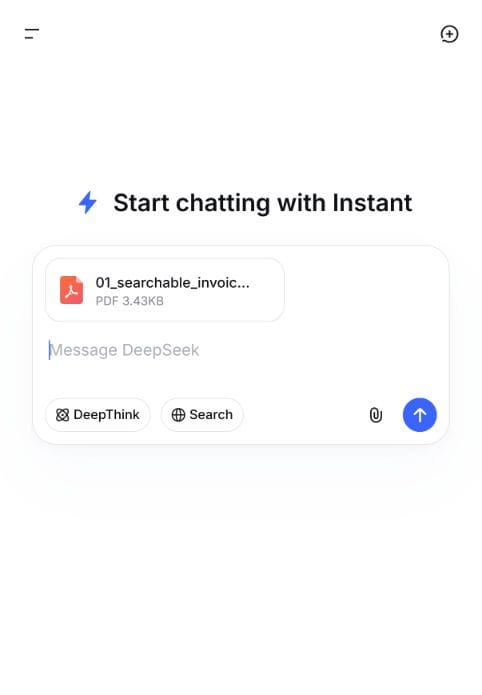
- Select the attachment control, choose the file, and wait until processing finishes.
- If the send control remains disabled or the file says “No text extracted,” remove the failed file and verify its format, encryption, or text layer.
- Request structured fields, calculations, and exact evidence pages, then check the answer against the original file.
Supported file types and upload limits
Our controlled set successfully used PDF, CSV, and TXT files in the web interface. That is an observation from July 24, 2026, not a permanent support guarantee. DeepSeek’s public Help Center gives image-upload failure examples such as unsupported image formats, no extractable text, and exceeding a maximum, but it does not publish a numerical size-and-format matrix. The official update log records a previous optimization to file upload and webpage summarization.
Do not convert DeepSeek V4’s advertised context window into an assumed PDF upload limit. Context capacity, file size, parser behavior, and the amount of extracted text passed to a model are separate constraints. Check the live interface and test a representative document before building a production workflow.
DeepSeek Chat file upload is not the same as the API
The consumer Chat interface used in this benchmark includes a file-processing layer. The documented DeepSeek chat-completions API currently describes message content as text. DeepSeek’s Anthropic-compatible documentation also marks image, document, and container-upload blocks as unsupported.
For an API workflow, plan to extract text, parse tables, or perform OCR before sending content to the model unless DeepSeek publishes a new native file endpoint. Do not advertise browser upload behavior as a documented API feature.
Privacy: what should you upload?
DeepSeek’s privacy policy treats uploaded files, photos, and chat content as user inputs. It advises users not to submit sensitive personal data, explains that inputs may be used to provide and improve services, provides a training-improvement opt-out, and states that data is stored and processed in the People’s Republic of China.
- Use synthetic or properly anonymized files for testing.
- Do not upload client contracts, medical records, identity documents, private financial records, or trade secrets without an approved data-governance process.
- Review the current privacy policy and account settings before use.
- Verify every high-impact answer against the original document.
- Remove passwords locally only when you are authorized to access the file; do not share passwords in a chat prompt.
Frequently asked questions
Can DeepSeek analyze PDF files?
Yes, the DeepSeek Chat web interface analyzed searchable, scanned, table-heavy, long, and amended PDFs in our test. Accuracy depended on document type and mode. The Instant-mode Chat product workflow scored 89/100, comprising 84/95 from submitted responses and 5/5 for protected-file interface handling.
Can DeepSeek read scanned PDFs?
It read our image-only scanned receipt correctly in Instant, including every line item and total. That result does not prove equal OCR accuracy on low-resolution, handwritten, rotated, or damaged scans.
Can DeepSeek read charts inside a PDF?
Mode choice mattered in this one chart case. Instant returned null for all values in our raster-only chart PDF, while Vision read every value and calculation correctly. Test Vision with representative visual files before relying on it more broadly.
Can DeepSeek analyze several files together?
Yes in our test. Instant combined a CSV inventory, a TXT policy, and a PDF shipment schedule and returned correct calculations for all three SKUs.
Can DeepSeek open a password-protected PDF?
Not in our test. The interface reported “No text extracted” and blocked submission until the failed file was removed. It did not invent protected content.
What is the maximum DeepSeek file size?
We did not find a public numerical upload-limit matrix in DeepSeek’s official documentation on the test date. Treat any visible interface behavior as time-specific and verify it again before publication or deployment.
Can the DeepSeek API accept a PDF directly?
The current official chat-completions documentation describes text message content, and the Anthropic-compatible guide lists native image and document blocks as unsupported. An API pipeline should extract or OCR the document before submitting text unless the documentation changes.
Final verdict: Is DeepSeek reliable for PDF analysis?
In this small synthetic benchmark, DeepSeek Chat was a strong file-analysis assistant when prompts requested verifiable structure and the document was routed to a suitable mode. Instant performed well on the tested text extraction, calculation, OCR, long-document, amendment, and cross-file cases. Its two point losses outside the chart test came from over-inclusive page citations, not wrong document values.
The raster-only chart is the critical caveat. Instant’s 1/10 result and Vision’s 10/10 result show why a single overall claim such as “DeepSeek reads PDFs” is too broad. The practical workflow is to use Instant for text-centered files, route visual documents to Vision, and verify every important answer against the source.
As a post-hoc sensitivity calculation, replacing the failed Instant chart result with the later Vision diagnostic changes the product total from 89/100 to 98/100. This was not a predeclared or independently rerun routing benchmark, so 89/100 remains the primary result. Neither score is a reason to remove human review from legal, financial, medical, compliance, or deadline-sensitive decisions.
Official sources
- DeepSeek Help Center
- DeepSeek update log
- DeepSeek V4 announcement
- DeepSeek models, context, and pricing
- DeepSeek chat-completions API reference
- DeepSeek Anthropic API compatibility guide
- DeepSeek privacy policy
- DeepSeek terms of use
Last tested July 24, 2026. Interface behavior, model routing, file support, and policies may change after publication.