
Documentation update (August 22, 2026): DeepSeek’s current hosted catalog has three API IDs: deepseek-v4-flash (Public Beta), deepseek-v4-pro (GA), and deepseek-v4-flash-vision-exp (Experimental). The Vision model accepts image input through Responses as a URL, Base64 data URL, or image file_id. This provider capability does not by itself prove that every Codex surface forwards image attachments correctly.
Evidence update (August 21, 2026): In a separately authorized bridge run, the retained Flash and Pro case artifacts each recorded PASS / HANDSHAKE_PASS. The run itself did not complete successfully: its final record is BLOCKED_STOPPED with INDETERMINATE_UPSTREAM_MAY_HAVE_STARTED and primary code INVALID_JSON after two upstream-request-created events. This is not verification of the direct env_key setup below. The bridge tested a locked minimal rebuilt request path; raw-forward equivalence, file, shell, patch, approval, recovery, quality, latency, cost, and reliability remain unverified here.
DeepSeek with Codex now has a first-party documented route for using DeepSeek’s hosted models in local Codex clients through the Responses API. The same user-level Codex configuration is read by Codex CLI, the ChatGPT desktop app, and the Codex IDE extension for VS Code, according to DeepSeek’s integration guide. That convenience also raises the stakes: changing one file can affect all three clients.
This guide shows the official DeepSeek setup exactly as documented, then provides a more secret-conscious alternative based on OpenAI’s current env_key field. It separates provider authentication from local file and command permissions, reports the bounded bridge evidence without upgrading it into a full compatibility claim, and labels every behavior that still needs a direct live test.
The short answer
- Check
minimal_client_versionin DeepSeek’s live Codex catalog before setup; the retained August 20 check recorded0.144.0for Flash and Pro, not a current minimum for Vision. - Back up
~/.codex/config.tomlbecause the user-level file is shared across local Codex clients. - Choose either DeepSeek’s official script/manual route or the
env_keyalternative below; do not mix fields without reviewing the final effective configuration. - Keep local authority narrow for the first run:
sandbox_mode = "read-only"andapproval_policy = "on-request". - Confirm the effective model and provider before sending a prompt. A model name in a picker is not proof of a successful DeepSeek request.
- For images, select
deepseek-v4-flash-vision-expand verify the exact Codex surface end to end; Flash and Pro remain text models.
DeepSeek’s provider catalog currently contains deepseek-v4-flash (V4-Flash-0731, Public Beta), deepseek-v4-pro (V4-Pro-0813, GA), and deepseek-v4-flash-vision-exp (Experimental). All three are documented for Responses; only Vision is multimodal. The retained August 20 catalog comparison recorded minimal_client_version 0.144.0 for Flash and Pro, and our isolated package check returned codex-cli 0.148.0 with exit code 0. That dated check did not cover Vision, so verify the live models.json and the exact Codex client before selecting it. None of this establishes authentication, routing, tool behavior, model quality, latency, or cost.
Understand the four boundaries first
| Boundary | What controls it | What it does not prove |
|---|---|---|
| Codex client session | Your ChatGPT or OpenAI authentication for OpenAI-backed features | It does not authenticate a third-party DeepSeek request when the provider uses its own key. |
| Model provider | model, model_provider, the provider table, and the selected model catalog | A visible DeepSeek label is not evidence that a request completed through DeepSeek. |
| Provider credential | DeepSeek’s documented bearer-token field or the environment variable named by env_key | It does not grant broader file, shell, browser, network, or connector permissions. |
| Local authority | Codex sandboxing, approval policy, permission profiles, and the workspace you open | Changing the model provider does not weaken or replace host-side controls. |
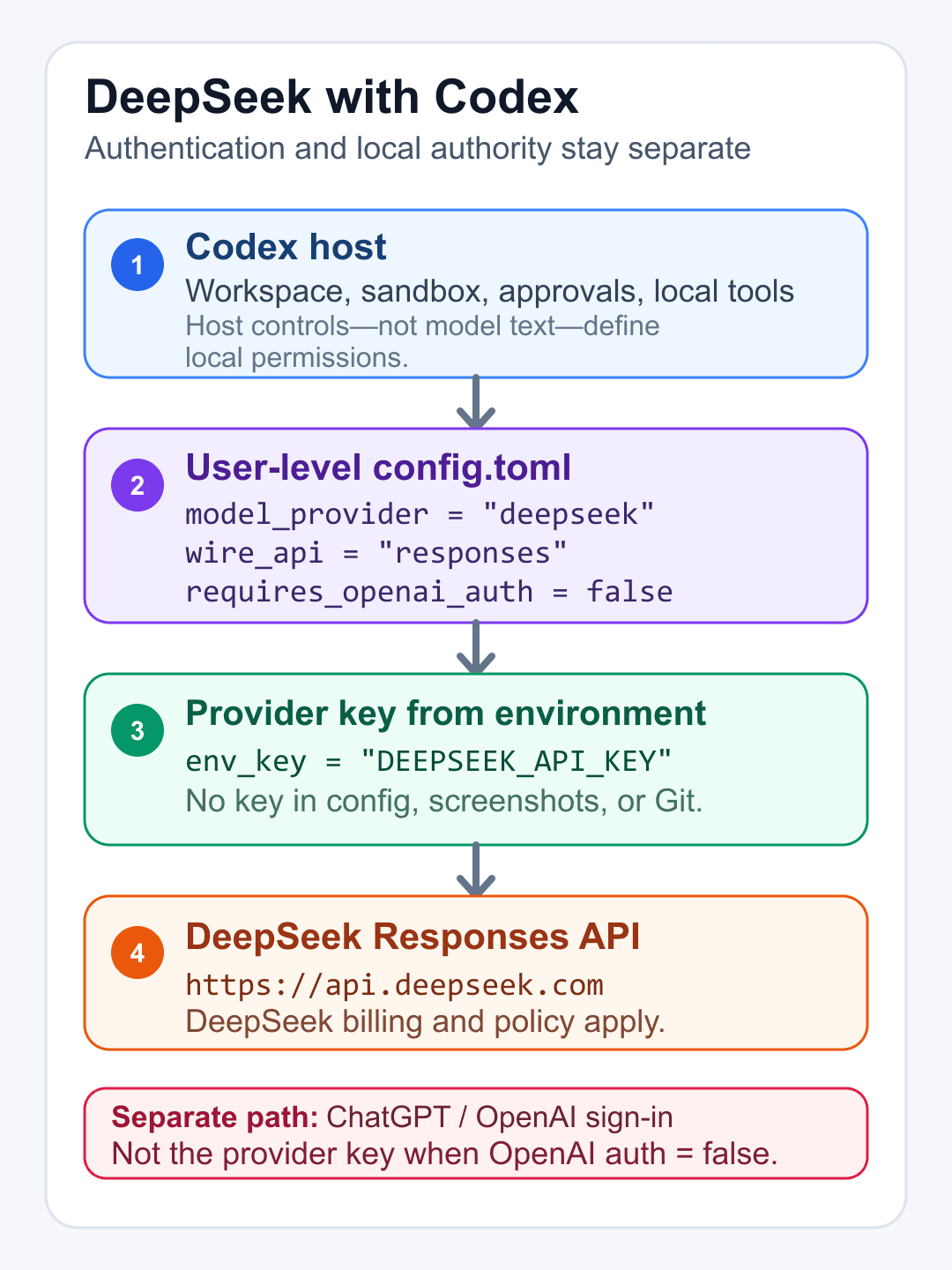
OpenAI’s current configuration reference says env_key names the environment variable that supplies a custom provider’s API key. It describes a direct experimental_bearer_token as discouraged and recommends env_key instead. The same reference lists responses as the only supported value for wire_api.
Before you change the configuration
- Install and launch Codex CLI or the ChatGPT desktop app at least once so
~/.codexexists. - Confirm the installed Codex version is at least the minimum shown in DeepSeek’s current
models.json. - Back up
~/.codex/config.tomland note which client is currently open. - Use a disposable repository containing no production secrets, customer data, or private keys for the first live check.
- Decide whether code and prompts from that repository are permitted to be sent to DeepSeek’s hosted API.
OpenAI’s reference places the user-level configuration at ~/.codex/config.toml. Project-scoped .codex/config.toml files cannot override model_provider or model_providers, so provider and authentication settings belong at user level, not in the repository.
Option 1: DeepSeek’s official one-click script
DeepSeek marks its setup script as the recommended route. The current official commands are:
macOS or Linux
bash <(curl -fsSL https://cdn.deepseek.com/api-docs/codex-deepseek-setup-en.sh)Windows PowerShell
irm https://cdn.deepseek.com/api-docs/codex-deepseek-setup-en.ps1 | iexSupply-chain warning: both commands download current remote content and execute it immediately. For a controlled workstation, download the script, inspect the exact bytes, record its hash, and run that reviewed copy instead of piping an uninspected response directly to a shell.
DeepSeek says the script backs up ~/.codex/config.toml under ~/.codex/backup-deepseek/, writes ~/.codex/models.json, updates only the necessary configuration fields, preserves unrelated settings such as MCP servers and project trust levels, and validates both files before writing. It can also switch models or restore the pre-installation configuration. These are vendor-documented behaviors; this refresh did not execute the script.
Option 2: DeepSeek’s official manual configuration
DeepSeek’s manual route first requires the full current ~/.codex/models.json from its Codex integration page. Do not copy a stale catalog from a third-party article: the file carries model metadata, supported reasoning levels, tool formats, context information, and the minimum client version.
The current DeepSeek manual config.toml block is reproduced below as documented, with the secret replaced by a placeholder:
model = "deepseek-v4-flash"
model_provider = "deepseek"
preferred_auth_method = "apikey"
forced_login_method = "api"
model_reasoning_effort = "high"
model_catalog_json = "~/.codex/models.json"

[model_providers.deepseek]
name = "deepseek"
base_url = "https://api.deepseek.com/"
wire_api = "responses"
experimental_bearer_token = "<your DeepSeek API Key>"
Credential warning: this official DeepSeek example stores the key directly in config.toml. OpenAI’s configuration reference describes direct experimental_bearer_token use as discouraged and points to env_key for a provider-specific environment variable. Never commit either configuration or catalog to a repository, include the key in a screenshot, or paste it into a support conversation.
A more secret-conscious env_key alternative
The following is our security-oriented adaptation of the two official contracts. It is not the configuration written by DeepSeek’s script, and this refresh did not send a model request through it. It keeps DeepSeek’s model catalog and Responses route while moving the secret out of config.toml using OpenAI’s documented env_key field:
model = "deepseek-v4-flash"
model_provider = "deepseek"
model_reasoning_effort = "high"
model_catalog_json = "~/.codex/models.json"
approval_policy = "on-request"
sandbox_mode = "read-only"

[model_providers.deepseek]
name = "DeepSeek"
base_url = "https://api.deepseek.com/"
wire_api = "responses"
env_key = "DEEPSEEK_API_KEY"
requires_openai_auth = false| Field | Why it is present |
|---|---|
model | Selects Flash for the first baseline. Test Pro in a separate fresh session. |
model_provider | Points Codex to the matching model_providers.deepseek table. |
model_catalog_json | Loads DeepSeek’s live Codex catalog. Verify that it exposes the intended Flash, Pro, or experimental Vision entry before use. |
base_url | Routes provider requests to DeepSeek’s documented endpoint. |
wire_api | Uses Responses, the only value supported by OpenAI’s current Codex reference. |
env_key | Reads the provider key from DEEPSEEK_API_KEY instead of embedding it in the TOML file. |
requires_openai_auth | Keeps provider-specific authentication separate from OpenAI authentication. |
approval_policy | Lets Codex pause when an action requires approval. |
sandbox_mode | Starts the first check without write authority. Expand authority only for an intended, reviewed task. |
Load the key for the current shell only
On Windows PowerShell, read the key without displaying it and keep it only in the current process tree:
$codexDeepSeekSecret = Read-Host "DeepSeek API key" -AsSecureString
$env:DEEPSEEK_API_KEY = [System.Net.NetworkCredential]::new("", $codexDeepSeekSecret).Password
Remove-Variable codexDeepSeekSecret
if ($env:DEEPSEEK_API_KEY) { "DEEPSEEK_API_KEY is set for this process" }
A plaintext environment variable is still visible to the current process and its children. Use a suitable secret manager for persistent team use, rotate any exposed key, and revoke a temporary test key after the run.
Shared configuration across CLI, desktop, and VS Code
DeepSeek says Codex CLI, the ChatGPT desktop app, and the Codex IDE extension share the same configuration file. Configure once, fully restart the affected client, and expect the selected DeepSeek model to appear across those local surfaces. DeepSeek notes that the desktop picker may show Custom rather than the model name on some platforms.
This sharing is a configuration claim, not proof that every client surface has identical tools or permissions. Test the exact client you plan to use. Codex cloud remains outside this local custom-provider procedure.
First-run permission settings
OpenAI currently documents approval_policy values including untrusted, on-request, and never, and sandbox_mode values of read-only, workspace-write, and danger-full-access. These are host controls. They are not selected or expanded by the DeepSeek model.
- Start with
read-onlywhile checking authentication and routing. - Use
on-requestso an attempted mutation can surface an approval boundary. - Move to
workspace-writeonly when the task genuinely requires repository changes. - Do not use
danger-full-accessorneverfor the first provider test. - Review MCP servers, plugins, browser access, network access, and other connectors separately; the model-provider block does not disable them.
What has actually been checked
| Check | Status | What it proves |
|---|---|---|
| Official package identity and local startup | PASS | The isolated npm package was @openai/codex version 0.148.0, and codex-cli 0.148.0 returned from --version with exit code 0. |
| DeepSeek catalog minimum | PASS, documentation comparison | 0.148.0 is above the catalog minimum of 0.144.0 checked on August 20, 2026. |
| Flash bridged handshake case | PASS, case artifact | The locked minimal rebuilt request returned HTTP 200 with one observed upstream-created event, one write, one response, TLS 1.3 authorization, zero retries, and zero followed redirects. |
| Pro bridged handshake case | PASS, case artifact | The equivalent Pro case returned HTTP 200 with the same bounded one-request counters, TLS 1.3 authorization, zero retries, and zero followed redirects. |
| Overall bridge run | BLOCKED_STOPPED | After both case artifacts recorded PASS, local finalization stopped with INVALID_JSON. No paid rerun was made because two upstream-created events had already been observed. |
| Direct env_key setup; file, shell, patch, approval, and recovery matrix | NOT RUN | The bridge did not test the direct setup or these host behaviors. They require separate client-native evidence on the exact tested surface. |
Do not add a verified claim to the title from either the package check or the bounded bridge cases. The bridge rebuilt a locked minimal request after validated Codex ingress; it was not the direct env_key route and was not byte-identical raw forwarding. DeepSeek’s script, literal-token route, direct env_key setup, and the full tool matrix remain documentation-only or NOT RUN in this edition.
What remains to be verified
- Keep the frozen direct
env_keymatrix distinct from the completed bridge cases; do not use the bridge result as a substitute. - Use only the separately labeled
env_keyadaptation; do not execute DeepSeek’s script or place a literal token in TOML during that matrix. - For Flash, use a fresh client home, process, and fixture for each case, with read-only sandboxing and on-request approvals.
- Run the frozen missing-key rejection, exact-text handshake, read-only file check, denied-write approval check, deterministic local test command, and recovery-after-an-expected-command-failure cases.
- Repeat the same six-case sequence for Pro with new isolated homes, processes, and fixtures.
- Record every route, request, native event, usage value, error, retry, cleanup outcome, and post-run blocker without combining Flash and Pro outcomes.
- Unset and revoke any temporary key under a separately authorized cleanup step, then confirm the normal Codex configuration was not overwritten.
The frozen prompts, pass criteria, version, configuration hashes, and stop conditions must be recorded before the first model result. The two retained bridge case passes establish only their bounded minimal response path. They do not prove the direct setup, file access, command execution, approvals, patching, or recovery.
Flash or Pro for Codex?
The retained bounded bridge evidence includes one separate case for deepseek-v4-flash and one for deepseek-v4-pro; each case artifact recorded PASS, but the run-level record remained BLOCKED after local finalization. The official catalog describes both as agentic coding models, but this guide has not measured their relative quality, latency, cost, or reliability. Recheck current availability and pricing before any future paid run.
For broader workflow advice, see our DeepSeek coding guide. For editor-specific setup, use the DeepSeek in VS Code guide. For measured API behavior, see the DeepSeek Responses API compatibility audit.
DeepSeek Responses API limits that matter in Codex
| Capability | Current documented status | Practical limit |
|---|---|---|
| Text input and output | Supported by Flash, Pro, and Vision Exp | Do not turn support across three IDs into a claim that their quality, latency, or status is identical. |
| Image input | Supported by deepseek-v4-flash-vision-exp | Responses accepts an input_image by public URL, Base64 data URL, or image file_id. Flash and Pro remain text-only. |
Generic documents and input_file | Unsupported | The Files API accepts images for Vision reuse; it is not a general PDF, document, or arbitrary-file input route. |
| Streaming | Supported | The stream uses semantic SSE events and does not terminate with data: [DONE]. |
| Conversation state | Stateless | The client must resend context needed for the next turn; do not assume OpenAI previous-response state. |
| Function tools | Supported | Schema and execution still require an end-to-end client test. |
| JSON Schema request format | Documented, with mixed historical audit conformance | In our separate 48-result Responses audit, one Flash schema case returned HTTP 200 but its visible JSON did not conform; the matching Pro case passed. Those dated text-model results do not test Vision. |
| Custom tools | Limited | DeepSeek documents the apply_patch custom tool for Codex compatibility; other custom names can error. |
| Server web search | Supported | DeepSeek executes it server-side; ignored request fields still require careful interpretation. |
file_search, code_interpreter, computer_use, MCP, and other Responses built-ins | Ignored at the DeepSeek API layer | This describes API tool types, not every local capability hosted by Codex. |
| Unsupported request fields | Often silently ignored | A 200 response does not prove every requested option affected generation. |
Vision input through Responses: URL, Base64, or file_id
The following payload shapes reflect DeepSeek’s current Responses contract for deepseek-v4-flash-vision-exp. They document the provider API; they do not establish that a particular Codex UI, clipboard flow, or local attachment feature serializes the same parts without an end-to-end test.
// Public image URL
{
  "model": "deepseek-v4-flash-vision-exp",
  "input": [{
    "role": "user",
    "content": [
      {"type": "input_text", "text": "Describe this image."},
      {"type": "input_image", "image_url": "https://example.com/image.png"}
    ]
  }]
}

// Base64 data URL
{"type": "input_image", "image_url": "data:image/png;base64,iVBORw0KGgo..."}

// Image previously uploaded through DeepSeek's Files API
{"type": "input_image", "file_id": "file-api-..."}
Use file_id only for a supported image uploaded to DeepSeek’s Files API. A generic Responses input_file part is not supported, and the Files API does not turn PDFs, office documents, or arbitrary files into valid model input.
Historical visual below: it was checked against the August 20 Responses contract, before Vision Exp and image-file support were announced on August 21. Preserve it as dated evidence for the Flash/Pro text audit, not as a current support map.
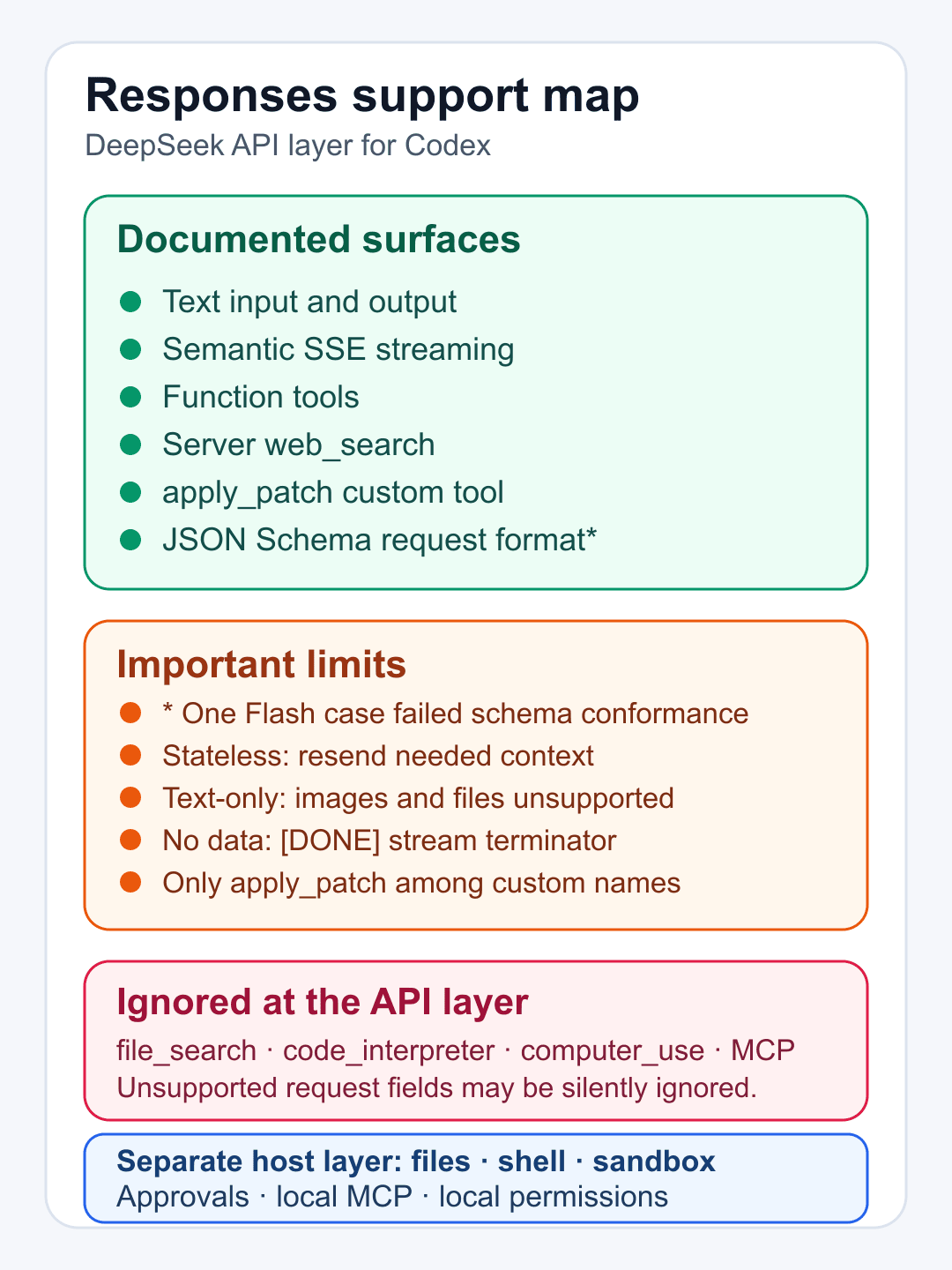
The layer distinction matters. DeepSeek’s documentation describes requests reaching its Responses endpoint. Codex can host local files, commands, approvals, sandboxing, MCP, and other tools around the model. An ignored API tool type does not prove that a similarly named host capability is absent.
Fix common setup failures
The model is missing or rejected
- Check the installed Codex version against
minimal_client_versionin DeepSeek’s current catalog. - Confirm
model_catalog_jsonpoints to the currentmodels.json. - Validate the JSON and TOML before restarting the client.
- Confirm the exact model ID is
deepseek-v4-flash,deepseek-v4-pro, ordeepseek-v4-flash-vision-exp. Vision is Experimental; confirm the live Codex catalog exposes it before use. - Fully restart the CLI, desktop app, or IDE extension after changing the shared configuration.
401 or authentication failed
- For the safer alternative, confirm
DEEPSEEK_API_KEYexists in the same process tree that launched Codex. - Confirm
env_keycontains the environment-variable name, not the secret value. - Confirm
requires_openai_authis false for the custom provider. - If using DeepSeek’s literal-token example, check for accidental whitespace and rotate the key if the file was exposed.
- Never print the variable or include raw authentication headers in evidence.
The desktop app shows “Custom”
DeepSeek says the ChatGPT desktop picker can display Custom when the selected DeepSeek provider configuration is active. Treat that label as a configuration signal, not proof of a completed request. Confirm the effective model and provider, then run a bounded handshake.
Previous sessions appear to be missing
DeepSeek says Codex groups session history by login method. Sessions created with a ChatGPT subscription and sessions created with a third-party API can therefore appear in separate groups. Restore the previous configuration and restart the client to show the other group again; do not assume the sessions were deleted.
Privacy and cleanup checklist
- Assume prompts and submitted code routed to
https://api.deepseek.comare processed under DeepSeek’s policies, not your ChatGPT workspace policy. - Do not send production secrets, customer records, private keys, or regulated data in a first-run repository.
- Review local sandboxing and approvals separately from provider compatibility.
- Retain sanitized evidence only; remove usernames, private paths, tokens, account identifiers, and request headers.
- After testing, exit Codex, remove
DEEPSEEK_API_KEYfrom the current shell, revoke the temporary key, and restore the intended configuration using the reviewed backup. - Restart every local client that shares the configuration, then confirm the expected provider and session group.
# PowerShell, current process only
Remove-Item Env:DEEPSEEK_API_KEY -ErrorAction SilentlyContinue

# macOS or Linux, current shell only
unset DEEPSEEK_API_KEY
For general ownership and errors, use our DeepSeek API guide. For other clients, use the DeepSeek integrations directory. Neither replaces the Codex-specific provider and permission boundaries above.
FAQ
Can Codex use DeepSeek without a ChatGPT sign-in?
For local Codex clients, DeepSeek documents API-key authentication that skips ChatGPT account login. The safer alternative on this page uses a provider-specific environment variable with requires_openai_auth = false. Codex cloud is outside this procedure.
Which Codex version does the current DeepSeek catalog require?
The retained August 20, 2026 catalog check showed minimal_client_version 0.144.0 for Flash and Pro, and our isolated 0.148.0 package started successfully. That evidence predates Vision Exp and does not establish its minimum client version. Recheck the live DeepSeek models.json for all three entries before setup.
What does DeepSeek’s setup script change?
DeepSeek says it backs up config.toml, writes models.json, updates the required provider fields while preserving unrelated settings, validates both files, and offers model switching and restoration. This guide did not execute the script.
Where should I put the DeepSeek API key?
DeepSeek’s current manual example puts it in experimental_bearer_token. OpenAI describes that direct token field as discouraged and documents env_key for an environment-variable name. This guide recommends the environment-variable alternative and clearly labels it as an adaptation.
Do CLI, desktop, and the VS Code extension share this setup?
Yes, according to DeepSeek’s current integration page, all three local clients read the same Codex configuration file. Restart the affected client after switching providers, and test its exact tool and permission surface separately.
Why does wire_api have to be responses?
OpenAI’s current Codex configuration reference lists responses as the only supported wire_api value, and DeepSeek documents native Responses API support for Codex. DeepSeek’s Responses contract now includes image input for Vision Exp, but generic input_file document input remains unsupported.
Does changing the provider change Codex permissions?
No. Provider routing and local authority are separate. Sandboxing, approval policy, workspace scope, network access, MCP servers, plugins, and connectors still need their own review.
Why did previous sessions disappear after switching providers?
DeepSeek says Codex keeps sessions in groups based on login method. Restore the earlier configuration and restart the client to show the prior group again; switching the visible group does not mean those sessions were deleted.
Official sources checked
- DeepSeek: Integrate with Codex
- OpenAI Codex configuration reference
- DeepSeek Responses API guide
- DeepSeek Responses API reference
- DeepSeek Vision guide
- DeepSeek Files API guide
- DeepSeek Vision Exp and Files API release
- DeepSeek models and pricing
- DeepSeek privacy policy
Provider documentation rechecked August 22, 2026. The isolated Codex CLI package/startup check and the retained Flash/Pro bridge artifacts remain dated August 20–21; they were not rerun for Vision. No authenticated Codex-to-DeepSeek request was made for this documentation update. Model IDs, catalog metadata, client requirements, pricing, scripts, and compatibility can change.