
Last verified: July 28, 2026 · Scope: DeepSeek API connection methods, automation platforms, business apps, developer frameworks, agent tools, and security boundaries. Chat-Deep.ai is independent, is not operated or endorsed by DeepSeek or the vendors named here, and is not an official support channel for any of them.
DeepSeek integrations connect DeepSeek models to apps, automation platforms, developer tools, data sources, and AI frameworks. The connection usually runs through the DeepSeek API, a platform connector, a webhook, an automation workflow, or a custom backend—not through a native account connection inside DeepSeek Chat.
Quick answer: Does DeepSeek have integrations?
Yes. DeepSeek officially provides hosted API formats, JSON Output, Tool Calls, and setup documentation for selected third-party agent tools. Most connections to Slack, Gmail, Notion, WordPress, Shopify, Jira, and similar products are not native DeepSeek features. They use the target platform’s API, a vendor connector, an automation service, or code that you operate.
This guide helps you identify the real connection route, the party that maintains it, the first low-risk workflow to try, and the permissions that must be checked before production use.
Independent live API check: July 28, 2026
- Current model inventory: a live
GET /modelsrequest returneddeepseek-v4-flashanddeepseek-v4-pro. The olderdeepseek-chatanddeepseek-reasoneraliases were not listed. - Tool Calls:
deepseek-v4-flashreturned one proposedcreate_support_ticketcall with the expected synthetic title and priority. No ticket or external action was executed. - JSON Output: the same model returned parseable JSON with the two requested keys and values.
These were bounded single-run checks using synthetic data. They verify a narrow API boundary, not the reliability, security, or end-to-end behavior of every connector on this page. See the DeepSeek API testing guide, Tool Calls tests, and JSON Output tests for deeper evidence and limitations.
In this DeepSeek integrations guide
- Browse integrations by platform
- Understand official, vendor, and custom routes
- Compare integration methods
- Automation and internal-tool integrations
- Work and collaboration integrations
- Customer, commerce, content, and community integrations
- API, SDK, RAG, and agent integrations
- Security checklist
- Frequently asked questions
Browse DeepSeek integrations by platform
Use this directory to find the most practical starting route. A platform name means that a connection is technically possible through the route shown; it does not imply a first-party partnership or a one-click integration maintained by DeepSeek.
| Platform | Common route | Good first workflow | Main control to verify |
|---|---|---|---|
| n8n | DeepSeek model node or HTTP Request | Classification, extraction, or reviewed draft | Credentials, execution history, retries |
| Zapier and Make | Listed connector, webhook, or API action | One trigger followed by reviewed output | Connector owner, current actions, retention |
| Pipedream | Component, API request, code step, or webhook | Structured event processing | Secrets, logs, retries, destination authorization |
| Retool | Protected backend resource or custom provider | Internal support or operations tool | User, tenant, and query permissions |
| Google Workspace | Workspace APIs, Apps Script, add-on, or automation | Selected-document summary or meeting brief | OAuth scopes and cross-app access |
| Gmail and Outlook | Gmail API, Microsoft Graph, add-in, or workflow | Triage, summary, or reply draft | Mailbox scope and approval before sending |
| Slack | Slack app, bot, Events API, or automation | Channel summary or source-backed Q&A | Channel access, scopes, posting approval |
| Microsoft Teams | Teams bot, Graph, Workflows, or middleware | Meeting recap or internal Q&A | Tenant consent and transcript permissions |
| Notion | Notion API or automation platform | Page summary or database-entry draft | Pages shared with the integration |
| Jira, Confluence, and Linear | Product APIs, webhooks, or middleware | Issue or specification draft | Project access, field validation, status changes |
| ServiceNow and Jira Service Management | ITSM APIs and workflow engines | Ticket triage or knowledge suggestion | Roles, SLA effects, escalation, write authority |
| Zendesk, Intercom, and Freshdesk | Helpdesk APIs, webhooks, or custom apps | Ticket summary or agent-reviewed reply | Customer visibility, grounding, public replies |
| Shopify and WooCommerce | Store APIs, webhooks, plugin, or backend | Product draft or return-reason classification | Customer data, refunds, inventory, publishing |
| WordPress | Server-side plugin, REST API, or workflow | Draft content or editorial assistance | API-key storage and publishing authority |
| Webflow and Framer | CMS API, plugin, CSV, or middleware | CMS field or landing-page draft | Staging target, fields, locale, asset rights |
| Discord | Bot, slash command, or automation | Opt-in FAQ or community summary | Server permissions and channel allowlists |
| WhatsApp Business and Telegram | Messaging API, bot API, webhook, or middleware | Reviewed support answer or intent routing | Consent, identity, escalation, send authority |
| Power BI and Tableau | Backend API, data-preparation step, or extension | Explanation or draft query from approved data | Dataset permissions and result validation |
| Janitor AI and custom chat interfaces | Custom-provider fields or an API proxy | Text-only chat with a supported model | Endpoint, model ID, key exposure, UI limits |
What counts as a DeepSeek integration?
“Supported,” “integrated,” and “native” are often used interchangeably even though they describe different relationships. Use the following labels when evaluating a claim.
| Label | What it means | What it does not prove |
|---|---|---|
| DeepSeek API capability | DeepSeek documents an endpoint or feature such as Chat Completions, JSON Output, Tool Calls, or an Anthropic-compatible format | Compatibility with every SDK feature, product, or workflow |
| DeepSeek-documented third-party tool | DeepSeek publishes configuration instructions for an external agent or coding tool | Ownership, endorsement, effectiveness, or security |
| Platform or vendor connector | An automation vendor or its partner provides a DeepSeek connector or configurable model step | A first-party DeepSeek partnership or identical behavior across vendors |
| Custom integration | Your application connects DeepSeek to another platform’s API or webhook | A ready-made product or safe default configuration |
| Manual workflow | A person transfers approved content between systems | Automated account access or synchronization |
| Self-hosted route | Your organization runs compatible DeepSeek model weights behind an endpoint it controls | Automatic privacy, hosted-API parity, or absence of logs and telemetry |
Before describing a route as native, confirm that the claim is documented by the companies responsible for both sides of the connection. A marketplace listing, community package, or compatible API shape is not evidence of a commercial partnership.
Which DeepSeek integration method should you choose?
| Requirement | Best starting route | Main trade-off |
|---|---|---|
| Add one model feature to your product | Server-side DeepSeek API request | You build validation, monitoring, and application state |
| Reuse existing Chat Completions code | OpenAI-compatible SDK | Compatibility is limited to documented API surfaces |
| Use an Anthropic-style client or supported agent host | Anthropic-compatible endpoint | Some Anthropic fields and content types are unsupported or ignored |
| Connect SaaS triggers quickly | n8n, Zapier, Make, Pipedream, or another approved workflow platform | The workflow vendor becomes another processor and control layer |
| Build a governed internal application | Retool or a custom backend | More engineering and authorization work |
| Build RAG, agents, or multi-step workflows | LangChain, LlamaIndex, or custom orchestration | More dependencies and version-specific behavior |
| Control the model runtime | Self-host compatible weights | Infrastructure, security, evaluation, and operations become your responsibility |
Choose the smallest route that meets the real requirement. A one-step summarization feature rarely needs an agent framework. A workflow that changes customer, financial, access, or operational records needs more control than a one-click connector normally provides. The DeepSeek workflow automation guide covers triggers, queues, approvals, retries, and production controls in more depth.
DeepSeek automation and internal-tool integrations
DeepSeek n8n integration
n8n provides a DeepSeek Chat Model node and DeepSeek API credentials, and it can also call the API through an HTTP Request node. Use the model node for standard AI workflows and an HTTP request when you need direct control over current request fields, JSON Output, thinking mode, or error handling.
A good first workflow classifies synthetic support tickets or creates a draft that stops for review. Store the key in n8n credentials, inspect what appears in execution history, and add schema validation before connecting email, databases, stores, or ticket actions. An AI Agent node does not remove the need to authorize the eventual action. For wider route comparisons, use the workflow automation guide.
DeepSeek with Zapier and Make
Zapier lists a DeepSeek app and documents actions such as Chat Completion and an API Request beta. The listing does not establish that the app is maintained by DeepSeek. Make lists a verified DeepSeek AI app, but its marketplace identifies Synergetic GmbH, a Make partner, as the developer and maintainer. These distinctions matter when you evaluate change control, support, and security ownership.
Both platforms can be useful for straightforward workflows such as summarizing approved text, extracting fields, classifying an event, or preparing a draft. Verify the current connector owner, action list, model fields, authentication method, plan requirements, run-history retention, retries, and destination permissions. Connector pages can lag behind DeepSeek’s API changes, so use DeepSeek’s own documentation for model IDs and request behavior.
DeepSeek Pipedream integration
Pipedream provides verified components for DeepSeek and states that its components are developed by Pipedream and the community and maintained by Pipedream. A workflow can place a DeepSeek request after an app event, webhook, schedule, or HTTP trigger and can combine connector steps with custom code.
Start by sanitizing one event and returning structured data for review. Check which account owns each step, where secrets are stored, what event data appears in logs, how retries work, and whether a repeated run could duplicate an external action. DeepSeek returns model output; Pipedream and the destination component execute workflow actions.
DeepSeek Retool integration
Retool can use DeepSeek through a protected backend resource or a custom AI-provider configuration where supported. This route fits internal support consoles, document-review tools, operations dashboards, and analyst interfaces because it combines application UI with access to approved data sources.
Keep the model request server-side and authorize both the user and the underlying record. A user who can open the app should not automatically gain access to every customer, ticket, database row, or model tool. Show drafts beside source records, enforce tenant boundaries, and require explicit approval before writing to a system of record.
DeepSeek work and collaboration integrations
DeepSeek Google Workspace integration
Google Workspace workflows can connect Docs, Drive, Gmail, Calendar, or Sheets to DeepSeek through Workspace APIs, Apps Script, an approved add-on, an automation platform, or a custom backend. Useful first cases include summarizing a user-selected document excerpt, drafting from selected fields, and preparing—but not creating—calendar-event details.
Use narrow OAuth scopes and retrieve only the files, messages, or events needed for the task. Confirm shared-drive access, document permissions, calendar identity, add-on data handling, and whether output can cross from one Workspace service into another. For a focused spreadsheet route, see the DeepSeek for Google Sheets guide.
DeepSeek Gmail and Outlook integration
DeepSeek can support email triage, thread summaries, action-item extraction, and reply drafts through the Gmail API, Microsoft Graph, add-ins, automation platforms, or custom applications. This is normally an external workflow rather than a native DeepSeek inbox feature.
Begin with a user-selected message or folder, not whole-mailbox access. Separate read permission from send permission and create drafts for review. Verify recipients, quoted history, attachments, mailbox identity, delegated access, retention, and OAuth scopes immediately before sending anything.
DeepSeek Slack integration
A DeepSeek Slack assistant can use a Slack app, bot, Events API, slash command, workflow platform, or backend service. Practical uses include channel summaries, thread summaries, internal Q&A with source links, and private response drafts.
Limit the app to approved workspaces and channels. Private-channel access, message history, files, member data, and posting identity require separate review. Treat Slack content as untrusted input: a message must not expand the bot’s permissions, reveal secrets, or cause an unapproved post or action.
DeepSeek Microsoft Teams integration
Microsoft Teams can connect to DeepSeek through a Teams bot, Microsoft Graph, Teams Workflows, Power Automate, approved middleware, or a separately governed model deployment. Common workflows include meeting recaps, internal knowledge answers, ticket-creation drafts, and weekly status summaries.
Meeting workflows need an accessible transcript; DeepSeek does not automatically join or read meetings. Verify tenant consent, Graph permissions, meeting and channel scope, transcript policy, file access, middleware storage, and the identity used when content is posted back to Teams.
DeepSeek Notion integration
A Notion integration can send selected page or database content to DeepSeek and return a summary, structured fields, a draft page, or a proposed database update. The usual routes are the Notion API, an automation platform, or a custom backend.
Notion integrations access only the pages and databases shared with them, so keep that scope narrow. Validate destination databases, property types, relation fields, page ownership, duplicate prevention, and write approval. Do not describe DeepSeek as being inside Notion AI unless a current first-party product explicitly supports that route.
DeepSeek with Jira, Confluence, and Linear
DeepSeek can support product specifications, issue summaries, sprint preparation, engineering handoffs, and draft tickets by connecting through platform APIs, webhooks, automation tools, or middleware.
Restrict retrieval to approved projects and spaces. Validate issue type, project, assignee, labels, visibility, status, and required fields outside the model. A proposed issue is safer than an automatic assignment, priority change, status transition, or closure. Preserve links to the supporting Confluence, Jira, or Linear records.
DeepSeek with ServiceNow and Jira Service Management
ServiceNow and Jira Service Management workflows can use DeepSeek for ticket classification, internal summaries, knowledge suggestions, response drafts, and escalation support. The ITSM platform remains responsible for identities, roles, queues, SLAs, approvals, and record changes.
Begin with internal assistance rather than autonomous resolution. Check customer-versus-agent visibility, service roles, knowledge permissions, assignment rules, SLA effects, and escalation paths. Never allow model output alone to close an incident, change priority, approve access, or trigger a production action. Related customer, sales, ecommerce, and service workflows are grouped in the customer operations and commerce guide.
DeepSeek customer, commerce, content, and community integrations
DeepSeek with Zendesk, Intercom, and Freshdesk
Helpdesk APIs, webhooks, custom apps, and orchestration services can connect support conversations to DeepSeek for summaries, tagging, intent classification, knowledge suggestions, and agent-reviewed reply drafts.
Ground answers in approved help content and preserve the source used. Distinguish private notes from public replies, minimize customer data, and escalate uncertain, angry, legal, security, billing, or account-access cases. Native helpdesk AI may be a better fit for standard platform workflows; use DeepSeek when a custom or cross-system model layer has a clear purpose.
DeepSeek Shopify and WooCommerce integration
Shopify and WooCommerce can connect to DeepSeek through store APIs, webhooks, WordPress plugins, automation platforms, or custom backends. Lower-risk uses include product-description drafts from verified catalog fields, review classification, ticket summaries, and return-reason analysis.
Store data is operational data, not just writing material. Validate product facts, variants, prices, availability, policy, customer identity, order status, and inventory. Refunds, cancellations, discounts, fulfillment changes, and customer messages require deterministic rules and authorized approval.
DeepSeek WordPress integration
WordPress can call DeepSeek from a server-side plugin, custom REST route, workflow platform, or maintained third-party plugin. Suitable uses include outlines, metadata options, summaries, editorial assistance, and chatbot drafts based on approved content.
Never expose a shared DeepSeek key in frontend JavaScript, theme files, browser-visible requests, or downloadable configuration. Restrict post types, authors, statuses, media access, and REST permissions. Generated content should enter WordPress as a draft unless a reviewed publishing workflow explicitly authorizes another state.
DeepSeek Webflow and Framer integration
Webflow and Framer workflows can use DeepSeek to draft CMS fields, page structures, metadata, localization variants, and content-review notes. Connections may use a CMS API, plugin, CSV process, automation platform, or custom backend depending on the product and account plan.
Treat output as a draft, not proof of factual accuracy, design quality, accessibility, or search ranking. Validate the destination collection, required fields, locale, staging environment, asset rights, links, and publish authority before updating a live site.
DeepSeek Discord integration
A Discord bot can use DeepSeek for opt-in commands, community FAQs, onboarding answers, summaries, translation drafts, and moderator assistance. The bot or workflow host—not DeepSeek—receives events and posts messages.
Prefer slash commands and approved channels over unrestricted server-wide reading. Verify bot permissions, privileged intents, message retention, moderation boundaries, member data, rate limits, and abuse controls. Sensitive moderation decisions and enforcement actions should remain under accountable human control.
DeepSeek WhatsApp Business and Telegram integration
WhatsApp Business and Telegram bots can route selected messages to DeepSeek through platform APIs, webhooks, middleware, or automation services. Common uses include intent classification, knowledge-backed support drafts, lead qualification, and multilingual response assistance.
The platforms have different requirements. WhatsApp workflows may involve user opt-in, approved templates, and conversation-window rules; Telegram bots use their own tokens, chat permissions, webhook or polling behavior, and abuse controls. In both cases, verify consent, conversation identity, retention, escalation, and send authority before automating replies.
DeepSeek Power BI and Tableau integration
Business-intelligence workflows can call DeepSeek through a controlled backend, data-preparation process, custom connector, extension, or approved automation layer. Use cases include explaining a selected result, drafting a query, classifying comments, and generating narrative summaries from approved aggregates.
Keep dataset permissions in the BI platform and never let a prompt bypass row-level security. Validate calculations, filters, dates, units, and query text before presenting an answer as analysis. See the tested implementation routes in the Power BI integration guide and Tableau and Looker Studio guide.
DeepSeek on Janitor AI and other custom chat interfaces
A custom chat interface may offer provider fields for an API endpoint, key, and model name, or it may require a proxy that translates its requests. Compatibility depends on the fields the interface actually sends and receives; a base-URL option alone does not prove full support.
Use current model IDs, keep the API key out of shared characters and browser-visible configuration, and check whether the interface expects unsupported images, files, web search, moderation, or streaming behavior. Treat older aliases as undocumented and subject to change. Chat-Deep.ai does not operate Janitor AI and cannot inspect or secure a third-party interface on your behalf.
DeepSeek API, SDK, RAG, and agent integrations
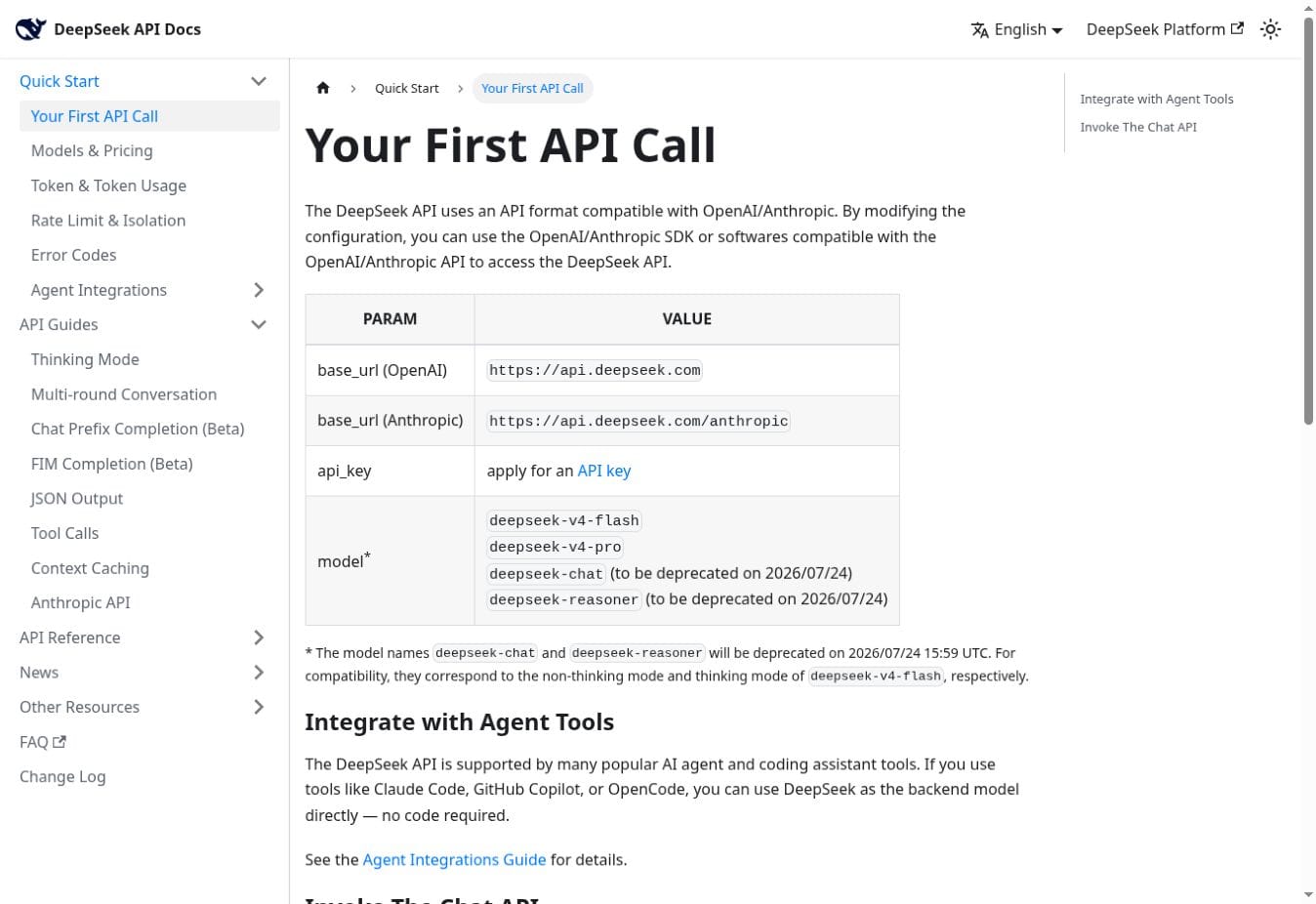
DeepSeek’s current official documentation lists two primary hosted API formats:
- OpenAI-compatible base URL:
https://api.deepseek.com - Anthropic-compatible base URL:
https://api.deepseek.com/anthropic - Current model IDs listed and observed on July 28, 2026:
deepseek-v4-flashanddeepseek-v4-pro
OpenAI compatibility is useful for Chat Completions clients, but it does not imply support for every OpenAI endpoint, helper, product, or content type. Anthropic compatibility also has a field-by-field support matrix: some fields are ignored, image and document content are unsupported, and native MCP fields are not accepted. Start with the DeepSeek API guide, OpenAI SDK compatibility tests, or Anthropic compatibility map.
JSON Output and Tool Calls
JSON Output can help extraction and classification, but valid JSON can still contain false or unauthorized values. Parse the response, check the finish reason, validate a schema, and enforce business rules. DeepSeek’s documentation also warns that JSON Output can occasionally return empty content and can be truncated if the token limit is too small.
Tool Calls allow DeepSeek to propose a function name and arguments. Your host validates and executes the function. The model does not independently read a mailbox, update a ticket, post a message, create a refund, or change a database. Strict Tool Calls can constrain arguments to a supported JSON Schema subset, but the feature is beta and does not replace authorization or fact checking.
Python, Node.js, LangChain, LlamaIndex, vector databases, and RAG
For a small application, the standard OpenAI client or a direct HTTP request is often enough. The site’s Python guide and Node.js and TypeScript guide cover current request patterns and production concerns.
LangChain can add model wrappers, chains, tools, agents, retrievers, and tracing. LlamaIndex can organize ingestion, indexing, retrieval, and response synthesis. Neither framework supplies your permissions, evaluation, or source truth. A RAG system also needs an embedding route, parser, storage or search layer, tenant filtering, provenance, and document lifecycle. Continue to the LangChain guide, LlamaIndex guide, vector database guide, or RAG knowledge-base guide.
Agent and coding tools
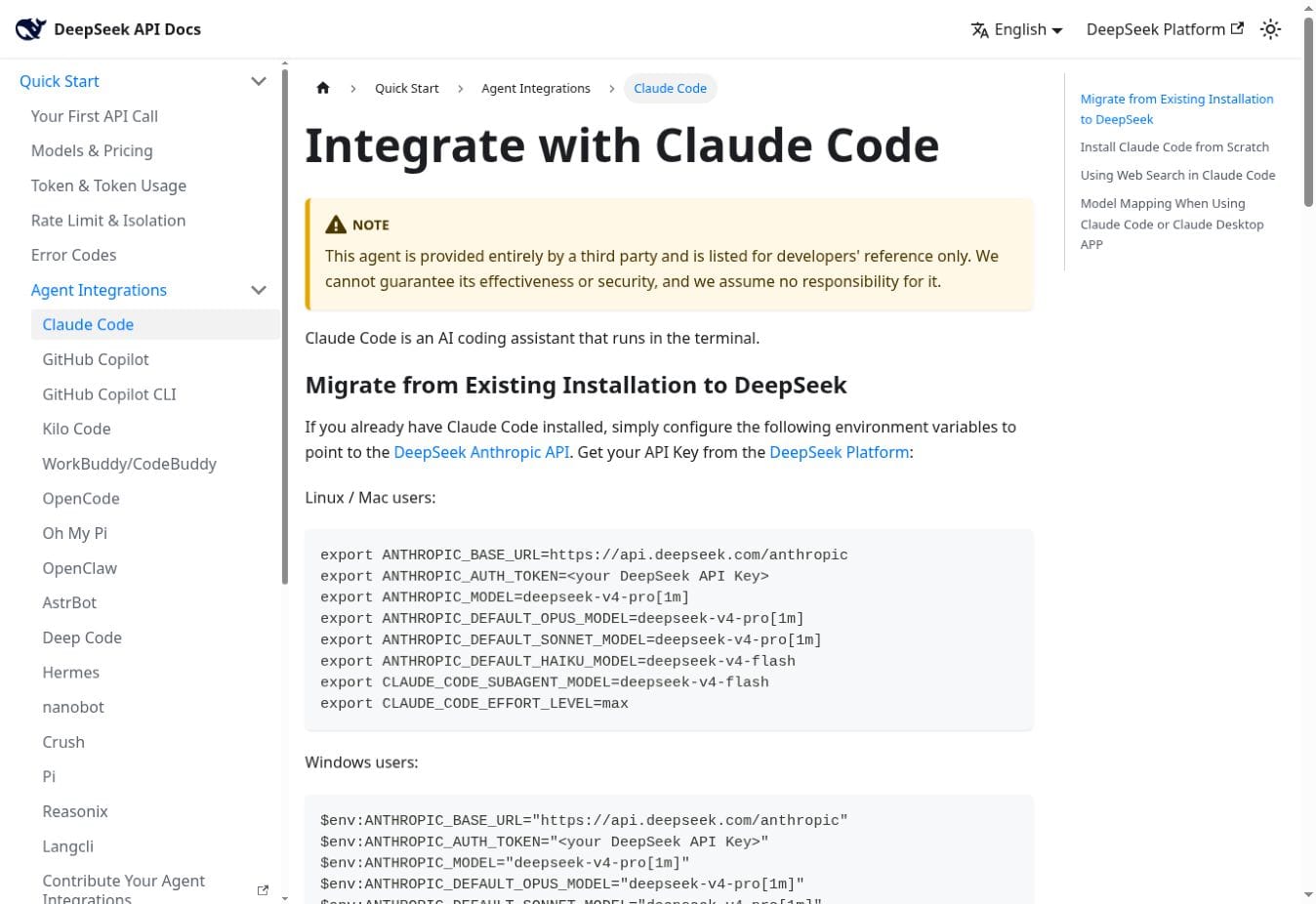
DeepSeek publishes setup instructions for selected third-party hosts, including Claude Code, OpenCode, OpenClaw, and Deep Code. Its documentation identifies these as third-party tools and does not guarantee their effectiveness or security.
A locally installed agent can still send prompts, code, and tool results to a hosted endpoint. Check the base URL, credential, model mapping, host version, filesystem and command permissions, approval behavior, and logging before describing an agent as local, offline, private, or maintained by DeepSeek.
How a DeepSeek integration works
- Source and trigger: an approved platform event, user selection, API request, schedule, or webhook starts the workflow.
- Policy-controlled backend: the application authenticates the user, retrieves only permitted data, removes unnecessary content, and prepares the request.
- DeepSeek model call: DeepSeek returns text, JSON, or a proposed tool call.
- Validation and approval: the host checks structure, facts, permissions, target state, and business rules. A person reviews consequential actions.
- Execution and audit: a narrowly scoped connector performs the approved action, while the system records a redacted event and prevents duplicate execution.
Source system → authenticated backend or workflow → data minimization → DeepSeek API → output validation → human approval where required → scoped connector action.
The central boundary is simple: the model proposes; the surrounding application authorizes and acts.
DeepSeek integration security checklist
- Keep DeepSeek keys, OAuth tokens, bot tokens, webhook secrets, and database credentials in server-side secret storage.
- Request the narrowest platform scopes and retrieve only the records and fields required.
- Treat emails, documents, messages, tickets, webpages, and tool results as untrusted input.
- Keep credentials and hidden policy data outside model-visible context.
- Validate JSON, tool names, arguments, identities, record IDs, amounts, dates, recipients, and target state.
- Recheck live authorization immediately before an external write.
- Require confirmation before sending, publishing, deleting, purchasing, refunding, booking, changing access, or modifying a system of record.
- Use idempotency and conflict detection to prevent duplicate or stale writes.
- Define retention for prompts, outputs, connector histories, logs, and approval evidence.
- Add budgets, rate limits, bounded retries, monitoring, incident response, and a kill switch.
- Review every processor in the data path—not only DeepSeek.
- Tell users when AI is involved and how they can review, correct, or challenge an outcome.
Use the sensitive-data checklist and enterprise deployment guide for additional controls. A workflow created in another vendor or in your own DeepSeek account has its own processors, terms, regions, and retention settings.
How we verify integration claims
- Official DeepSeek documentation: used for API origins, current model IDs, API features, compatibility boundaries, and DeepSeek-documented third-party agent tools.
- Platform documentation: used to identify connector status, APIs, webhooks, credentials, and integration routes maintained by the target platform or its named partner.
- Independent testing: the bounded July 28 API check described near the top of this page verified the current model list, one synthetic Tool Call proposal, and one JSON response without executing an external action.
We did not sign in to every platform or claim an end-to-end test for every connector. Marketplace actions, UI labels, account plans, permissions, data handling, and supported model fields can change independently of DeepSeek. Verify the exact deployment before using real data.
DeepSeek integrations FAQ
Does DeepSeek have integrations?
Yes. DeepSeek provides APIs and model features that applications can integrate, plus setup documentation for selected third-party agent tools. Business apps usually connect through their own APIs, webhooks, vendor connectors, automation platforms, or custom backends.
Which apps can connect to DeepSeek?
Possible routes include n8n, Zapier, Make, Pipedream, Retool, Google Workspace, Gmail, Outlook, Slack, Teams, Notion, Jira, Confluence, Linear, ServiceNow, Zendesk, Intercom, Freshdesk, Shopify, WooCommerce, WordPress, Webflow, Framer, Discord, WhatsApp Business, Telegram, Power BI, Tableau, and compatible chat interfaces. Availability depends on the connector, plan, permissions, region, and implementation.
Are Slack, Gmail, Notion, and Teams native DeepSeek integrations?
Usually not. They can be connected through platform APIs, workflow tools, bots, add-ons, or custom applications. Describe the exact route and maintainer rather than calling it native without first-party confirmation.
What is the easiest way to integrate DeepSeek?
For one feature in your own application, a server-side API call is usually the smallest route. For a simple SaaS trigger, an approved automation platform can be faster. For internal tools, Retool or a custom application may provide better permission and review controls.
Can I use the OpenAI SDK with DeepSeek?
Yes, for documented OpenAI-compatible Chat Completions surfaces. Configure the DeepSeek base URL, use a DeepSeek-issued key, and select a current DeepSeek model ID. Do not assume compatibility with every OpenAI endpoint, product, helper, field, or content type.
Can DeepSeek integrate with n8n, Zapier, or Make?
Yes, depending on current connector and account support. The route may use a model node, listed connector action, HTTP request, webhook, or custom step. Review credential storage, execution logs, retries, current request fields, connector ownership, and destination permissions.
Does DeepSeek execute tool calls or external actions itself?
No. DeepSeek can propose a function name and arguments. The application or workflow host validates the request, checks authorization, executes an allowlisted action, and returns any permitted result.
Does DeepSeek support MCP?
An MCP-capable host can expose tools through its own translation and execution layer while using DeepSeek as the model. DeepSeek does not document a general native hosted MCP endpoint. Its Anthropic-compatible documentation says the mcp_servers field is ignored and MCP tool-use content blocks are unsupported.
Is it safe to send confidential data through a DeepSeek integration?
There is no universal answer. Review the data, every processor, provider terms, region, retention, deletion process, contracts, applicable rules, and organizational policy. Minimize and redact input, use narrow permissions, and keep consequential actions under deterministic and human control.
Can Chat-Deep.ai connect to my accounts or run these workflows?
No. Chat-Deep.ai is an independent educational guide. Its browser chat does not connect to your Gmail, Slack, Notion, Microsoft, store, project, or automation accounts and does not execute the integrations described here.
Primary sources and update notes
- DeepSeek API Quick Start: current base URLs and model IDs.
- DeepSeek JSON Output: request requirements and empty-content caution.
- DeepSeek Tool Calls: function proposals, thinking mode, and strict-mode beta.
- DeepSeek Anthropic API: supported, ignored, and unsupported fields and content types.
- DeepSeek Integrate with AI Tools: current third-party agent setup routes.
- n8n DeepSeek credentials and DeepSeek Chat Model integration.
- Zapier DeepSeek setup: current listed app and authentication guidance.
- Make DeepSeek AI integration: verified partner app, modules, developer, and maintainer.
- Pipedream DeepSeek components: component ownership and maintenance statement.
July 28, 2026 update: rebuilt this page as a consolidated integrations directory after older platform-specific pages were merged into this URL. Added a current platform finder, corrected connector-maintainer labels, replaced retired model instructions with current V4 IDs, added the bounded live API check, linked directly to current internal guides, and consolidated repeated security and architecture material.
Start with one bounded workflow
Define the exact source data, expected output, owner, failure cost, and action allowed. Then choose the smallest connection route that meets those requirements. For implementation, continue to the DeepSeek API guide, API-key guide, or workflow automation guide.